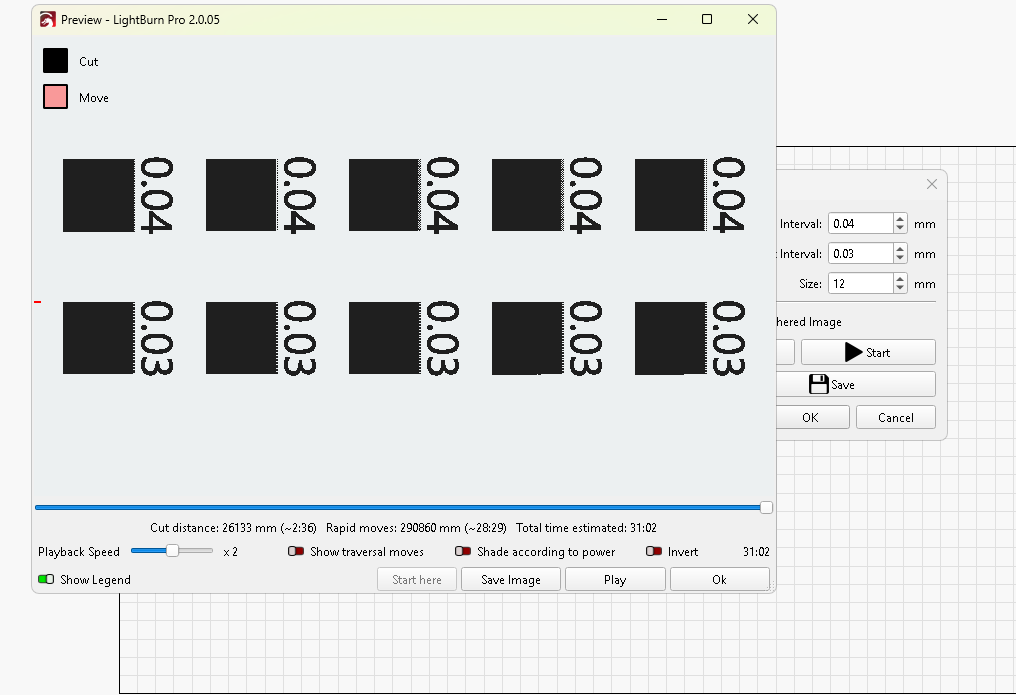
Hello!
I am struggling to find anywhere in the units/settings that deals with truncation/rounding of the numbers on the test files. This unfortunately will not allow me to figure out which interval test is what as it is dropping a figure.
Hello!
I am struggling to find anywhere in the units/settings that deals with truncation/rounding of the numbers on the test files. This unfortunately will not allow me to figure out which interval test is what as it is dropping a figure.
What laser is this for? That is a really, really small (0/001mm) interval step.
The data is being truncated. Has nothing to do with my laser.
Well, no and yes. No, your laser is not causing it. And yes, a CO2 laser (listed in your bio) is not capable of such detail. If this is a galvo or fiber laser, the people reading this and wanting to help need to know the laser type. It matters whether it is an operaror or software issue to get the appropriate responses.
This is not a bug, so it likely falls under the Feature Request. Post your request on https://lightburn.fider.io/ and others will vote on it. If it applies to the newer high resolution machines, I am positive it will get a lot of attention. You can also email Support@LightburnSoftware.com and reference this posting. They might push it into the next release.
Sure but the data is still being truncated?
Sure I totally understand why that would matter.. What am I missing for why it would be truncating or dropping the actual data from the software. Is there a setting or something to display the # of digits past the decimal or reduce the font size for the test so it can fit in the space it selected or something?
This topic was automatically closed 30 days after the last reply. New replies are no longer allowed.
