Just check that the units of speed in your Cuts/Layers is now (mm/min) and same speed of 400:
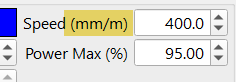
Just check that the units of speed in your Cuts/Layers is now (mm/min) and same speed of 400:
If I bump the S setting to 100,000 the laser looks like it’s at about 20%. It at least makes a mark on the wood.
That worked. Why is the power linked to speed? Thanks!
M4 “Dynamic Power Scaling” is done in the background by the controller, that is what links power to speed and it’s not something you would usually have to ever think about.
The controller reads the the target speed from your job and will constantly scale the power based on actual speed, so when the target speed is reached the full programmed power will be used but will scale down the power as motion slows for corners etc. (or if your target speed is 3x more than the machine is capable of due to a units mix up - the power will also scale down)
Thanks all for your help! Apparently downloading 2.1.01 overwrote some settings I had. I do have one last question - how do I know if my 40W diode laser is working at its max output?
Because you’re not using “Constant Power Mode”.
The reason for it is as the laser slows down for turns, you usually want the power reduced along with that so they don’t end up torched. For example, if you engraved without overscanning enabled and used constant power mode, it would look like this:
..because the laser slows down to turn around at the edges, and if the power isn’t reduced to match, you get the above.
The problem you’re having is related, except that you asked the laser to go really fast and it couldn’t, so it reduced the power to give you the same level of burn you technically asked for.
A qué unidades te refieres?
Which units are you referring to?
The upgrade definitely did something. What do you mean, “Not sure if .00 or .01 got it, but there is a switch linking design with control units”? I don’t know what .00 vs .01 means? I did get it running right by selecting the rights units and match the correct speed. Thanks.
These were LB version numbers last digits.
Glad you got it going!
I get know. Thanks,
Go to *File - Preferences - Load Backup Pref .
(Select a Date from the list before the new version was installed)
. And you are good to go.
Good Luck