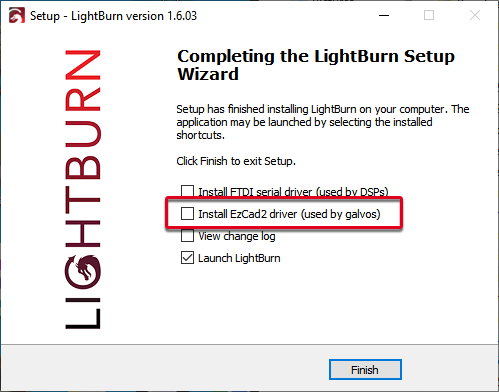
Need some advise. I plugged the USB cable in today to run light burn on my Fiber and got the following. “This driver has been blocked, Lmcv4u.sys does not pass the Windows driver policy”. Doing some reading, apparently this was an update in April of 2026 for windows. How do I get around this?
That is not the correct driver for LightBurn. First, you will need to uninstall the Lmcv4u.sys driver. Then re-run the LightBurn installer again, and select the check box to ensure the driver is installed. Windows will prompt you for permissions escalation to install it, and replace the driver provided by default with one LightBurn can use to communicate with your galvo-based laser.
If you prefer to install the driver manually, you can find the installer at C:\Program Files\LightBurn\EzCad2Driver\ and can be run again via the dpinst-x64.exe file directly.