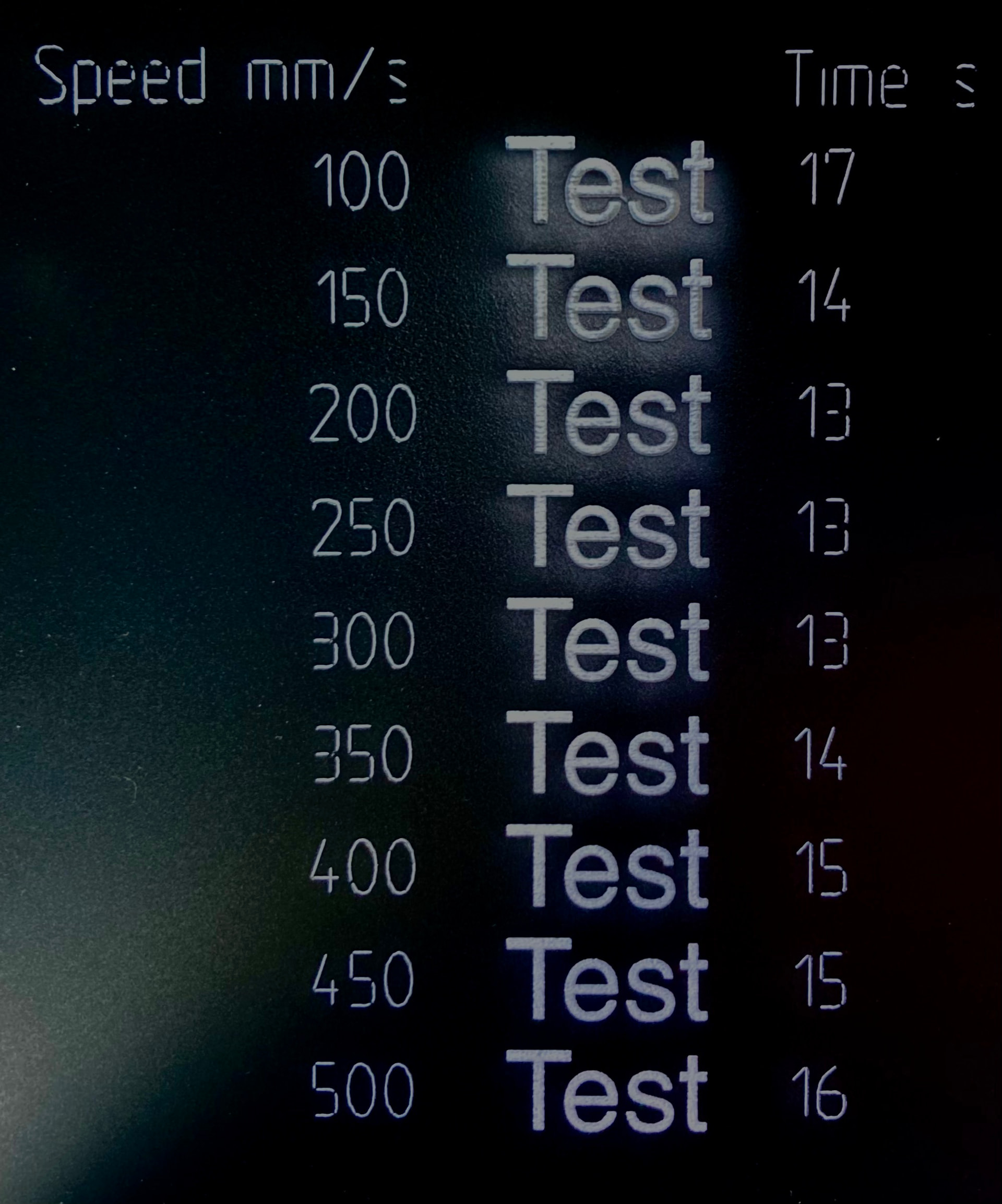
To find the right settings, I like to use a small test to find the appropriate power and speed settings.
It also shows where the limits of the speed lie.
Picture is before I remove the dust from engraving.
The material is 2-layer sign material, (ABS), 1.6mm, I use 11.5% power max, 8.5% min, 0.07mm line spacing. (the process can be optimized by increasing the line spacing and fine-tuning the power settings)
I choose 300mm/s, because it is the fastest with not too deep engraving and which gives the nicest result under a magnifying glass.
The interesting thing is, however, that the process time increases from 300mm/s, i.e. higher speeds do not necessarily give better process times. (It is important to find/know the limitations of your machine.)
I didn’t expect there to be any use/interest in the test itself, because it is relatively machine-dependent. (CO2 60Watt) It was mostly the speed curve I was interested in.
But of course everyone is welcome to use it, just remember to adapt it to your machines/material.
I have read the real times from the controller after each test/speed and added them manually.
Notice that there is very little deviation from LB’s calculated times to the actual measurements, some are only a few ms off but rounded up.
 (It is important to find/know the limitations of your machine.)