How when I preview I get that pop up.

So I duplicate the slots and one layer should be red and one should be blue correct?
I think you clicked off, deselecting the duplication, then you shift clicked the layer, which selected both sets. Undo the duplication, then duplicate and without clicking anywhere else change the layer color.
You have to change one to blue, but yes.

You can’t really tell by that view. Turn off traversal moves and Press the play button and watch what it does.speed it up so it doesn’t take 5 minutes.
1 Like
I think you are right. Thank you Sir
2 Likes
When in doubt test on cardboard or other scrap before committing the good material.
2 Likes
Have you ever worked with Trotec TroLase | 12"x24"x1/32", Black/White | 2 Ply | Modified Acrylic | Laser Engraving Double Color Plastic Sheet | Engraving Blanks for Laser with CO2 Laser?
Not that particular product, but I have used similar product. Rowmark multi layer engraving sheets from Johnson plastocs plus.
Works great after I got the Scanning Offset Adjustment set correctly:
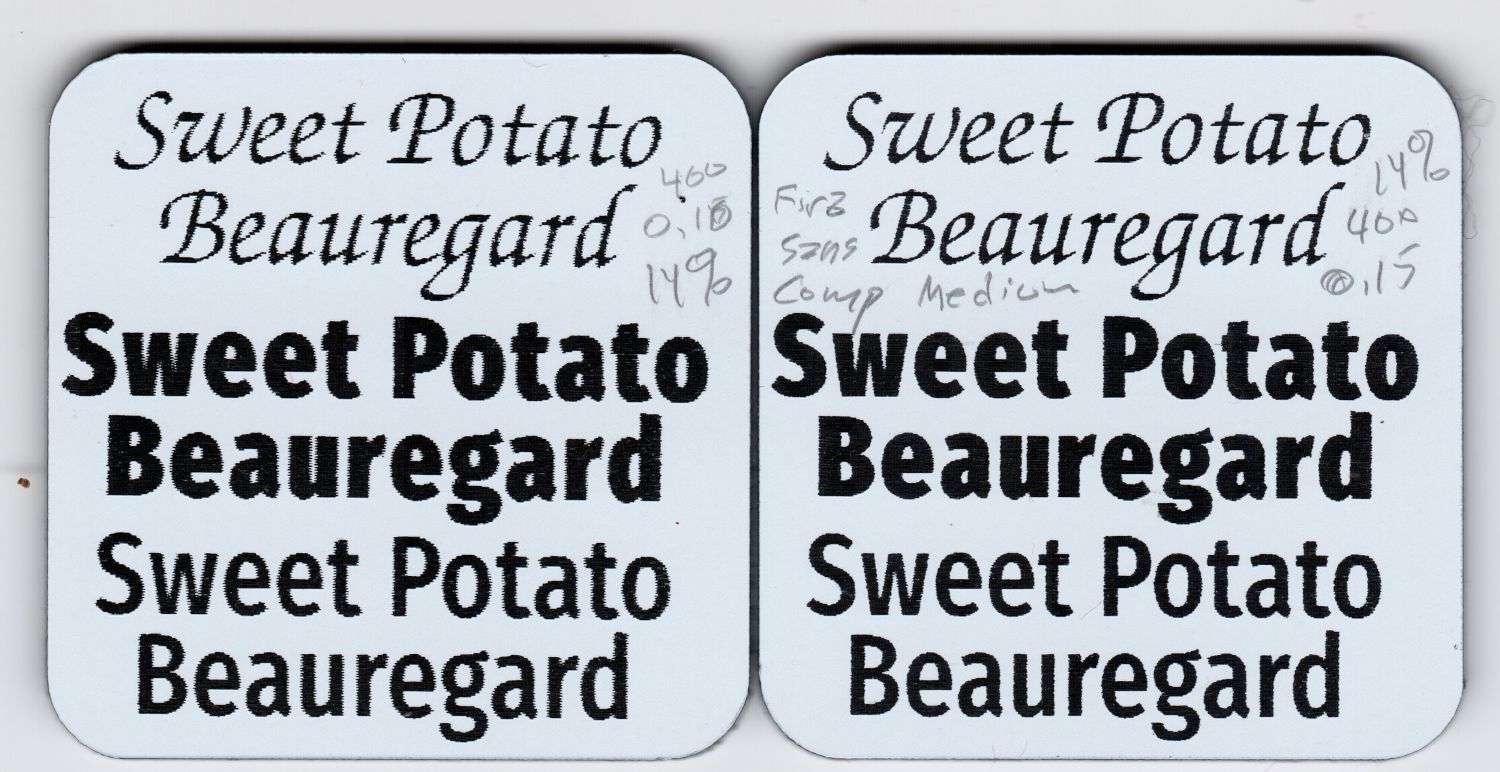
These settings looked good:
- 400 mm/s
- 14% of 60 W
- Line interval around 0.15 mm
That was with 3 mm = 1/8 inch Trolase, but I think the top layer is about the same thickness on all of them, so those settings should get you close.
1 Like
Hi
I tried 15% power from 100-200mms the results are nothing special. I have also tried differed settings but I can’t get a very good job that I am satisfied with. Btw my laser is a 100 watt CO2.

It’s likely 15% is close to the lowest possible power for that tube, but the speed is much too low.
Run a Line Interval Test against speed:
Use line spacing from 0.15 mm to 0.35 mm with 0.02 mm increments and speed from 200 mm/s to as fast as the machine will go.
Attached is a picture of a material test then I did an Interval test just like you said but I can still see a little black. Or is that normal?


I did interval test 500mms @ 20% power

The photo shows LightBurn’s mixed units, with distances in inches and speeds in mm/s: 0.0028 inch = 0.07 mm, which is much too small.
The focused laser spot is about 0.2 mm in diameter, so intervals smaller than 0.15 mm won’t make any difference; I recommended 0.15 to 0.30 mm with steps of 0.02 mm for that reason.
Run the Material Test with an interval of 0.2 mm, pick a good-looking speed/power combination, then run the Interval Test with those spacing at that speed/power. It may require a few iterations to find a sweet spot in that three-dimensional matrix.
I use hard metric in the Basement Shop specifically to avoid conversion errors … 
1 Like
Hi
When using the Trotec Material do you take off the protective film when cutting and engraving?
Thank You
Yes!
After all the cutting is done, a soft rag and denatured alcohol gets the condensed acrylic dust off the surface.
Thank You Guys for all the Help. I have two more questions. One how to I change the Line Interval Default from .10 to .15 so if I make new files so the default will be .15mm. Second question is I process my files for Lightburn on my main pc and I have a Laptop at my laser how do I make sure that all the settings are the same across these two devices. (Probably Not Possible)
Thank You Again