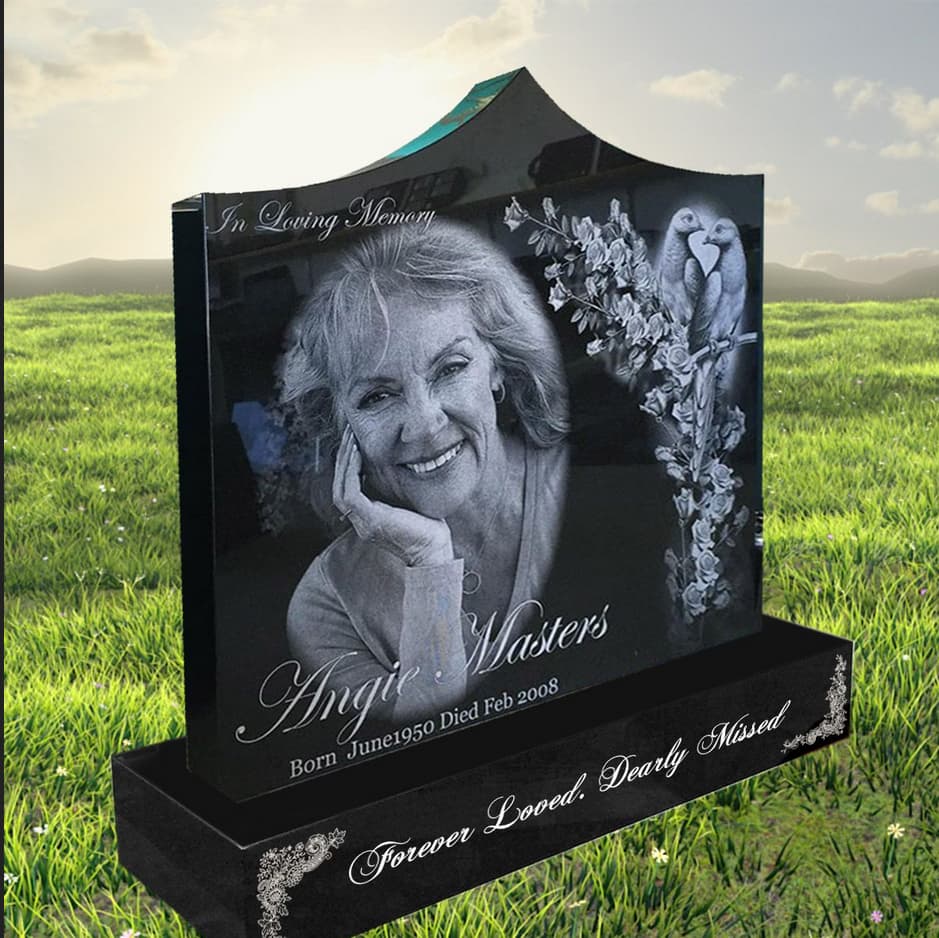
Hi all,
I’m using an AP Lazer SN4836 100W - 1.5 lens, mainly for engraving granite for headstones, and I’m running into a lot of issues trying to get clean, consistent results.
I’ve tried both:
Running images through Da Big Gimpin’ (Dither and Halftone modes)
And also just using LightBurn’s built-in photo processing tools
But no matter what I try, the results aren’t where I want them to be.
Problems:
With Da Big Gimpin’ Dither: I get weird speckled backgrounds and sometimes horizontal banding
With Da Big Gimpin’ Halftone (1.5 Tile preset):** results are cleaner but still not perfect — details look soft or washed out
With LightBurn’s Jarvis/Stucki dithering: the image often looks too pixelated, or just turns into a blob when engraved
Even well-edited photos lose clarity or burn unevenly
What I’ve Tried:
- DPI: 254, 300, 150, 200
- Line Interval: 0.1 mm
- Power: 20%
- Speed: 12 - 30 mm/sec
- Dot Width Correction: Tried 0.002", 0.001", and OFF
- Negative Image: ON (since it’s granite)
- Pass-Through: ON when using pre-dithered images
- Pass-Through: OFF when using LightBurn to dither
Still can’t get smooth grayscale transitions or sharp facial features. Either the image gets too dark, or turns into a weird mess of dots that doesn’t resemble the photo.
Any advice would be appreciated. Are there known quirks with LightBurn’s photo engraving on granite at this scale? Am I missing something obvious in my workflow?
Thanks in advance!