It has been mentioned elsewhere, but we are working on Epilog compatibility as we speak, and we are sending builds to Epilog for validation starting this month. So, in the very near future, you won’t need additional hardware to communicate with Epilog devices.
@Colin Just out of curiosity, what Epilog machines are targeted for support? I’m assuming just the newer line, ie Fusion Pro, Maker, Edge, Ascent? Or will there be support for older models as well?
Thanks.
I’m not sure - @adammhaile care to expand?
We are currently targeting:
- Pro
- Edge
- Maker
- G100
- G2
- Fusion
- Zing
- Mini
- Helix
4 Likes
Oh, wow. Much broader than I anticipated. Thank you!! Can’t wait to see the progress.
2 Likes
Im open to help with Beta testing as I have a epilog helix sitting next to me right now that’s itching for lightburn to be its control
2 Likes
Epilog support is now in the latest LB RC’s
Epilog Helix hasn’t made it there yet?
Not yet:
Currently supported:
FusionPro 24, FusionPro 32, FusionPro 36, FusionPro 48, Fusion Ascent 12, Fusion Ascent 24, Fusion Ascent 36, Fusion Edge 12, Fusion Edge 24, Fusion Edge 36, Fusion Maker 12, Fusion Maker 24, Fusion Maker 36
Not yet supported:
Fusion Galvo G100 4″×4″, Fusion Galvo G100 6″×6″, G2 Galvo, Fusion 32, Fusion 40, Fusion M2 32, Fusion M2 40, FiberMark Fusion 32, FiberMark 24, FiberMark 24 S2, Zing 16, Zing 24, Helix 24, Mini 18, Mini 24, Legend EXT 36
Epilog asked us to focus on their current gen machines first.
1 Like
Is this the place to ask questions about issues with 2.2.0.0 on currerntly supported Epilogs?
If not, where shouldd I post them?
roy@engravingconcepts.com
1 Like
Thanks, @roybrewer1943, For now, yes.
We will build a place under the ‘LightBurn Hardware Compatibility’ section over the next few days. Once done, we will move related posts there for ongoing use.
2 Likes
Thanks for the prompt response.
I’m havining some issues/reesults different from Epilog’s techs. For instance, Epilog’s Power% to LaserBurns in/min suggests 7,200 for 100% and that works for them.
However, with the samee system (Ascent 24 80watt) I cannot key in 7,200. I can key in max of 720. I can use the up arrow and increment that only to 3,900 and no more.
What setting must I have different?
1 Like
A common gotcha is not noticing the difference in units. IN/m, IN/s, MM/m, MM/s, and so on.
Always specify units with your numbers, even if they don’t. 
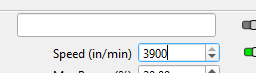
Could that possibly be this issue here? The field clearly specifies in/min and will not allow non numeric digits..
Calculation: 3900 in/m × 25.4 = 99060.0 mm/m
I am pretty sure that is about the max limit of Lightburn. What units do you usually work in? I most often see mm/s and mm/m.
Mikey,
I’m trying to work in in/min. But, the question is, why does another laser in Colorado key in the value of 7,200 and it works and mine maxes out at 3900? What value where will cause that?
7200 what? Without knowing the units for sure, there is no way an accurate opinion can be formulated.
As I already pointed out, this is 99,000mm/m. Is your laser a galvo type? If not, this speed is way too high for normal production. If I had to hazard a guess, I would say they used 7200mm/m, or about 283.5 in/m.
Beware those examples you see on the Youtube videos. What you do not get to see is the multitude of trials and experiments to capture that perfect one with the perfect piece of material.