Try working through this link to set your computer IP address and the Ruida address.
And to confirm, the computer and the Ruida [laser] must have different IP address numbers as Jack has detailed. You can make the last 3 digits 1 number different, like 10.0.3.113 and the other 10.0.3.112.
I have followed the instructions and even changed the last set of numbers 8 times but it still will not connect. I also need the drivers for Lightburn don’t I since it’s a new computer. I don’t have the drivers so could that be the problem? If so, where do I go to get the drivers for Lightburn? I have a diode, my CO2 and a MOPA 80W Fiber laser and will need the drivers for all of them also. I don’t understand why it won’t connect. I only have 1 ethernet cable connected I unplugged the 2nd one and it just won’t connect.
Please try to answer each of these questions or else it will be impossible to guide you:
Earlier it looked like you had 2 separate ethernet adapters. Is that the case? If so, which one are you using to connect to the laser?
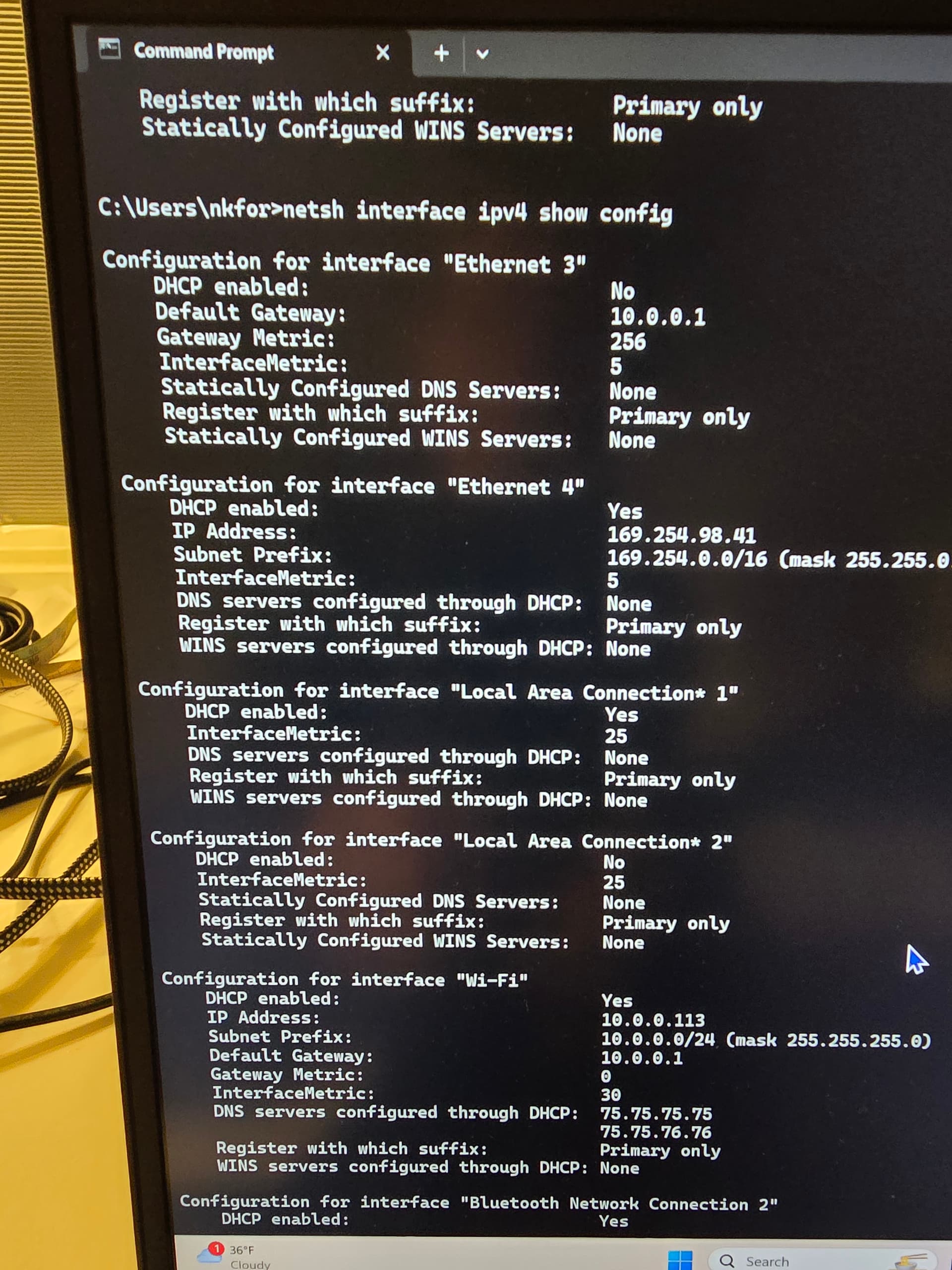
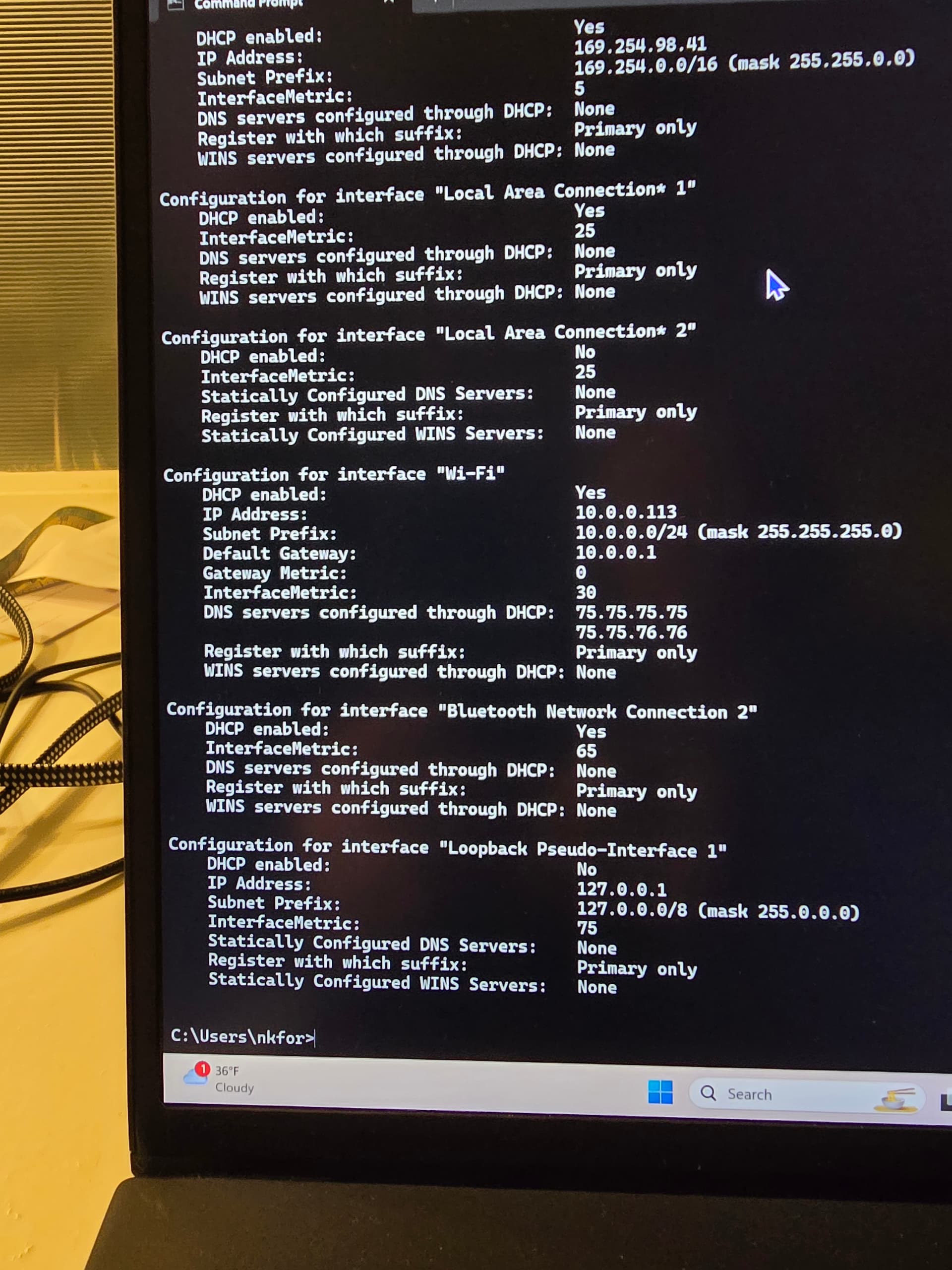
The netsh command that you ran earlier did not show any information for what I was expecting for the two ethernet adapters. Were they plugged in when you ran the commnad? Is it possible that it ran off the top of the screen? If so, scroll up and capture all the text. You needn’t take a photo if you can copy and paste the text here. Try running the command again to confirm the results.
If the netsh command doesn’t show you the ethernet ports try running ipconfig /all. Then again, make sure you capture ALL the text and copy here.
These are 8 bit values in an ip, so it’s referred to as an octet.
I’ve been trying to follow this and there are things that are not clear to me.
Do you use a wireless or wired (Ethernet) connection for the Internet from this computer?
The whole idea of using Ethernet is really to avoid the use of USB.
These connect like any other network device, via a router or switch to your local lan.
You can run an Ethernet cable between the PC and the Ruida, but you have to configure it differently… Which is why most people just run it to their lan.
I’ve run mine in multiple modes and the only problem areas was usb… Ethernet solved the communications issue.
Might help us if you could describe how your lan works along with how you connect to the Internet. If you connect wireless, you will break your connection to the internet unless your entire lan is on the same domain, which is unlikely.
@berainlb guess we crossed over simultaneously. I’m trying to figure out what they are using. As far as I can tell it’s an Ethernet dongle on a usb port.
To me the network topology is not the difficult part of this. If the proper information is provided this isn’t hard to configure. Once OP provides the data this should be straightforward.
I am using the ethernet connector that came with the computer to convert the plug from a USB to an ethernet port. It came with the computer and should be working. I unplugged the other ethernet connector that I bought because I was told that the computer I bought didn’t have ethernet. There is only 1 connector plugged in to my computer and it’s the one that came with the computer.
This computer was purchased because my other laptop died. It was purchased as my business computer to run my lasers. As well as handle my website and Facebook business page. If I need to reconfigure things just tell me how. I’m not a techy person so I need complete instructions. I grew up in the DOS computer era so all this new stuff is difficult for me to figure out without good instructions. No one has yet to tell me how to change the ethernet configuration on my computer so if that’s what needs to happen then please give me the instructions and I will follow them and get the configuration on my computer changed I just don’t have the knowledge to do it without help.
Run the command and show me the output of the command.
Also, are you able to copy and paste the whole text in a replay rather than taking the photo? The missing information makes it difficult to understand what’s happening. If that’s not possible, try to capture each screen.
I can’t just copy and paste because it won’t let me. You can’t copy and paste when you are in the programing mode. The only thing I can do is take pictures.
I have a friend that works for Microsoft so I asked him for advice and he came over and it took him less than 10 minutes to fix the problem. Everything is working just fine now.