This might be a silly question but I don’t see it specified in the main ethernet tutorial…
Does the ethernet cable plug directly from the laser to your computer or from the laser to your router? or Both?
This might be a silly question but I don’t see it specified in the main ethernet tutorial…
Does the ethernet cable plug directly from the laser to your computer or from the laser to your router? or Both?
That’s the usual connection, so the laser controller appears as just another device on your local network.
You must set the Ruida controller’s IP address (using the machine’s console) to a value within your network, which means the first three octets (for mine: 192.168.1) must match all the other devices and the last octet must be different.
The controller’s IP address must be outside the range the router automagically assigns with DHCP. My router hands out DHCP addresses in the range 192.168.1.50 through 192.168.1.99
With all that in mind, my Ruida is at IP address 192.168.1.47.
Then you configure LightBurn to use that IP address.
The LightBurn doc covers all that and more:
It works both ways. I have connected my laser machine to my LAN with a small switch, if the router is nearby it can of course be connected directly to it. A direct connection to the computer with a standard LAN cable is also possible.
I’ve followed the instructions in the document. I can’t seem to get Lightburn to talk to the laser when I connect it directly to my laptop via LAN. I usually have it connected via USB but I’ve been getting a few corrupted files so I want to set up an ethernet cable.
Ethernet Connection (Ruida) - LightBurn Documentation
Ruida controllers accessed over a network are their own type of connection for a device, so in the “Devices” menu, click “Create Manually”.
have you done it? (Create manually)
Yea I’ve set it up for the Ruida device that way and it still isn’t talking.
Can you provide screenshots/photos for every major step of the process? Specifically, Ruida configuration, ethernet configuration on your computer, and LightBurn configuration.
I think it’s a misunderstanding of how Ethernet works.
In todays world we expect to plug a network device into router and have it work… Other things need to happen
When your pc (mac - windows - linux) and virtually all networks connections expect a DHCP to exist to tell it what IP to use. The Ruida is static, but the pc is probably dynamic and expects a usable IP to be issued. When this doesn’t happen there is not connection.
I did this often using my Linux box, I configured the port of the pc to the Ruida domain, which was 10.0.3.X (I think) and set the port to a static ip.
It appears the Ruida is pretty stupid when it comes to most of it’s I/O, it really doesn’t need a gateway as far as I can tell. It must be useful for something, but they are UDP and the Ruida doesn’t know who sends/recieves them anyway.
Anyway, it should then talk or connect.
On a lan it needs to have it’s ip changed to your domain. That’s the first three octets of the ip addreess.
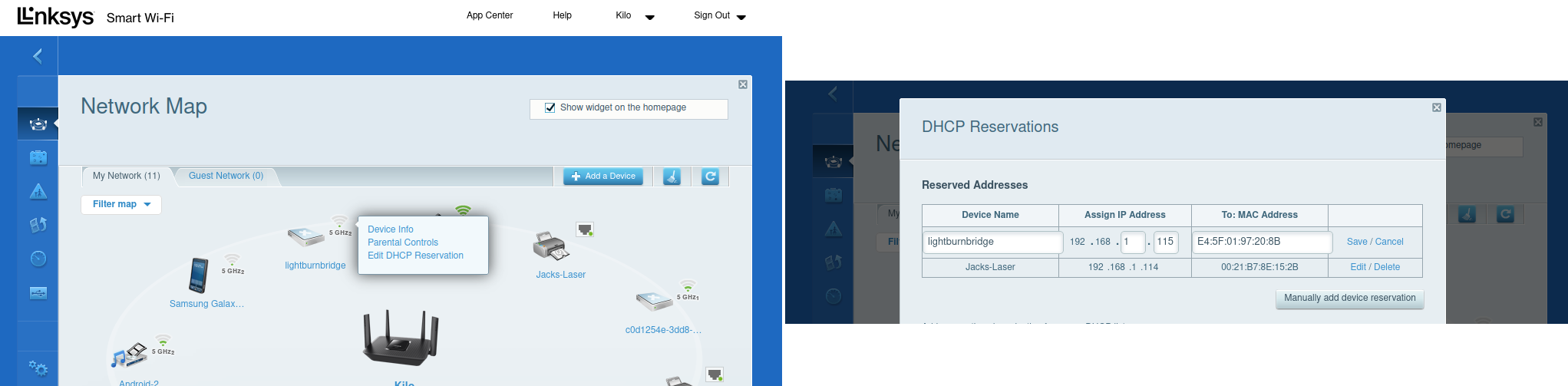
On a lan, a router like my linksys, I can bring up the network map, right click and bind the devices MAC address with it’s static ip address…
It does work, your port isn’t properly configured.
Make sense?

Thanks for all the responses and advice.
Unfortunately I’m still not having any luck. My laptop sometimes forgets I have WiFi causing me to need to restart and so I’m not keen on a set up that relies on the Wifi. I’ll stick with the USB for the time being. Besides, I have other issues that I need to bug everyone about! 
This is a standard, needed operation. If this isn’t consistent, then it’s unlikely the usb ever will be…
The Ethernet connection is the most dependable, meaning less bugs and no drivers to fuss with… the world runs on Ethernet…
Good luck
This topic was automatically closed 30 days after the last reply. New replies are no longer allowed.