Lately I have been opening version 1.4.00 to hand trace over an image as the lines in the recent versions of Lightburn are finer/feinter and difficult to see and then pasting back into v2.0.04. I assume I am missing a setting somewhere to make the lines more visible! Here is a screen shot of version 1.4.00 opened next to version 2.0.04 showing the difference in vector line visibility. Anyone know which button I haven’t pressed in maybe Settings or somewhere? (I have tried the coarse and smooth options under ‘Window’ menu. Thanks!
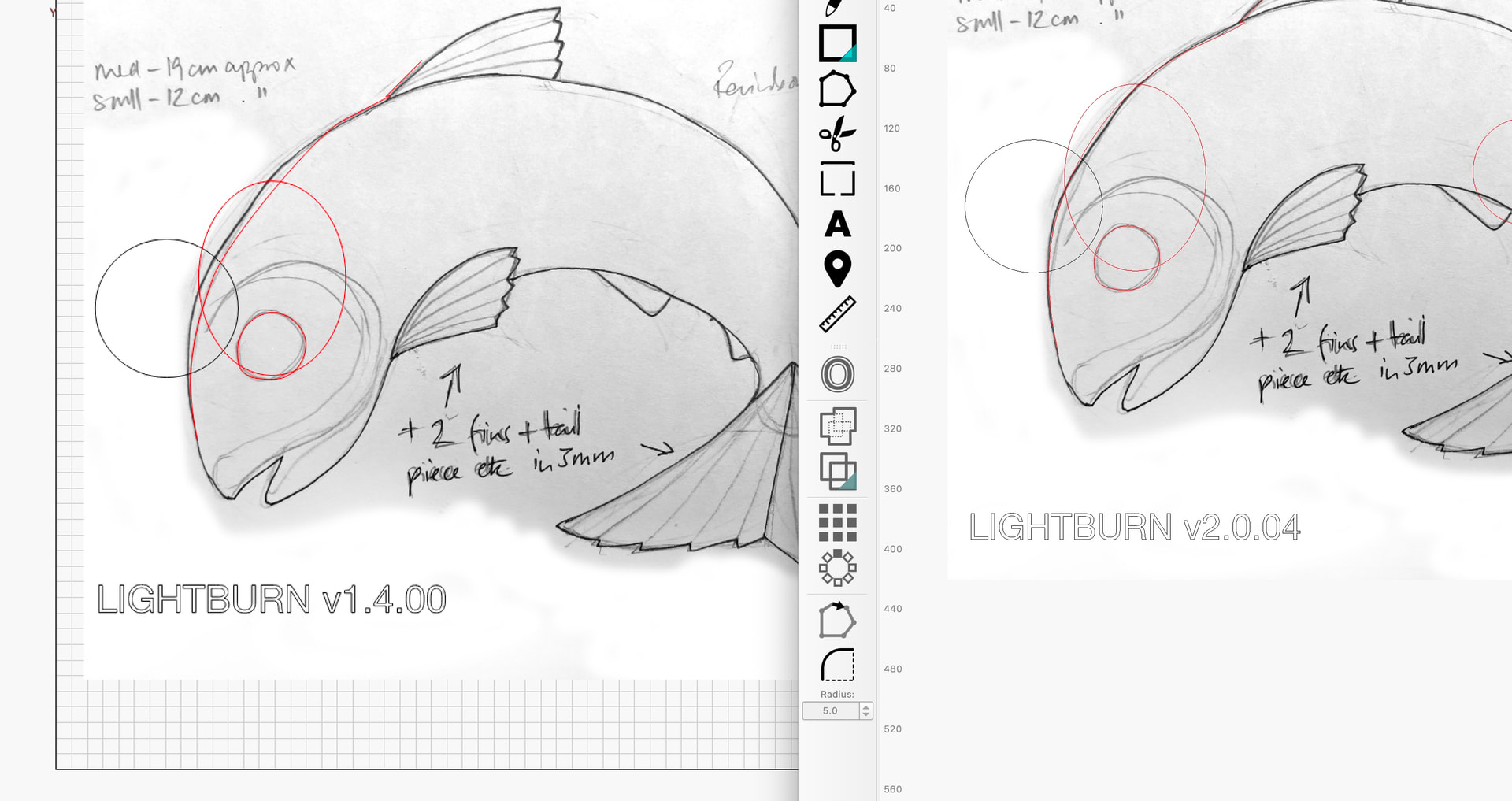
Unfortunately there is no secret button to make the lines in drawing mode more visible again. I also find it irritating, especially when I can compare “before and after” on a daily basis between my design/construction computer with the latest LB version and my working version of LB 1.7.8 on my laser computer.
We can only recommend and ask for a change and hope that LB understands and agrees and makes the drawn lines more visible again.
Yes, I will put in a request. I have noticed that the Coarse and Smooth settings under the”Window” menu change the line slightly… ‘Coarse’ makes the line feint and ‘Smooth’ less feint…
This topic was automatically closed 30 days after the last reply. New replies are no longer allowed.