Laser stopped going to lower L, initially would only
Are the Jog directions still correct?
Have you changed any GRBL parmeters in the Machine Settings window? Maybe by accident?
Laser stopped going to lower L, initially would only sit at side and not move, I then changed 2 limit switches, 1 wasnt working and the other just in case, it now will home but top left, and if I start a project from there it just grinds aginst the back wall, so I manually bring it back to lower left home position. It will then engrave or cut properly and home properly, but if I hit the home button then it goes upper left. It is <Idle|MPos:0.0010,0.0010,0.0000|FS:0.0,0|WCO:0.0000,0.0000,0.0000>
[OPT:VH]
[software versions: CV50-MASTER-Release V3.0.1 20230511-1116]
ok
$0=10
$1=250
$2=0
$3=0
$4=0
$5=0
$6=0
$10=1
$11=0.010
$12=0.002
$13=1
$20=0
$21=0
$22=1
$23=1
$24=2000.000
$25=4000.000
$26=244
$27=6.000
$30=1000.000
$31=0.000
$32=1
$100=80.000
$101=80.000
$110=25000.000
$111=8000.000
$120=500.000
$121=500.000
$130=400.000
$131=415.000
$150=1
$151=4
$152=30
$153=0
$154=0
$155=0
$156=0
$157=1
$158=1
$160=1
$161=8.00
ok
[G54:-nan,0.0621,0.0637]
[G55:-nan,0.0621,0.0637]
[G56:-nan,0.0621,0.0637]
[G57:-nan,0.0621,0.0637]
[G58:-nan,0.0621,0.0637]
[G59:-nan,0.0621,0.0637]
[G28:-nan,0.0621,0.0637]
[G30:-nan,0.0621,0.0637]
[G92:0.0000,0.0000,0.0000]
[TLO:0.000]
[PRB:0.0000,0.0000,0.0000:0]
ok
okcurrently in upper L corner—-
Jog directions work, except for the long jog if that makes sence, , I dont think I changed any settings but Im not sure
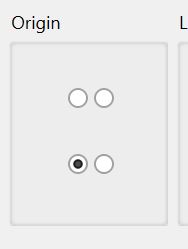
This is the Home position because the switches are located there. Make sure you have the correct button selected for the machine Origin.
This is way too high for the limit switch pull-off speed. 200mm/m is much better.
So I changed the lemit switch to 200mm/m, no change Ive ordered additional limit switches and Saturday I will replace the ones that I didnt the first time I chaged them and see what happens, ideas suggestions?