Hey all, I am training a new employee on my Light Burn software, and he’s noticed his settings are set to Fill but the shapes are showing up as Lines. At first I thought he had two shapes over lapping but he says when he does that, they appear as solid shapes. I’m at a loss as to what do. Thanks
Post photos and the file in question. We have a hard time seeing in our imagination what you are seeing with your eyes.
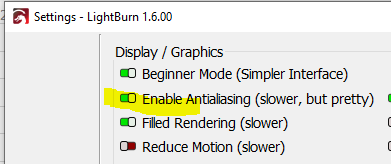
Highlighted wrong one. Filled rendering
1 Like
Thanks I’m having him try that we’ll see what he says
How do I add a photo? 
@LiquidSchwartz, you can drag and drop directly into the post editor or click the ‘Upload’ button and follow the prompts. 
Look for this button:

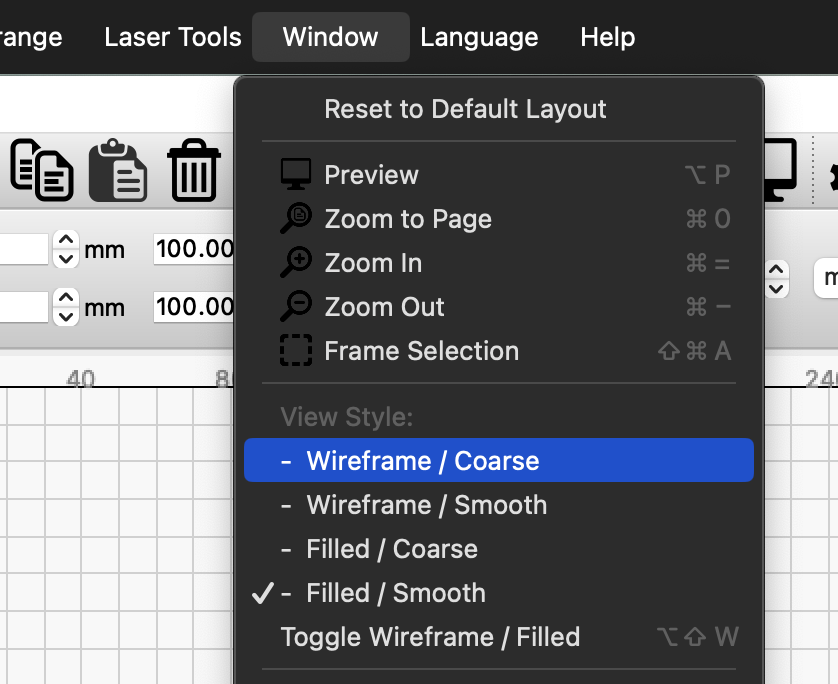
LightBurn renders everything as wire outlines by default, as that is the way the software is intended to be used. The “correct” way to verify the work looks as expected is to use the preview.
You can enable filled rendering in the Window menu as Jess notes above, however it makes a number of things more difficult, including node editing, selection of inner shapes, and a few other things.
1 Like
0.9.24? I left work so I can’t look it up… but I can check it tomorrow. I’m working a little OT tomorrow
Easy method to upload screen shots:
SHIFT+WIN+S
Drag a box around what you want to copy, it gets put on the system clipboard
Come into the forum and press CTRL+V to paste that clipboard image to the thread.

1 Like
This topic was automatically closed 30 days after the last reply. New replies are no longer allowed.