Hi guys,
Using LB since years, I finally upgraded yesterday my 1.6.03 version to the last version after yet another problem of rounding on curved shapes.
WTH did you do guys ? You changed 90% of what I’m using every days !
New submenu for editing nodes is OK
But why not simply using that same system for shape submenu and boolean submenu ?
Why doing that system who need long clic to show submenu ? And keeping the last choice as next choice ?
And where is the right clic menu for grouping items ?
It’s unbelievable how you changed ergonomics in that way.
EDIT : right clic menu is back without doing something special
I saw a lot of change happen between 1.6.03 and 1.7.08. Then there was the 2.0.00 release that caught everyone, including Lightburn, off guard. Once it was determined Windows had some hidden secrets, things calmed down with new releases.
Lightburn had to rewrite the core (not Core) code due to technology changes. Technology nearly killed DOS, right?
I think what the OP is referring to is having to click twice to initiate a shape choice that includes rectangle and circle. You didn’t have to do that in prior versions. If you are making a lot of rectangles and or circles, it adds an extra click.
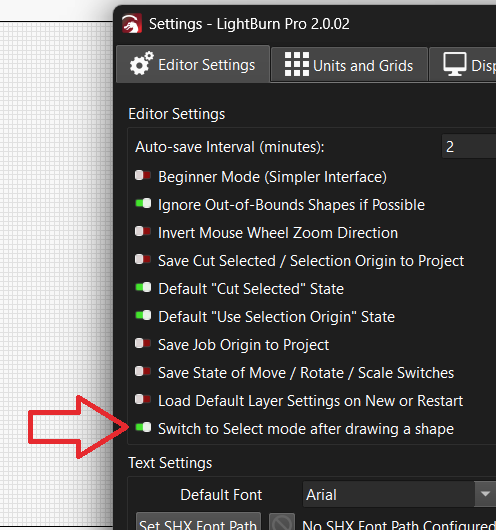
Found the problem on the right click menu. It doesn’t display while you’re NOT in Select mode !
You create a shape : no access to right clic menu.
Then you click on an a shape you previously created : no access to right clic menu ( because you’re still in Create mode )
So you need to do an Escape, and then righ click menu is there.
Just … WHY ?
It’s always been that way - You stayed in “Shape Create” mode for whatever shape you were creating. The difference now is that you can select and resize your shapes while still in create mode, which you couldn’t before.
In the previous versions, you’d have to hit escape to get back to select mode to be able to select and resize shapes, and now you don’t. You still need to go back to select mode to use the Right Click menu.
Verified on 1.6.03, you’re right.
After Create, Escape was always needed to Select, so I’ve never noticed that right click menu not displayed. And probably doing Escape since times without realizing it.
But now we can select without Escaping so we stay in Create mode and menu doesn’t display.
That is so true. At work we are using a piece of software that is 13 years old. When I train people on using it, I tell them “this is on life support”. In fact, the software is so old, the people I train on it were in Kindergarten when I first started using it.
I have been iusing LB since I believe 0.9# and if people had to use those early versions, they would be pulling their hair out. I am using the latest version 2.02 and I like it. It took about an hour to get use to all the new features which weren’t really new per se, they were just moved to different places.