@LsrSal well the refactoring to use the same preprocesser directives to select spindle configurations works for PA8 but when I try to switch the Spindle_base to PB and spindle_pin to 0 I do not see PWM action on PB0. Will keep digging.
Doug,
I have a feeling that you are in my footsteps.
I was in exactly the same situation: everything works except PWM.
I’ve started with “6-axis” source. There is no hint in the code that PWM can be on B0.
I had to study reference docs to find “alternative configuration” for HAL whit “partial remap”.
There is a chunk of code, probably from HALCOGEN/MX with “partial remap” functions. So I’ve changed to “partial remap” (by hand, in notepad) and after applied - I still had no PWM. Then I had to add timer init code, because my source did not had config of the timer registers for another channel. I think this is oversight of the source. Even if CPU map has changed - no switch for the timer config in the sources. So I rewrote timer init for different channel, and together with HAL adjustment - finally I got PWM.
Sal you are correct and that “alternate configuration” is called “Alternate Function/AF” in the STM world. One of the devs of grblHAL pointed me to the magic call which changes the state and I will be testing it today.
__HAL_AFIO_REMAP_TIM1_PARTIAL();
I looked at the grblHAL driver for the 32F4xx and it had stuff for using PB0 but I don’t think it was tested but then again, that chip as like 4 alternate functions so the switching call was different since the 32F1xx only has one alternate function.
I had thought about using a fork of grbl and working on one of those but it seemed the place where there was more development was grblHAL and generally my goals line up with doing what helps the most people going forward. I don’t need another laser but this one caught my attention with the fact it too was using an STM32F103 based board like the Orturs and a few others. So maybe with a well functioning grblHAL for STM32F103 they might use the open platform instead of going proprietary.
Hopefully I will have some time this afternoon to try this magic AF remapping call and see if it works. From there it is then onto adjusting all the GPIO control/trigger lines which you’ve done and said was the easy part.
Doug,
All correct. Just clarification about my path:
As I use 6-axis as source, I read that GRBLHAL used exactly the same source as starting point for STM32F1xx “driver”.
In that source, while pretty much every port has multiple case structures for various pins selection - PWM output was coded inline with no configuration cases, or rather not complete setup of case change. Essentially, PWM timer initialization was coded linearly, for single case. While CPU map file has definition for PWM pin - I believe it was inherited from original Atmel source of GRBL, and translation was done for single case (Blue Pill) and not developed after that.
For you this means, after switching B0 to AF, you also need to do whole timer setup and control for that pin. I do not know if this code for alternative function (different PWM pin) is in GRBLHAL, but definitely missing from 6-axis source.
I also vaguely recall that after moving PWM with AF - serial port got garbled output (input still OK). Serial was taking commands OK, but output was garbled. I had to explicitly disable GPIO of that pin (A9 or 10) in AF to restore normal function of UART.
I’m exited to see your code working!
Are you able to comment out all unused pins?
What is your firmware size so far?
Ya, I had to move a bunch of stuff from the F4xx driver.c and driver.h to get the F1xx working. The grblHAL dev guiding me recommended that so it seemed it was the least I could do.
With that magic AF setup to remap the port PB0 now does PWM with gcode command( M3; G0S200 ). My repo has been updated: GitHub - dlarue/STM32F1xx: grblHAL driver for ST STM32F1xx (Redpill, Bluepill)
I’m using the “Release” build option, changed optimization from O2 to Os and get 111K without hardly any trimming.
My Symbols look like this:
BOARD_JL1
N_AXIS 3
NO_SETTINGS_DESCRIPTIONS
NVS_SIZE 1536
OVERRIDE_MY_MACHINE
RX_BUFFER_SIZE 512
STM32F103xB
USB_SERIAL_CDC 0
USE_HAL_DRIVER
A newer way to program the full flash(not using stock bootloader) would be DFU mode which also requires pulling BOOT0 high(3.3v) when power is applied. Because the USB driver chip is connected to the tx/rx on the STM32F103 you can just use the USB cable which came with the JL1. From there it’s a matter of getting BOOT0 pulled up with onboard 3.3V bus, turn on the machine(12VDC) then remove the BOOT0 jumper.
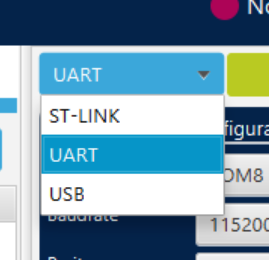
Same STM32CubeProgrammer should work but set it to UART mode using the USB0 created when you plugged in the USB cable.
Doug,
I hope we are safer here than at $79 thread.
This was in my very first message in this thread.
I’m glad you got serial to Cube working.
I’m not able to replicate it yet. (not tried really hard) As you’ve mentioned at other thread: use “DFU over serial, not the serial”.
I do not see settings specifically for DFU in Cube. I assume DFU = USB. When I reset with Boot0 High - I see DFU driver pops up in Windows, if USB cable is connected (Blue Pill), but I’m not interested in using that.
Otherwise I’m trying to use serial UART1 - no response, except one very old Blue Pill. (Maybe it has something else for boot loader?!?)
I did set interface as Serial and reset with Boot0 Hign. I expect it to start form ST Factory boot loader from System memory, if ST boot loader is there. It may work with USB and serial, but I see no option to select specifically DFU over serial.
Maybe I had timing wrong? I will solder button to Boot0 and repeat. Maybe I will get different results.
You are on Linux, right?
LOL, right you are and I hope he posts his reason for even being in the thread. If he doesn’t have one that geesh but if he does have one then what info is he looking for. We’ll see if he answers.
You are correct, USB option and not DFU option. My mistake. One would think using a USB interface was what selecting USB option would be for but nope. In our cases, that USB interface on the JL1 is not too unlike having an USB FTDI UART connected to the tx/rx pins of the MPU and running DFU software. it’s the same thing just not FTDI but CH341 chip instead.
And I’m not sure I’ll be working on the BluePill much any more since it got me a test platform before taking apart my JL1. Now I have the JL1 board on my bench and sorry but I’m not interested in preserving the stock bootloader. And boy, I wish I knew what you knew when I started but then again, I learned a bit from the grblHAL dev who helped me but I’m starting to think the 6-axis code repo was probably the place for me to start. It didn’t dawn on me that active firmware dev might just mean actively porting. It’s almost looking like grbl is dead with no updates in 3 years(1.1h)…
I just set the CubeProgrammer to UART, set the port(/dev/ttyUSB0) and hit connect. I said it couldn’t read because read-protect was set but the fact it could tell at all told me it was connecting.
I will try to upload a firmware in the morning using UART/DFU mode of the CubeProgrammer.
USB on the JL1 can be powered and connected at all times because it is isolated from the STM32.
But we need to have the onboard 3.3V jumpered to the BOOT0 pin(R19) before we power up the board and once it’s powered up, remove the jumper from BOOT0. That’s all I did.
Yes but the STM32CubeProgrammer and STM32CubeIDE are both eclipse based so they run on any platform.
I ohmed out ESP8266 tx and rs pins:
STM----ESP8266 12F
PA2 → ESP-Rx
PA3 → ISP-Tx
I don’t, there can’t be any good one. Maybe he had a bad day, would feel sorry for him. Still not the reason to vent own irritation here. Or maybe kind of person who blames everybody but himself when stuck in traffic. Whatever. I will not gratify anymore his outburst with reply. Once is more than plenty.
I kind of expect you to eventually abandon factory boot loader. To have this laser and not running it is kind of torture. Then for $65 you may pickup whole bunch of spare hardware (JL2 machine) and continue later. I kind of hoped to have a company to work on it.
That is so but drivers are working very differently. Irrelevant for Eclipse development but important for flashing with CubeProg. Do you recall Jack was struggling with that CH340 in Linux?
I just found one more pin from EPS: ESP A1 is ESP enable. I wire Spindle Enable to it. No harm, I will move GRBL stuff from it when I have a chance.
I really like to flash ESP3D to it. Need to make quick transparent serial to serial firmware in STM, only need one resistor and button to put ESP into flashing mode. Not much different than serial flashing of STM.
Then in GRBL can make serial automatically selectable, depending on ESP or CH340 has traffic. Should not be very difficult. Or just merge all messages from two ports. There are ways.
This little board has a lot of hardware in it. I really like it!
1 Like
I have ordered the JL2 and it is likely I will try to figure out the puzzle of the encrypted bootloaded firmware. I had already bookmarked the 6-axis grbl firmware you posted long ago as what you started with.
Do you know where to pick up the t-nuts for this 2040 extrusions? Can’t seem to find anything this small. Even something like what’s holding the belts would be usable.
It would make it relatively simple to move the Y limit switch…

I know you were asking Sal about the T-slot nuts but I think these extrusions, like the Ortur, NeJe, Ender3, etc are based on OpenBuild design. I would think they would be all over the place.
@LsrSal I was able to upload new firmware onto my JL1 using the supplied USB cable and the V+ jumpered to R19/BOOT0 and the stock power supply.
STM32Programmer software in UART mode.
What this means is you don’t need an STLink programmer to program the JL1.
- plug in USB cable and see USB0 device created
- BOOT0: jumper onboard 3.3V found at the 4pin blank header and labeled "V+), jumper it to R19 on the side nearest the STM32F103
- apply 12V power and turn the ON/OFF switch ON
- remove BOOT0 jumper
- Start STM32CubeProgrammer, select mode UART, select box “Read Unprotected(MCU)”, connect
- If the MCU resets restart the JL1 in BOOT0 mode, deselect “Read Unproteced” then connect and start programming.
1 Like
Doug/Sal/All,
You are [still] “safe” in the $79 machine thread. As I posted there, I have no objection to the discussion(s) going on there, as we’re still talking about our $79 machine and its JL1 controller… along with Grbl, Lightburn, and assorted lasers and techniques we are using with it. While a lot of the stuff is over my head, the tired/retired engineer in me still enjoys reading it. This thread is well-established and relevant as well so if it makes more sense to take this particular discussion here, I’m good with it… and it’s your choice. You’re always welcome to post in the $79 thread. @ferg apparently just got lost in the LB forum “mansion” and came in with a preconceived idea of what he should find in our particular “room”. Thank you for all you’ve done to teach us and help get our machines running.
– David
3 Likes
I got this. Fits perfectly.
They have slanted corners so it is easy to insert in the middle of the slot.
Doug,
Could we re-purpose the onboard button to do the BOOT0 function by cutting a trace and putting in a “blue-wire” (boy does that expose my age!).
Mike
1 Like
Wow Mike you almost read my mind. I wasn’t thinking about the onboard button for Boot0 but I must have uploaded a firmware images 2 dozen times today. While I had 2 Teasing Needles on a jumper wire( https://www.amazon.com/Edu-Labs-Assorted-Multicolor-Dissecting-Teasing/dp/B07D9JXZF6 ) with one needle stuck in the V+ header pin thru-hole I only needed to probe R19 for a moment with one hand while the other flipped the ON/OFF button ON. It still was a PIA and a few times I thought about wiring up a button.
Again, it was quite handy that the needle would stay in the V+ thru-hole so that I had a full 2 hands free to get it into Boot0 mode. Had I had a loose single pin from an inline header it might have been a bit easier and I could have been less careful whenever grabbing the R19 jump needle.
Oh and I love my 30awg jumper wire and use it for all kinds of stuff like you mentioned. I don’t do wirewrapping much any more but I still have both a manual too and the electric version. Backplanes back in the day were a rats nest of “blue wire”.
Reminds me of the time I wired up a one off controller for a customer of the company I was working for. I used all blue wire. Awhile later the customer called and wanted to know where the blue wire went!
1 Like
The complication here is that signal from button is normally high/pushed low. Boot0 need the opposite. Button soldered (one side obviously) into ground fill on both sides. I would not brave to cut ground all around on both sides just to invert it. I do not think it is practical.
(But I’ve used it just for that for my ESP3D flashing)
But it is very easy to add 2-pin header. R19 right next to 3.3V bus and spacing is just about right.