So I just bought a Gweike G2 Pro Galvo Laser. It comes with this horrible piece of software called Glaser. It’s crap but the thing I like about it is that it lets you click on a shape and assign a color to it. I want to use LightBurn, but before I spend $100 upgrading, I was wondering if any of you know of an easy way to assign colors to an object? Is there a LightBurn document out there that has all of the colors listed as a test grid, or could you point me to a really good YouTube video that explains it will. Ill inevitably end up using LightBurn, but want as much info as I can get before upgrading to the galvo license. Thanks
Colors are a result of machine individual settings, which are individual for each machine, just like cutting and engraving settings of diode or CO2 lasers.
The purpose of the manufacturers’ own and most proprietary software is to be able to service their own products in the best possible way while at the same time binding their customers to the company. Unfortunately, there are not many products/software where this goal ( the first part) is achieved.
If your new laser is compatible with LightBurn, the only way to a “color database” is your own test results which must be saved in the LB material library. Some LB material databases for specific lasers can also be purchased online from private sellers, here the result is unfortunately often only (just like the one from the manufacturer) a starting point for a good result.
I personally have made material libraries for all the materials that I work with myself for the machines I have had or still work with. It simply gives the best results, is relatively fast and a very experience-rich process where I have learned to know/operate my machines better.
Are you talking about the colors displayed on the screen? LB has the color buttons right at the bottom, you can select any object and assign a color. The colors represent layers, where you can set different settings for each.
Those colors are not related to the output result, as Bernd mentioned. If you want achieve different colors on a steel object, you need to test. Settings lists from manufacturers give a starting point at most, because many factors have an influence (ambient temperature, for example).
The Fiber source of the G2 Pro has a fixed Q-Pulse, so most tutorials for color engraving steel won’t apply.
However:
I’m attaching my current device settings, including a Material Library with a few Presets:
Gweike_G2_Pro_30W_1500mm_Aa_08-2026.lbzip (193.1 KB)
Thank you for that. I do understand that it will take a bit of patience, but I just wanted to head start if possible. This is helpful. Thank you.
Melvin, I think he is referring to some fiber laser software that has “built-in” settings for specific colors on metal. Here you choose, for example, blue and the appropriate machine settings are automatically loaded.
That’s how I also understood the request.
I now took a moment to search for this in the GLaser software shipped with the Gweike, but couldn’t confirm that there are presets to engrave colors.
At least, these color swatches here are not that. They are merely placeholders for different shapes, working similar as in LightBurn.
Be aware those settings are for a specific thickness and grade of stainless.
The way this works is you heat the metal to a specific temperature, that temperature peak causes an oxidation layer to be produced. Some visible light is reflected and some penetrates and is reflected, there two different emf mix creating a wide range of output emf values. Oxidation thickness varies, which changes the resultant color.
I’ve tried this for over three year on/off with my fiber (M60 JPT M7 MOPA). You can nail a color, but if you increase or decrease it’s size, you get a different color. It appears the metals take too much heat away as this is an assumption… 
I’ve give up on it, but I never discourage others to try and get right what I did not. However I think this is a physics issue less then purely settings.
Here’s a couple lab articles about it.
Formation of colours on SS304L stainless steel
induced by laser colouring
Worth looking through. The first one has some excellent photos. On either, ensure you know which laser they are using.
I agree pretty much with @Aaron.F that change items like interval seems to be more effective. Changing the frequency/q-pulse will definitely change the amount of heat the material is receiving.
What makes a fiber laser work like it does is that it’s a pulse driven laser, not a cw laser like an led or co2.
A 532nm (green laser) has a higher percentage of absorption, than the same materials at a longer wavelength. This goes the wrong way when we
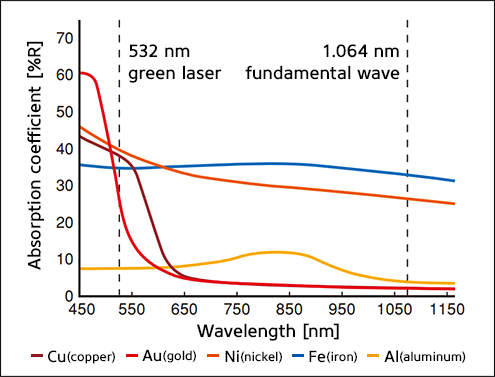
These are absorption values for different metals. At lower frequencies (longer waver length), like IR (Fiber and Co2 are in the IR area,) there is not much absorbed, most of it’s reflected
The machine pumps the fiber up, then opens the gate and it’s dumped out the fiber.
When my fiber pulses, each pulse is 18 kw. Even with only a 10% absorption, that 1.8kw per pulse.
If a fiber is not marked as being a MOPA, it’s not a MOPA, they bring more dollars. Don’t know what source you have, lens length or much else with these, so it’s hard to tell many things.
A q-switch will mark limited colors, so you can go that way. Some of the sites have starting material settings, but so much varies, it’s hard to tell what real numbers are happening.
We’re here if you have questions.
