If I use the laser in Current Position, the gantry will fly across the bed. I slowed the framing speed. If the laser is in Absolute Coordinate Mode, there is no issue. Now I never start the laser in Current Position Mode. I have the laser in the home position before I hit the start button.
I do not know if others have had such instances. So I would appreciate knowing how they solved the problem. This is a Sculpfun S 70 W Max Laser I am using.
Thanks, Frank
I’m just guessing because you don’t show your screen. You probably have artwork off grid. Absolute coordinates ignores off grid items by default, whereas user origin and current position do not. Try this. In current position enable the cut selected graphics AND use selection origin switches in the laser window.
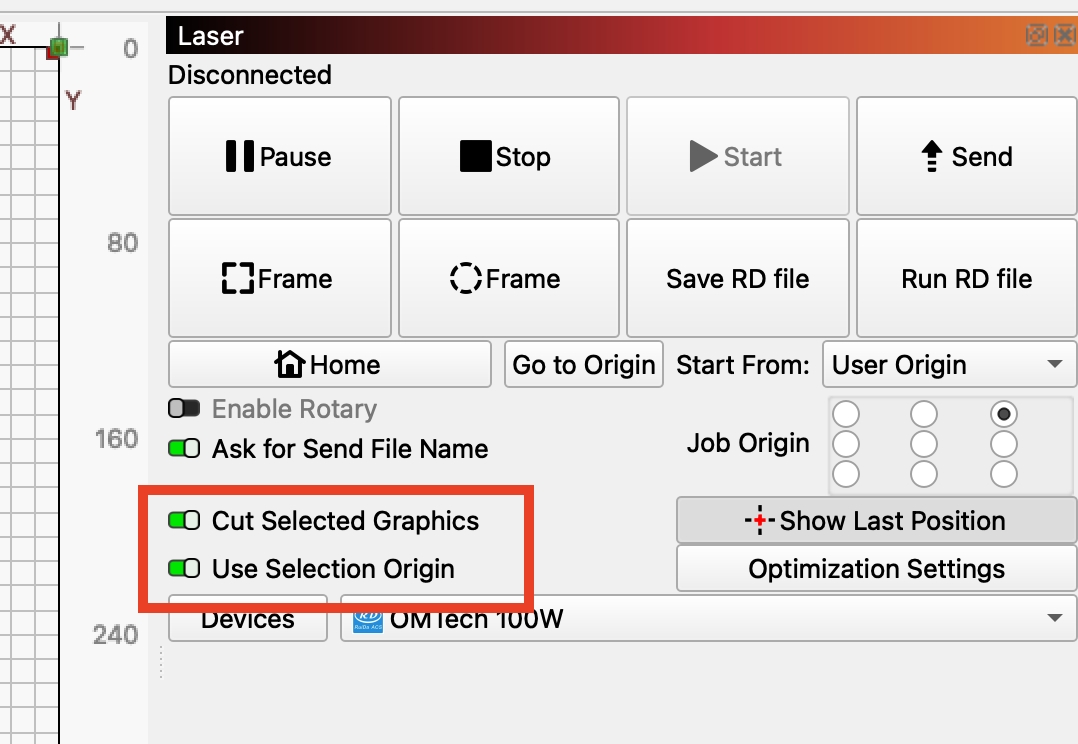
I always suggest using Absolute Coords for one simple reason: You can then imagine the Lightburn grid floating above the laser table. Wherever you have a line in the grid, that is where the laser will go.
I use Absolute Coords, Cut Selected Graphics=ON, and Use Selection Origin=OFF.
If you do not use Absolute Coords, then moves are incremental from the last position. If you do not mentally keep track of the position, it is real easy to get crashes and out of bounds alarms.
Sweet! If that came out before I bought my SF-A9 40w/20w machine, I would have bought it instead. You should find few operating differences between it and your Atomstack. Basically you have a lot more power, but pay for that with a bigger beam diameter. Keep your 5w laser (did I get that right?) for the fine detail work.