FolkHero
November 12, 2026, 4:36am
1
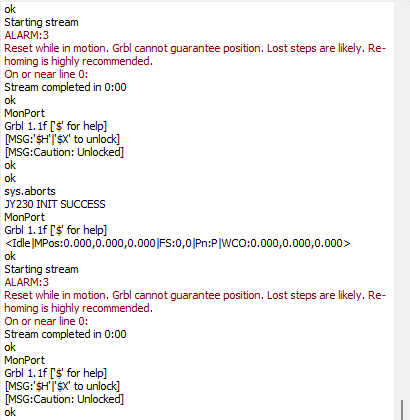
When attempting
Fanhole2.lbrn2 (9.6 KB)
to cut this I keep getting this error. I’ve tried many different adjustments, but nothing seems to work. All help appreciated.
ednisley
November 12, 2026, 1:25pm
2
Knowing what you’ve tried will help us avoid recommending those same solutions.
Like these:
My guess is a USB problem, per many previous discussions:
WOO HOO !!! I got everything working right , FINELY !!! What was the problem?
It turns out to be the USB to Controller board cable was faulty. That was the only thing I failed to check and that was it. I have a bad habit of buying one to use and one to loose.
When I thought about the cable being bad, I got the cable out the spare controller kit and that one worked. I feel really stupid sitting here thinking how I spent 4 to 6 weeks crying and trying to fix this thing and never though…
I have just purchased a Gweike Cloud RF laser, using with Lightburn. The supplied USB cable works fine but it’s very short. So I bought a nice long one, 5 metres length. USB C to USB A, I use Macs. It’s a good quality cable, but I don’t seem to be able to make a connection when I plug in to the laser and to my Mac? Any suggestions/fixes most welcomed. I came across a really useful post by @BillieRuben who seems to have knowledge of these machines and setting up, any idea Billie ? tia
MikeyH
November 13, 2026, 12:42am
3
My notes also indicate a defective power supply can also cause an Alarm 3 message.
FolkHero
November 13, 2026, 9:27pm
4
What I don`t understand is had cut several pieces before the Alarm:3 code came up. I just assumed it was a graphic problem (Too big, outside the boundaries, etc)