Having trouble reading screen?

I got tired of squinting and moving closer to the screen trying to make out numbers and such.

For me to get everything I want on screen, I have issues seeing numbers and the like
I found a solution at least for me.

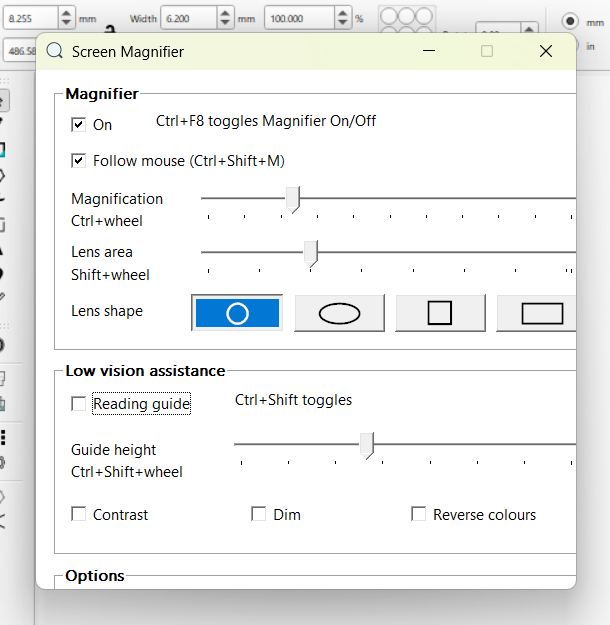
An APP called “Screen Magnifier”

Select the shape of the lens that best suits your liking ang go to town. You can turn on ans off whether the lens follows your mouse or not.

1 Like

This could be very useful for some of those who already need a boost to their vision! (Like me) :grin:
Thanks for sharing!

1 Like

Thanks for the kind reply.

I just thought, if I were having issues there may be others.

3 Likes

Nice! This is like getting one more zoom when node editing. :rofl:

1 Like

Thanks for this @ehendrix

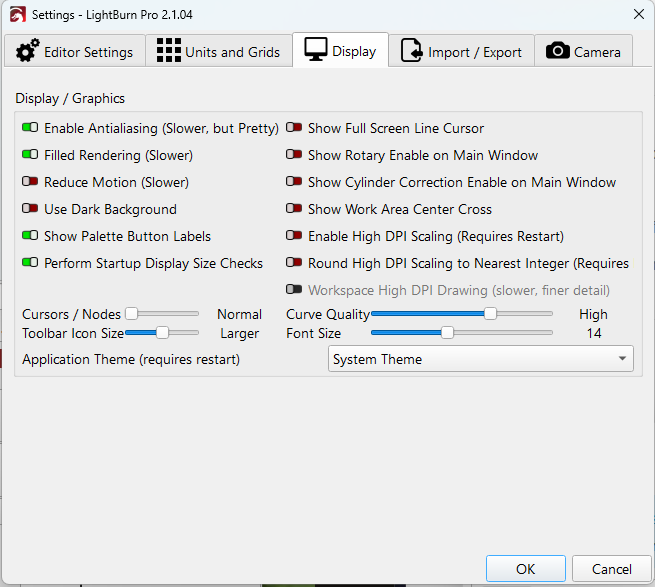
You can also adjust this directly in LightBurn under Edit → Settings → Display.

There are separate controls for Font Size and Toolbar Icon Size, plus High DPI scaling options.

image

1 Like

I found that using Lightburn adjustments increase screen size and causes the edges to run off, and for some reason on my computer I can’t get to all I need to see.

The app, for me, solves this issue.

1 Like

I am currently using this option you sugest.

However, due to the monitor size and the distance at which it is viewed, when zooming in “too much” but necessary to be able to read, the arrangement of the icons changes and some end up being hidden. This facilitates visibility but complicates use.

I haven’t yet tested the option suggested by @ehendrix, but it seems to me that having a “magnifying glass on hand” to use when you need to consult data such as dimensions or the position of objects can be quite useful in some monitors.