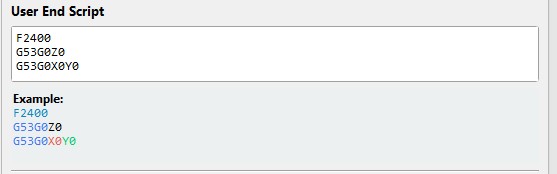
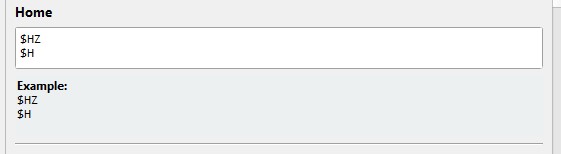
When I press “all home” or when I type $H only XY goes, Z doesn’t move, I have to give a separate command. To get Home Z+X+Y, I have to activate something in millmage?
For now I created a macro for All Home ($HZ
$H ). If possible, this should be on the All Home button of MillMage so that we don’t break cutters at startup. 
It does on my Genmitsu 3040 CNC. One Click Home Cycle. Just did it about 10 times today diagnosing a GCode file for a friend.
If you tell us the controller in your CNC, maybe someone has encountered this.
Mks dlc32 v2.1 ts35
No, that’s not possible. The standard home command is $H.
Your firmware is not configured correctly (for your requirements). Depending on your firmware you can either define the homing sequence in a configuration file, or (for example with standard grbl) you need to define this at compile time.
You define arbitrary homing sequences there, (for example, home Y, then home Z, then X). You define it for your machine, and MillMage will always just call $H if you click on home. Everything else doesn’t make sense.
1 Like
My knowledge of grbl and the code is very basic. If I understood correctly, you mean, to go to the device Settings and change the code according to my needs ?
No, firmware is the software running in the controller board. That is what @misken says may have to be modified. You can only change parameters that affect what the firmware does when it is given commands to control the laser. If you see the word “recompile”, you are in the right subject area.
Normally, the Zaxis will Home first to retract away from the work area. Only after the Zaxis Homes will the Xaxis and Yaxis begin moving. This is a safety feature to keep from crashing a spindle or laser module into a part.
Is this a DIY machine? It sounds like your board is capable of Z motion, but is designed for a laser that normally only requires X and Y axis control.
1 Like
Do you mean I should download and run the latest firmware from GitHub - makerbase-mks/MKS-DLC32: MKS DLC32 motherboard kit, which is an offline engraving master control kit developed for desktop engraving machines. The hardware is equipped with a 32-bit high-speed ESP32 module, integrated WIFI function, and directly drives a 3.5-inch touch color screen; it can realize fast engraving and WEB web pages. Control, mobile phone APP control and other functions.
I consider doing this as a last resort to solve a problem. In my case, that problem has to be severe enough to hinder acceptable operation. You have to decide if your $HZ and $H combo macro requirement rates as a severe issue.
1 Like
I second Mike. You can flash a new firmware, but there is a risk that it takes some time until all the other settings are dialed in again. You can also brick your device. That’s not very likely, but it can happen.
If the workaround using the macro is ok for you, you should not start playing around with the firmware. It could take another week or two until you are running again. I suggest using the macro and starting to make use of the CNC
1 Like
I believe flashing the new firmware won’t solve your issue, as @MikeyH and @Misk have said.
If anything you may lose existing machine configuration parameters.
Now, if the macro is too annoying/risky for you, here’s what I would suggest to look at to change the firmware configuration (no flashing needed!).
If the firmware is a GRBL-derivative (like what it looks like on their Github), you need to look at the GRBL configuration settings on the firmware. They’re easily accessible.
If you type $$ in the console, you should get a whole list of $= appearing. Those define how the firmware is set up.
For the homing cycle direction, check what the setting for $23 to $27 is, as described in the GRBL documentation here:
Before you modify any of these values, make sure to copy the full list of $= entries you got back from the console, and save that.
This will be your backup in case something doesn’t work as expected after you modify parameters.
To update any of the configuration values, the syntax would be something like:
$23=3 - if 3 is the value you want to set.
Again, only if the risk/annoyance factor is too high to take the risk. If you’re not familiar with how firmware configuration is done (and I realize it’s a niche knowledge set), look for help before attempting to do it.
2 Likes
Minor remark: This does not work, since in grbl firmware options, you can only set directions, but not change the axis used. His problem is that the z-axis is missing in his homing cycle, and changing direction does not change the behavior. Z will always be excluded in the $H command if not included at compile time.
1 Like
I believe you set the axes with one of them? And some of the z-related distances could be set to 0? With looking into.