Hello,
Some time ago, I purchased the Monport motherboard (LightBurn-compatible) for the K40 CO2 laser.
I had bought a cheap K40 from Sihao due to budget constraints. I contacted them because their motherboard had an unconnected plug; even after connecting it, the board wasn’t recognized by their Chinese cutting software anyway.
They couldn’t find a solution, other than offering a partial refund just to get rid of me.
So, I bought your Monport motherboard for LightBurn and the K40.
I need some advice here.
The installation went smoothly, the connection was successful, and LightBurn recognizes the Monport board.
However, I’m getting errors 8 and 9.
LightBurn cannot perform the homing sequence and fails to detect the X and Y limits.
The machine locks up, and even after running `$X` and `$H`, the problem persists.
What should I do? I tried `$3=3` and `$5=0` (and `1`), but without success.
What do you think, and what can I do?
The X and Y connections seem correct. (Would you like a photo?)
Thanks in advance,
Ivan Zimmermann
“Homing fail. Pull off travel failed to clear limit switch. Try increasing pull-off setting or check wiring.” In order for homing to start, no limit switches must be activated. If this error appears, the switches were detected as pressed when the homing was started. Most common cause: the limit switches must be inverted, this can be done with the parameter $5. See software articles.
“9”
“Homing fail”
“Homing fail. Could not find limit switch within search distances. Try increasing max travel, decreasing pull-off distance, or check wiring.” The firmware searches for the limit switches in the set direction. The track being scanned cannot be longer than the maximum size of the work area. So if the laser has traveled further than the set length in $130 or $131 and has not found any limit switches, this alarm is triggered and the laser is stopped. This error is usually occurs when the limit switches are not recognized by the laser. They are either wired incorrectly or not configured correctly. See limit switches.
If this information does not help, let us know and we will ask more questions.
The Lightburn compatible boards usually mean they are just standard grbl boards.
does your Sihao have homing switches?
put the two values you changed back to what they were originally.
tell us which corner your home switches are mounted, if you have them.
if you put the head in the middle of the machine, which way does the head move when you power if up?
If you have the correct values in 3 and 5, the head should move towards the home location (homing switches).
Most of these home to the back/left. It’s possible, but unlikely, they home elsewhere.
The most common problem is the switches are not wired correctly. With no information from you we can only guess.
Both axes should move to it’s home switch, touch, back off and approach again at a slower speed. This is done for accuracy, but most of these operate that way.
Double check your wiring information and if possible post the document that came with the board or whatever you used to wire this up. Have you compared a photo of yours not working and one that is installed and that is working?
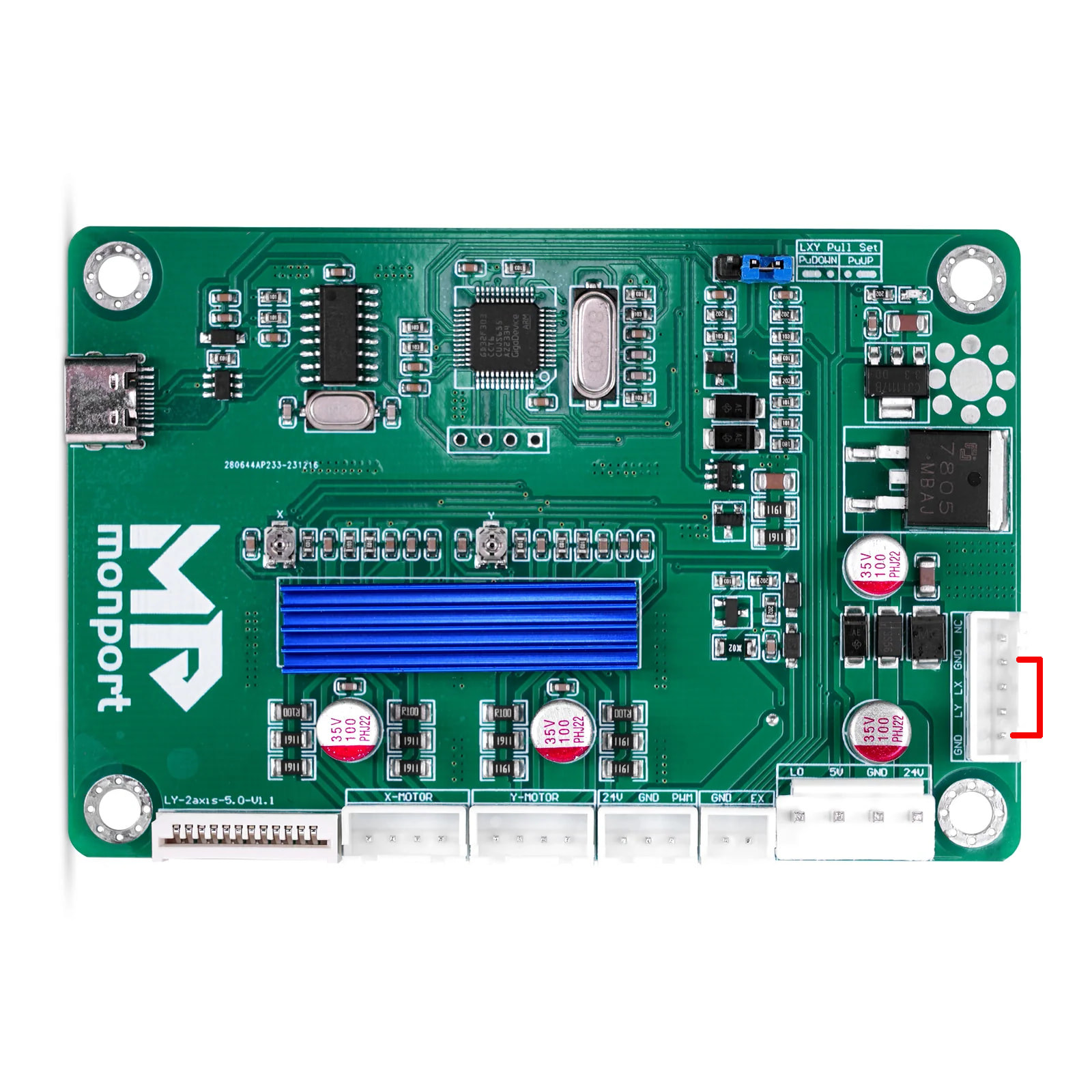
Is this your board? If so, the limit (home) inputs are marked in red. LX is limit X… Usually these are active when pulled low. Then only a single line needs to go the controller, the other is ground. Most of these use the supplied grounds on the connector and run a pair of lines to each.