I’m having problems after homing to BL my laser I go to the move tool and no matter what I do the laser takes off to the TR Conner, I’ve done all the tricks and nothing works
For a GRBL CNC machine, verify for us that you did all of this:
In particular, review the Status Reporting and Homing sections, because there’s plenty of ways to have all that go wrong.
If it’s still misbehaving, copy-n-paste the GRBL $$, $#, and $N settings here so the hive mind can get a look at them.
1 Like
Ok, I’ve done most of these things (some I couldn’t find)
The problem is in the origin settings some where, I’m down to when I use any move key it will move, but the movement is random and never repeats
I’ll try and send the files
Which is likely either too much speed or too much acceleration.
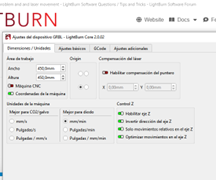
In addition to the $$ settings, a screenshot of the LightBurn layout, including the Cuts / Layers window, will be helpful.
$22=1
$23=3
$24=25.000
$25=1000.000
$26=250
$27=3.000
$30=1000
$31=0
$32=1
$100=79.000
$101=80.000
$102=1600.000
$110=2000.000
$111=2000.000
$112=500.000
$120=300.000
$121=300.000
$122=30.000
$130=400.000
$131=380.000
$132=55.000
ok
$#
[G54:-209.983,-211.164,-50.872]
[G55:0.000,0.000,0.000]
[G56:0.000,0.000,0.000]
[G57:0.000,0.000,0.000]
[G58:0.000,0.000,0.000]
[G59:0.000,0.000,0.000]
[G28:0.000,0.000,0.000]
[G30:0.000,0.000,0.000]
[G92:0.000,0.000,0.000]
[TLO:0.000]
[PRB:0.000,0.000,0.000:0]
ok
$N
$N0=
$N1=
That looks like a problem right there.
Clear the G54 offset:
G10 L2 P1 X0 Y0 Z0
Then use Get Position to verify it’s at (3,3) or maybe (0,0) after homing.
The X and Y Steps/mm values are different, which is unusual. Have you calibrated the axes to get those values?
The maximum axis speeds seem high for a leadscrew CNC machine; something around 1000 mm/min would be more typical. Excessive axis speeds will stall the motors, so if you’re not certain the machine can run at those speeds, back them down until everything else works.
Try tweaking those settings and see if the situation improves.
Well I’m at a loss, we have gone way above my head, I can’t find 1/2 the stuff that I need,
I was doing good until I was dumb enough to download 2.0 now it has destroyed the old Vr and 2.0 is crap.
Thanks for your help!’
Download a previous version from:
Install it as usual.
Reload an automatic preferences backup made before you installed 2.0:
That should move you back in time.
If you’re feeling adventurous, you can restore the backup in V 2.0 to see if that improves the situation.
This topic was automatically closed 30 days after the last reply. New replies are no longer allowed.