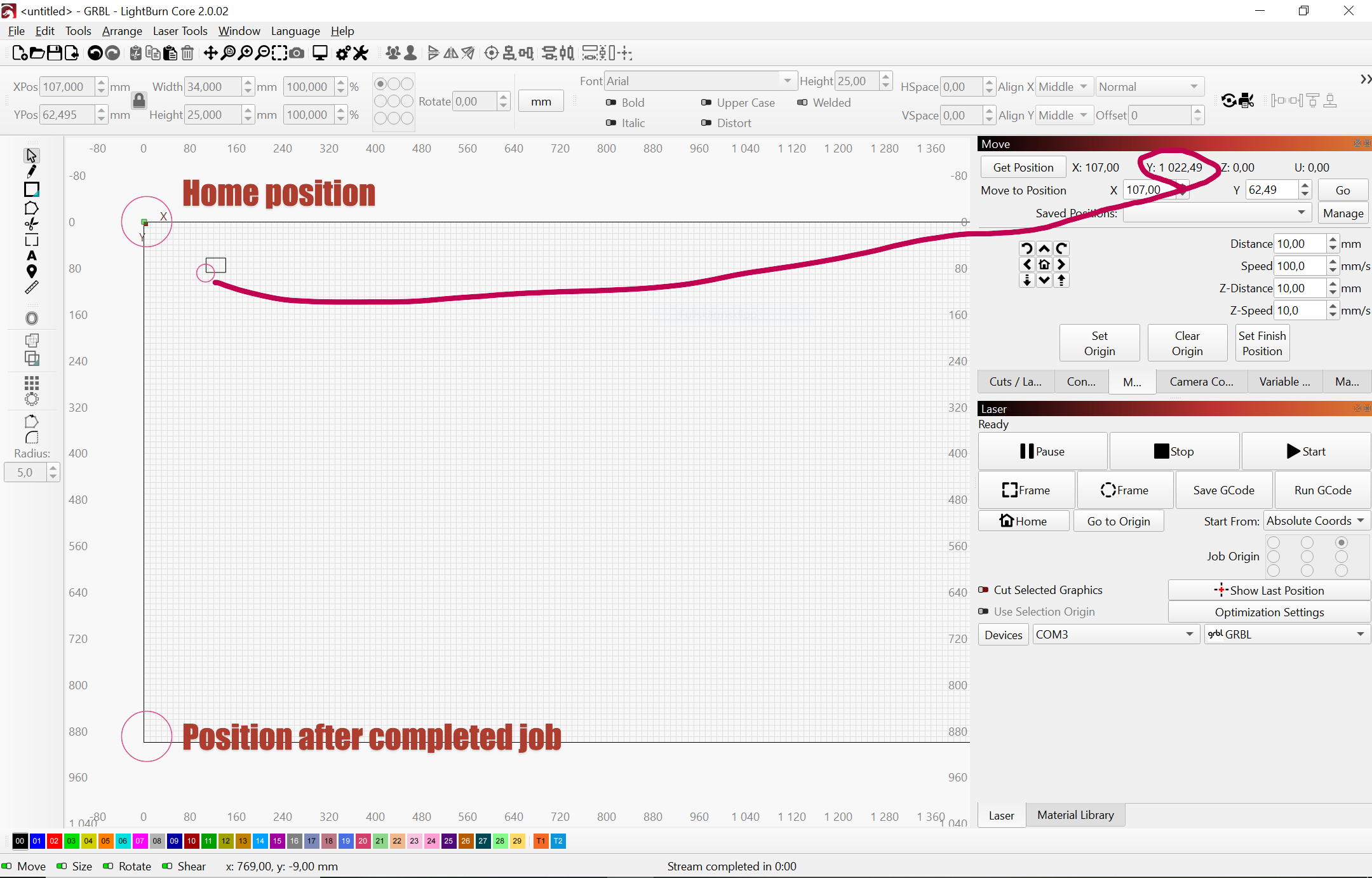
I have a problem that I hope someone can help me with. Homing works, but when I then press Frame, the laser head moves in the wrong direction along the Y-axis. If I press Frame again, it moves correctly (and then I can run my job correctly). Under the Move tab, I can only move the laser head along the X-axis.
Hardware MKS DLC32
I think I have tried all different settings of $2, $3 and $23
Error messages:
ALARM:1
Hard limit triggered. Machine position is likely lost due to sudden and immediate halt. Re-homing is highly recommended.
On or near line 1:
Stream completed in 0:00
SimpleLaser 1.1h [‘$’ for help]
[MSG:‘$H’|‘$X’ to unlock]
[MSG:Caution: Unlocked]
<Idle|MPos:3.525,6.293,0.000|FS:0,0|Pn:PY|WCO:0.000,-900.000,0.000>
Make sure Home and Jog directions are correct first and foremost. If this is not right, nothing else will be. Use the Lightburn Machine Settings window to make any changes in the parameters. Once you get it right, be sure to save the settings to a file…
Use Absolute Coords in the Laser window.
In the Device Settings window, make sure the Origin button matches the Home position of the machine.
In the Toolbar above the Grid, make sure the 9-button selection matches the Origin button.
Make sure Home and Jog directions are correct first and foremost. If this is not right, nothing else will be. Use the Lightburn Machine Settings window to make any changes in the parameters. Once you get it right, be sure to save the settings to a file…
Check
Use Absolute Coords in the Laser window.
Check
In the Device Settings window, make sure the Origin button matches the Home position of the machine.
Check
In the Toolbar above the Grid, make sure the 9-button selection matches the Origin button.
Check
This works, but Y now starts at 900 and goes to 1800 instead of going from 0 to 900. However, after a job is finished, the laser head moves to the lower left corner (0,1800) instead of the home position (0,900).