I´m using a CNC LaserTree k1 Pro 40w. There´s a cross indicante a point in the material to grave or burn but the real laser point is located above. How can I turn on the laser for focusing?
Perhaps:
Which will require enabling Fire:
The example screenshot in the doc is for a CO₂ laser that does not have an Enable Fire option, but GRBL machines will:
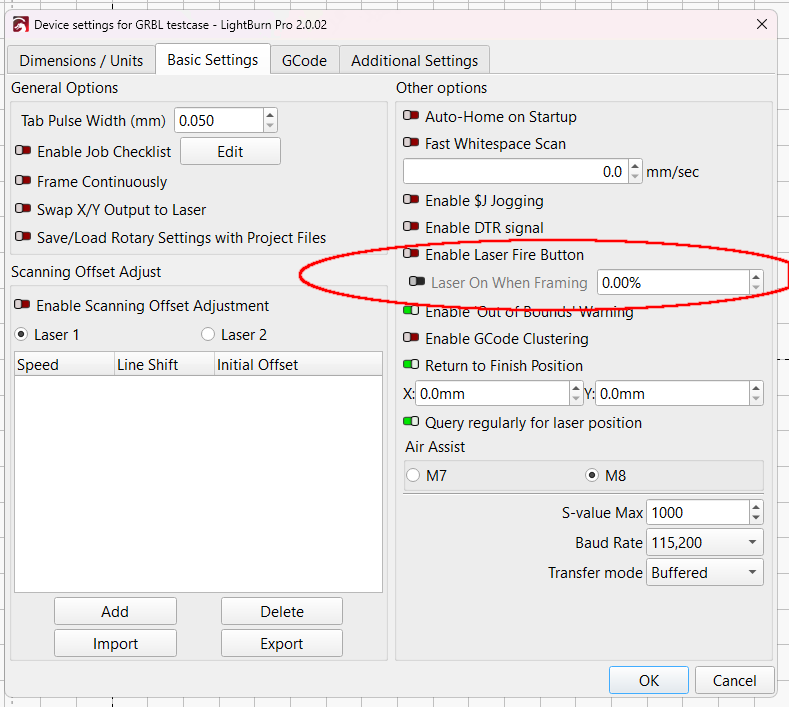
@JohnJohn: This comes up often enough to deserve more love from the doc team. Given that most folks have GRBL-ish lasers, adding a settings screenshot just for them would help.
1 Like
You can use either the laser or the crosshairs. You can’t use both.
Either set the crosshair offset in device settings or enable the fire function.
This topic was automatically closed 30 days after the last reply. New replies are no longer allowed.