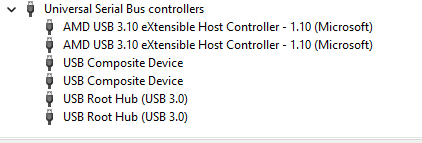
There is No CH340 driver in device manager, and I can not get it to show when I download and install.
Does it show when you plug in the laser USB cord? It should pop up and include the COM port number. When you unplug the laser, it will go away.
This is a “sudden” new problem? You showed your GRBL parameters via $$, so it was working.
When I connect and disconect the usb, the pc chimes. The device is ready and shows on com 3.
Yes, it shows the $$ values. It has been 6-8 months since i have used it.
I have a diode machine that does not have any limit switches. I can copy over $$ from it.to see if it works. Junt need to adjust frame size and speeds etc.
$20=,$21= and $22= should all be the same?
Well The Amazon truck stopped in front of my house. He left one of these on my door step. CNCTOPBAOS GRBL Controller Board for 3018 CNC 1610 pro 3018 Pro 3018PRO Max USB grbl Control Board USB 3 Axis Engraving Milling Machine CNC Controller 24V DC for DIY Mini Wood CNC Router : Amazon.ca: Tools & Home Improvement
I plugged all the wires in and…It Works!! I changed the $3= value to set the driection of stepper motors and a bit of bed size adjustment.
1 Like
I have to thank everyone for the replies and suggestions.
Next DUMB question, how do I save the $$ values?
Fortunately, you don’t, because they’re stored in the controller’s flash memory.
You should save a backup copy using the Machine Settings dialog:
Before I learned what @ednisley said, I would just copy them from the Console window and save in a text file.
The only dumb question is the one you don’t ask.
1 Like
This topic was automatically closed 30 days after the last reply. New replies are no longer allowed.