Hi Legends,
Im new at this program so please forgive my age & brain power … lol
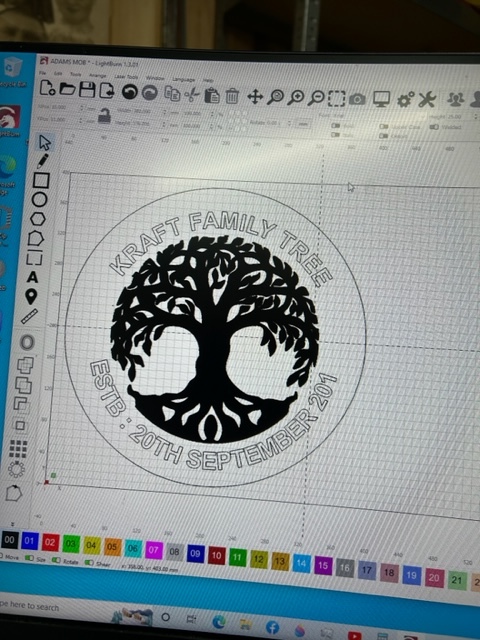
Im currently trying to cut out the project in the picture but it only wants to cut out the wording & colur the tree …
how do i set it up to cut out everything ???
I will suggest all our documentation is worth review, and in particular, this section to assist,
Walking through this project is intended to provide an overview of the main concepts and tools in LightBurn. 
To be clear - I understand that you want to cut the letters all the way through the wood (I presume you are using wood as your media) - and the tree will be engraved (burned by only on the surface)
This is a job for different “layers” - the colored blocks at the bottom of the screen. You can set different speed and power levels on each layer. Slow and hot and multiple passes for the cut outs, faster and not-so high-power level on the engraver image. The display on the computer screen will show different colors, but the PREVIEW button will show what the output will look like.
Sorry JImNM ,
I want to cut the letters & the tree out.
at the moment it will only cut the outside ring & the letters but wants to engrave the tree
Difficult to tell as you don’t show the Cuts / Layers window. What is used for the tree art? To “cut” the tree, you would need to ensure the tree is composed of vector paths for the laser to follow and not an image. If this is an image, you can use the ‘Image Trace’ feature to create these vector paths, then hide or remove the image. Set the resulting traced shapes on a ‘Line’ layer with appropriate settings for the material, and you should be set.
1 Like
This topic was automatically closed 30 days after the last reply. New replies are no longer allowed.