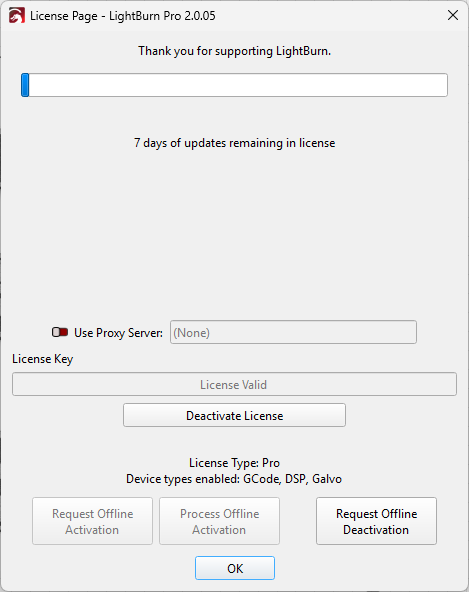
This seems so basic, I feel like I’m missing something obvious. My license expires in 7 days and I want to renew it. In the licensing portal, I can’t find a button to renew my license. The dialog in Lightburn simply tells me that the license will expire in 7 days with no button to renew. It offers a button to deactivate and a button to request offline deactivation. I even read the documentation online and I’m not finding renewal instructions.
If the Lightburn folks are listening - please make it easier to find the renew button. The license management portal and the dialog above would be great places to put it, not to mention the online documentation for licensing.
I really just want to send you money for such a great product. Make it easy!
The renew button appears in the license management window after a license has expired, but you should be notified by LightBurn that your key is expiring soon.
You can find instructions for renewals in our documentation on the Licensing page, as well as (take a breath with me here) under the License Management drop down on the top bar of the forum by selecting the License Explained option which will redirect you to the How the LightBurn License Works page on our website. There, you can find the sub-header ‘How much is another year of updates?’ which will provide the direct link to the renewal purchase page.
We are discussing how we may look to improve this process
With the incentive of a couple of extra months if you renew your license prior to expiration, I would think that it would be advantageous to make the “Renew” button show up either all the time, or at least a month or two prior to expiration, and maybe annotate on the license screen or something like that about the two months free advantage to encourage license renewal. Just a thought.