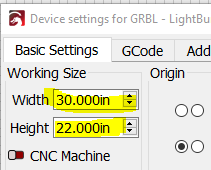
I am not sure how to set up my machine so it knows how big (the size) my project piece is AND how big (the size) of the design I want to laser on my project piece.
I believe the max space on my machine is X is 380.00 mm and Y is 380.00 mm (Not sure what the proper term for that is).
Im sorry, I didnt follow that. So if I have a piece thats X 344.4 and Y 238.1. but I want to put a small design in the middle, how do I tell the machine the 344.4 and the 238.1.
The machine work area (my term for it) is a fixed space. That is also the grid area displayed by Lightburn.
I represent the material size and shape with a Tool layer. For example, if I am working with 12”x12” Baltic plywood, I create a 12x12 inch box, which I park in the front left corner (I always use Absolute Coords).
Any design work I do stays within that box. If I have multiple parts with an odd shape, I just draw a rough version of that shape to use as a guideline.
For assemblies with more parts than will fit in the Tool layer outline, I just move stuff in and out as needed.
Like @MikeyH said you would make a 344.4 x 238.1 rectangle and work your project within that rectangle. The grid on which you are working should be the work area of your machine, which you put in when you set up your machine.
Yes lasered a design last night. I just eye balled it and used the framing button but later this week I’ll try a design using the method you both described