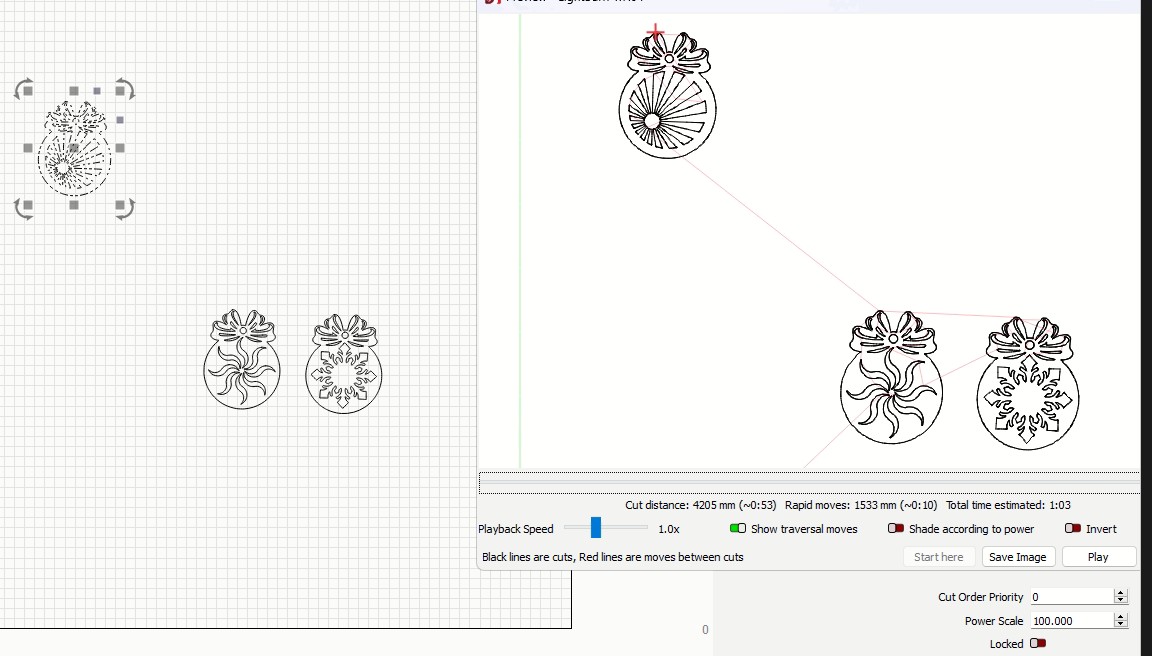
When I try to select a single object to use Frame or Preview, LightBurn behaves as if the whole page is selected: Frame and Preview show all three designs on the sheet and the traversal moves between them. The objects are not grouped.
What I’ve already checked:
Objects appear separate on the canvas (not grouped).
I tried clicking directly (not click-drag) to select a single object.
I looked at Layers and it seems the three designs are on the same layer.
Can anyone suggest what else I should check or how to force Frame/Preview to use only the currently selected object?
In the Laser window, enable the ‘Cut Selected Graphics’ switch. That should limit the preview and the production to only the selected parts of the art.
There is at least one group in the group in your selection, indicated by the mixed dots and dashes when it’s selected. I don’t think there’s an issue with this.
You’re welcome to post your file to share it here or send it to me privately if you’d like another set of eyes on it.