I am trying to tighten up my tabs & slots in some boxes that I’m making, but when I double-click on the layer, I get the Cut Settings Editor window, but under the “Common” tab, there is no Kerf Offset adjustment that shows up. I’m running Lightburn 2.1.04, so as of today the software is up to date. How do I get the Kerf Offset to show up in the Cut Settings Editor? Or is there someplace else in the software that I should be looking for the Kerf Offset?
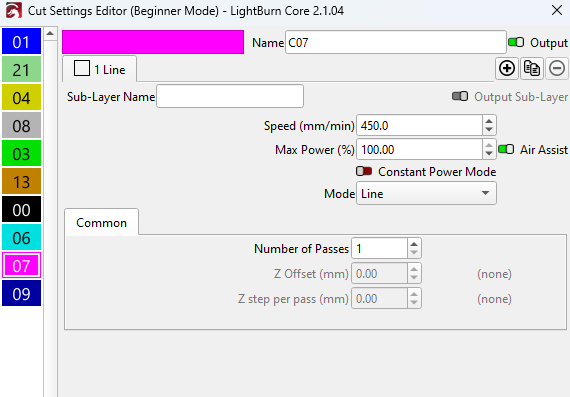
At the very top of your image it says Beginner Mode. Edit, Settings, turn it off.
Very helpful, thank you, Sir!