Yesterday I had a question. “How to increase jog speed”
What I discovered as follows
click edit
go to machine setting
double click on the outputs bar This will open up this page. you will get a warning but click yes
there will be commands for X Y Z A
Example X max rate (mm/min) ($110) 1000.000
X acceleration (min/sec ^2) ($120) 100
What I did was changed the max rate from 1000 to 90.000
Acceleration from 100 to 350
I did the same for the Y axis. I can now control the speed of my laser on the layer page
hope this helps someone I’m not sure if it will hurt a motor or not if anyone knows it will be great to hear from you
This is actually not a good idea to change these values without knowledge of the background 
Yes, you can change speeds here, but these are not related to jog speed (only indirect). The max rates and acceleration values are hardware-dependent values that should be set according to the specifications and physical limits of the machine.
It might be the case that you had wrong settings set there or the manufacturer choose very conservative values.
Usually, a diode laser mechanic can easily use speeds up to 6000 mm/min, newer and well tuned machines will reach 10,000-36,000 (the latter is usually only advertisement and not true in reality).
Accelerations reach from 500-2,000 mm/s². So as long as you stay in those ranges, just test how fast your machine can run, and change the speeds accordingly.
3 Likes
I very much agree with @misken about this is not the place to change these and no one should do this for this purpose.
Acceleration is usually mm/s^2, this is how quick it can get the head up to speed. Many of these are set very conservatively, to ensure they operate under bad conditions.
Changed the speed limits your machine from 1000mm/m (16mm/s) to a maximum speed of 90mm/m (1.5mm/s) so 90mm/m is the fastest the machine will engrave.
Seems like you would have visually noticed the speed limitation in operation ?

good to hear from you Melvin I’d hoped you would let me know if I was on the right track.
I did bring the acceleration back to 100 and the mm to 6000. I can control the speed of the laser in the layer box. Jack did say to to change 1000mm/m to 16mm/s can I type that in? Is there anything else I should know.
The way to increase jog speed is to set the “speed” in the move window.
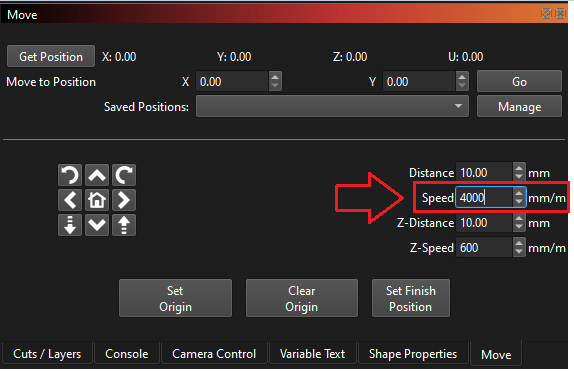
Unless you are referring to the white space scanning speed?
Unless the “.” in your country is the “,” in the USA, You went backwards. Otherwise, you set the machine to 90,000mm/m (30+ MPH) which is a speed impossible to obtain on your laser.
this is right. What are the machine setting in your out put and below that there is a acceleration settings these two settings are very important
If your unsure where to find them let me know
What I have learned is to set the acceleration at 100 and mm/m to 6000 then the box your showing here is the control for jogging
I did calm it down to 6000mm/m I wont say 30 MPH but it was crazy fast I made a drawing of a circle about 18 inches across and it would make a pass in I would say half a second. Set at 6000mm/m my laser moves fairly quick i use it to cut 3D puzzles i haven’t tried laser engraving yet
1 Like
This topic was automatically closed 30 days after the last reply. New replies are no longer allowed.