When I import a pdf or svg, designed in AI, the design gets changed. The punching holes for my leather change into a line instead of a cirkel of holes. I have tried svg, pdf, all the same. When I first look at it in Acrobat reader, it looks correct.
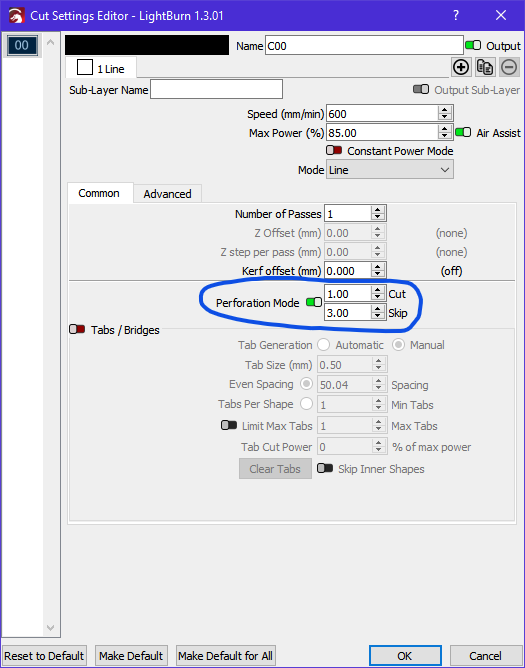
I don’t think the linetype information is used by LightBurn but there is a way around it. If you make your stitch lines in AI a different colour, LB will put them on a different layer to the other vectors. You can then set the ‘Perforation Mode’ to on.
Hope this helps.
Thanks for thinking with me. The strange thing is that in a big design with different parts, some of them get transferred correct, and some have that line. But I can’t find what that difference is. I don’t have experience with Illustrator. I try to get a pre- designed pattern ready for Lightburn.
No, I’m not familiar with Illustrator either so I can’t help very much with that side of things. Could you attach a couple of your designs (one which works ok and one which doesn’t) in PDF, SVG or AI for me to have a look at?
In case you’re not aware, the forum is very restrictive when it comes to the file types it allows you to attach. To get around this you can append a .txt file extension to your file. The forum will then allow you to attach it.
Hi Marcus. I got in contact with the designer, and she knew what was happening. In Illustrator, when you make changes, before exporting the file, you need to select “Expand Appearance”. Effects that haven’t been expanded look weird in other software. It is solved. Thanks for trying to help Marcus !
No problem, I’m glad you got it sorted 
This topic was automatically closed 30 days after the last reply. New replies are no longer allowed.