after performing “calibrate camera lens” and “calibrate camera alignment” I’ve to adjust width and height by hefty -25% in camera control settings in order to align sizes of the shown and the real thing. Wouldn’t be a problem, but now the camera captures only a fraction of the working area.
Any hints to resolve that?
Zap! By bad. The alignment indeed is dependend of the distance between camera and object. This explains the phenomen, thanks. The problem however, remains: If the distance from the camera shrinks, the capture shows the real think too large, so the adjustment has to be negative. Intercept theorem, I believe. A side effect of this is, that the capture gets trimmed - effectively depicting only portions of the real workspace.
… on my work computer running the the last one Linux version, it doesn’t have % nor mm , sorry for the confusion, on my “construction and design” computer it has the measurement units you mention and now I’m sitting in front of this updated LB-Macbook.
However, when I use my Mac with the camera and the latest LB version, I don’t experience the errors you mention.
When I calibrate my camera I usually only need to fine-tune X and/or Y a few times and if it gets outside (my) 1mm limit then I start over with lens and camera calibration.
It should be said that I have a height-adjustable table, i.e. the distance from camera to material surface/focus does not change here. If I forget to focus, let’s say from 3mm to 5mm I can clearly see the difference in accuracy but only in a few mm area.
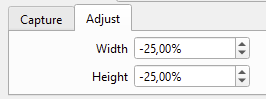
 , sorry for the confusion, on my “construction and design” computer it has the measurement units you mention and now I’m sitting in front of this updated LB-Macbook.