I have searched previous posts here with no luck. I am trying to add my 50 watt JPT fiber laser to the currently running version of lightburn on my laptop. Not from a new install of lightburn but from version 1.7.08 currently running on my Windows 11 laptop.
JPT laser works in Ezacad2 but is not found in Lightburn or device manager. Any help would be greatly appreciated. Thanks!
My lightburn/help doesn’t specifically say I have the Pro version but it does say “Device types enabled: GCode, DSP, Galvo”…
I have seen this video you suggested. I don’t have the exact files in Device Manager as it does in the video. I’m so scared to try this in fear of screwing up existing version of lightburn to my 2 CO2 machines.
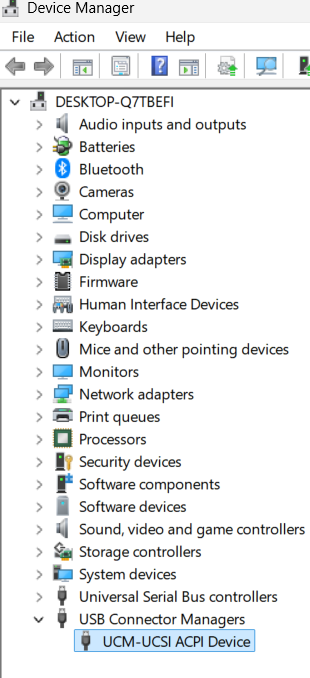
This is what my Device Manager looks like. I am not connected with a USB cable to any machine. Does this look normal? Do I remove the highlighted UCM device?
I don’t know if you install Lightburn without the pro license, if it propagates to older installations without any issues. From my understanding, Lightburn only checks during installation. If you had a previous version without the pro enabled, maybe it operates differently. Only the Lightburn people can answer that.
When you go to manually install are their galvo machines in your listing to pick from? I’ve always had to do this using the manual installation, it never seems to detect my laser.
If there is not galvo machines listed, it may think you don’t have a license.
To use a JCZ or Ruida, you need the pro version. What version are you using?
I have the Pro version. I found a Lightburn help file on installing the galvo driver manually if I didn’t check the box to install it from the get go. Which is what I did. Did not check the box to install galvo driver on initial install of lightburn
Going to try that later today. Hopefully that fixes the issue. Nothing shows up at this point when I run “find my laser”…



 Installed the driver manually, ran Find My Laser and all is good..