I am generating various designs in FreeCad (I wrote a workbench to create various parametric tool holders for our French Cleat system). The flattened versions are then exported as a dxf file and imported into Lightburn.
They then cut just fine, so far so good.
But it would be good to have some sort of automated nesting to optimize material use, at which point I discovered the integration of Lightburn with svgnest, great!
Except it doesn’t work.
It turns out that rather than seeing the outlines as whole shapes, svgnest is seeing them as a bunch if indivdual shapes, one per line, and trying to nest those, which just results a dark blob in one corner of the material.
So what I need, somewhere between the image I see on FreeCad and hitting the svgnest “Start Nesting” button, is a way to have those shapes be recognized as complete shapes rather than a whole bunch of edges.
Perhaps there is a setting I have missed, or a tool that will do the job?
Do you have connected shapes in LB? If not, select all of your shapes and Auto-Join Selected Shapes.
I’m no expert on nesting… but I’ve used it successfully a few times.
Conditions for successful nesting:
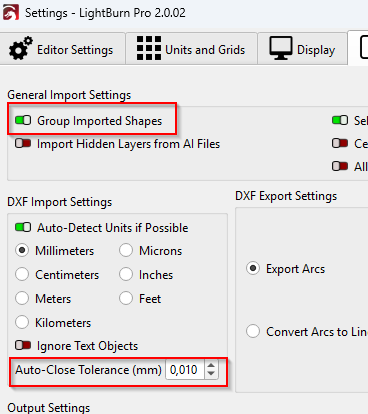
- All shapes are closed (and only then can they be recognized as individual parts)
- All elements are ungrouped
I don’t know if these are all the requirements, but it worked for me.
To ensure my object(s) is a closed loop, I use the Fill mode on the object. When there are no gaps, it will fill, and not before.
Sometimes, I have to use Close Selected Paths With Tolerance instead. In other words, try the various choices with Fill turned on. Then turn it off when done.
This video is also super helpful for manual node editing pro tips: https://www.youtube.com/watch?v=eFmLKBr5Xxg
Alternatively, selecting all your geometry and going to ‘Edit > Auto Join Selected Shapes’ may work for you.
This topic was automatically closed 30 days after the last reply. New replies are no longer allowed.