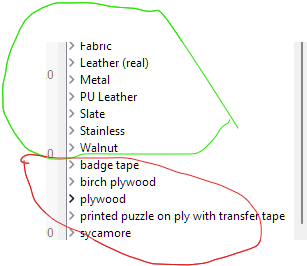
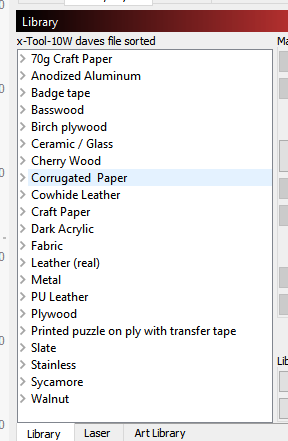
I’ve got an Xtool D1 10w, so loaded an Xtool 10W specific library I found from Louisiana Hobby Guy’s portal. Since then I’ve added some ‘specific to me’ materials to that list and notice that they are all being added to the end of the library in alphabetic order, but starting at the end of the original loaded file. Hopefully the attached screenshot helps - green is the original loaded library (all in alphabetic order) , the red ones are the materials I’ve added (also in alphabetic order).
Is there a way to tell the library file to sort everything into one A-Z set? If not within Lightburn, is there an external app that would do it without breaking the syntax?
Thanks for the info - its been some years since I delved into XML formats and its late here in the UK but I had a go…
After looking at your links and some more googling, I tried a few online tools but couldn’t get the sorted output to be any different from the starting version. I then downloaded XMLNotepad https://microsoft.github.io/XmlNotepad/
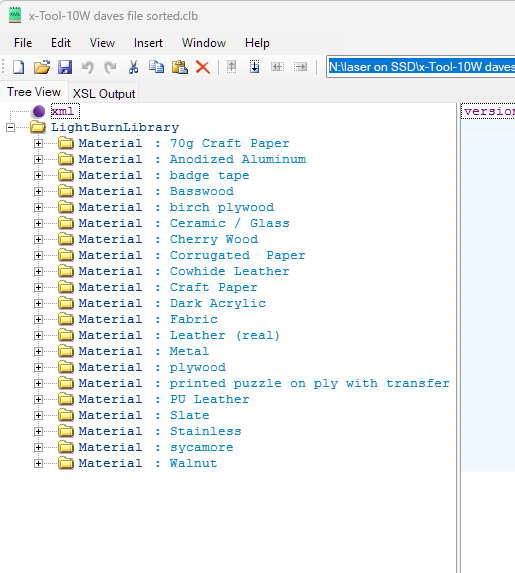
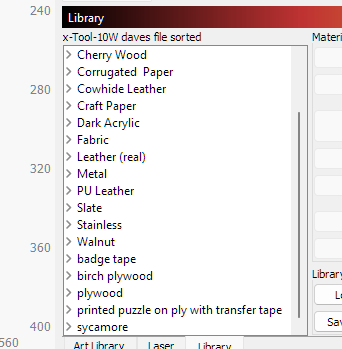
That will open the .CLB file and display it in tree view and let me manually ‘nudge’ the materials into the tree order I wanted…see screenshot. If I look at the ‘XSL Output’ it shows the file structure matches the new tree view, but if I save it and load it into lightburn it still shows my added materials at the end of the list. I have closed LB and XMLNotepad and reimported the updated sorted.clb into XMLNotepad and it retains the order as per the screenshot, so the file appears to have been modified as expected…Its too late for me to work out why LB still manages to keep the order as it was -unless it is using some parameter creation timestamp???
I hate XML. It is a bloated data file. If I was working on this, I would look for some parameter that repeats in the LB records. Then look for that parameter not appearing in your added records. Then the LB parameter can be added to the added records. If I lost you on this, make a backup copy, add TXT as a file extension, and upload it here. I will see if I can help.
Thanks Mikey - I agree with you! I’ve renamed the file .txt and checked that in notepad the order is as I had arranged it (i.e. walnut is last). However, if I load into lightburn it still puts all my additions after walnut. I cannot see any obvious reason in the text file for this to happen.
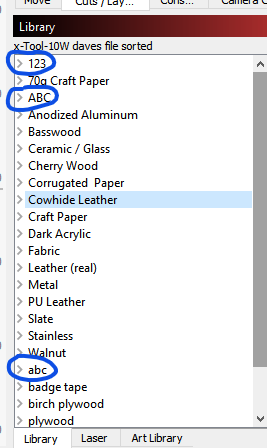
It looked to me as if LB is sorting the entries alphanumerically when it loads the material library. I tested this theory by adding some entries:
As you can see, my new numeric entry appears at the top, the upper case entry appears further down and the lower case one is still further down.
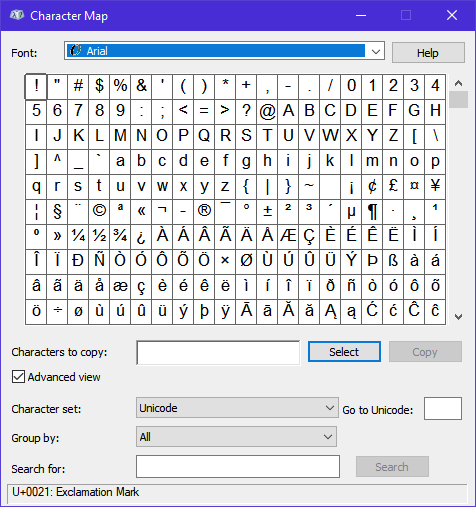
If you look at an ASCII table (or something like Windows Character Map) you’ll see numbers come before upper case and then comes lower case. If you want it to be alphabetical just make sure your entries use the same convention.
Thanks, there really wasn’t much figuring out though . As soon as I saw your library I suspected it was sorted alphanumerically. I guess it helps if you’ve been around computers for over 40 years, and all of those years coding in some form or another.
If you could mark my answer as the solution that will help others with a similar issue.
Well, yes that’s one possible way they could’ve done it, it’s up to whoever coded it. They either explicitly sort the entries after loading the XML file or they’re using a tree list that automatically sorts. As soon as I saw numbers followed by upper case followed by lower case I made the assumption that it was alphanumeric and performed a quick test to confirm. Anyway, I’m glad we found a solution for your question.


 . As soon as I saw your library I suspected it was sorted alphanumerically. I guess it helps if you’ve been around computers for over 40 years, and all of those years coding in some form or another.