Hello,
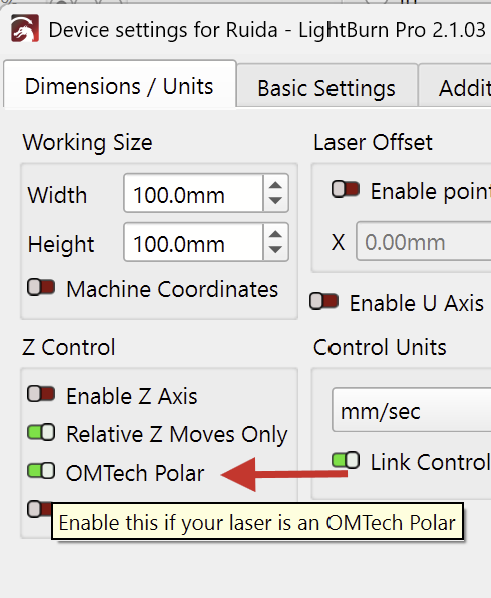
I’d like to report an issue with LightBurn 2.1.01 using an OMTech Polar CO2 50W connected on Mac.
After updating to version 2.1.01, when I send/start a job from LightBurn, the laser goes into an error state: the indicator light turns red, and in some cases it seems to start a different/previous job instead of the one I just sent.
I also tested the latest beta version, and the same issue occurs there as well.
At first I checked the water level, water flow, air bubbles in the cooling circuit, and safety sensors, but the issue does not appear to be hardware-related. After downgrading to a previous stable version of LightBurn, the laser started working correctly again.
I also have another Mac where LightBurn has not been updated, and the laser works normally on that machine.
So the issue seems to be related to LightBurn 2.1.01 and the current beta version, or to a compatibility problem introduced with these versions when using the OMTech Polar 50W on macOS.
Could you please check if this is a bug?
I’m available to provide logs, screenshots, videos, or run additional tests if needed.
Thank you.
Details:
Laser: OMTech Polar CO2 50W
Connection: USB and wifi (same issue)
OS: macOS
Problematic versions: LightBurn 2.1.01 and latest beta
Previous stable version: working correctly
Symptom: red indicator light when starting a job / possible previous job starting instead
Same laser works correctly from another Mac that has not been updated.
When you connect to it with LightBurn, can you tell me what device is reported at the bottom of the screen? It should say Found xxxxxx. I can’t recall which specific controller the Polar uses.
The problem is that the Laser doesn’t start and the red light stays on as if it were in error, it ruins the project, if I then open that project on another Mac it also ruins that version of LB until I remove all the preferences, reinstall LB and start the whole project from scratch.
It’s definitely a software problem because it shows up on all Macs where I open a project with version 2.1.03
@pepsimen I’ve moved your post in this thread and reopened it.
I see you’ve dealt with this problem for a while now. You wrote such a beautiful, detailed report, but it somehow got lost in the shuffle. I’d be happy to take care of it.
The red light indicator on the Polar can mean different things. It’s good to know that you’ve already checked and confirmed the hardware side (water level and so on) isn’t the issue.
Still a hardware issue (Falsely trigering a water alarm)
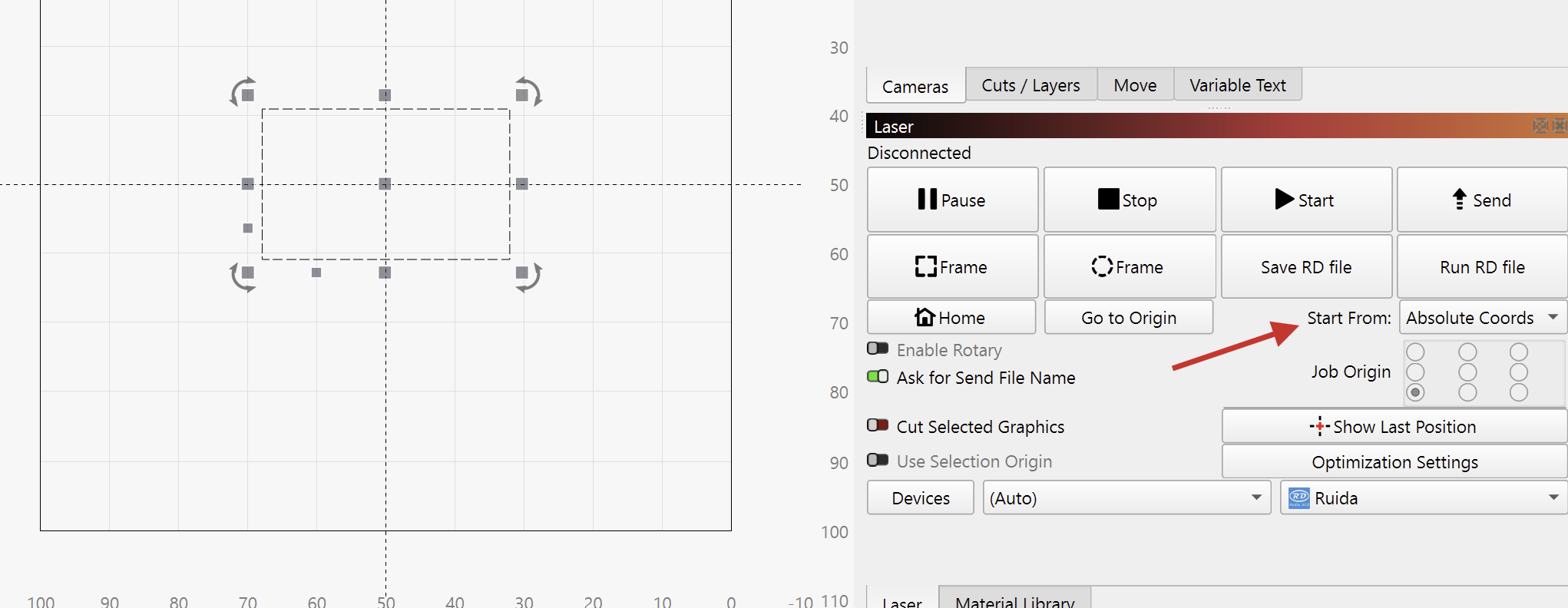
“Send” and “Start” transfer files to the controller differently. Does the red light show when using both these options?
To rule out an out of bounds warning as the cause, try to “Send” a simple rectangle to the laser.
Place the rectangle in the middle of the workarea and select “Absolute Coordinates” as the Start From value:
I never used a Polar, but pressing the button on top should start the last received job.
Some Polars have a display that show more infos why the indicator light turned red.
Which exact model do you have?
It should not be necessary to remove all the preferences, or reinstall. If your settings have changed for some reason, you can restore them from an automatically created Prefs Backup
Please let us know how it goes. I’m eager to hear what the solution to this is.
I’ve already tried to put the preferences back from the backup but it keeps giving the same problem.
To solve it I had to delete the preference folder from the Mac user library, I reinstalled everything and reloaded the preferences package that I had backed up before the problem. I recreated the project from scratch (because the saved one reported the same problem) And everything is working again.
I’ll do some more tests from the other Mac before reinstalling everything and I’ll give you more details.