La Sculpfun S9 hace mucho más grandes los trabajos

Hola buenas tardes, me podrían ayudar?, tengo una S9 nueva, en soporte me dijeron que instalará el drive CH340G el cual no existe, hay CH341SER.exe que se supone es compatible, lo instale, abrí lightburn y la reconoció, le pido que enmarcar y lo hace bien, pero cuando le doy play, hace un diseño por mucho más grande y muy tenue, lo que tengo, el diseño mide 4x2 Cms. Y hace algo de más de 10 x 20 Cms. Obvio detengo la máquina sin dejarla terminar…
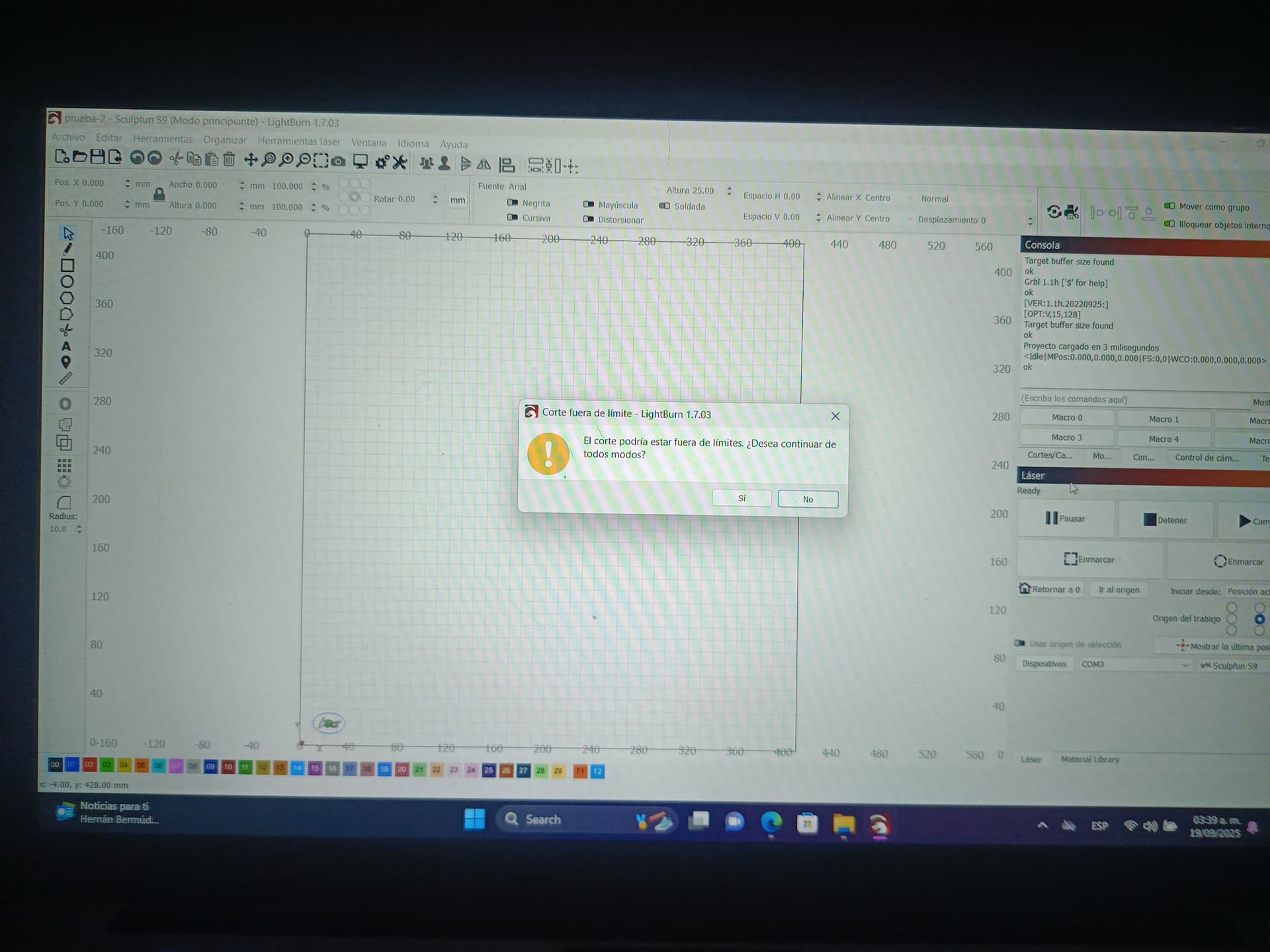
Después me dijeron que inabilitara “Out of bounds” warning y sigue haciendo lo mismo…
Tengo el firmware no hecho nada con el, no sé cómo instalarlo o si sirva de algo…

Ya instale y desinstale driver y programas varias veces y nada más no hace el diseño bien…

Todo esto fue en una laptop con Windows 11, Lightburn y una Sculpfun s9.

De antemano muchas gracias:. :. :.


If the measurement is 4mm and results in approximately 10mm, I’d say the dimensions are being converted from mm to inches somewhere.
It’s important to understand where.
It might have something to do with the $13 parameter, but I’m not sure.
In the “Console” window, type $$ and press enter.
Select everything and copy it here so everyone can verify it.

1 Like

After my previous suggestion I found that 2 goes into 20. Is that true? If so, how does the work appear in “Preview”?

Hello, good afternoon. Could you help me? I have a new S9. Support told me it would install the CH340G driver, which doesn’t exist. There’s CH341SER.exe, which is supposed to be compatible. I installed it, opened Lightburn, and it recognized it. I asked it to frame, and it did so correctly. But when I hit play, it creates a much larger and very faint design. What I have is a 4x2 cm design, and it’s a bit larger than 10x20 cm. Obviously, I stopped the machine without letting it finish…
Then they told me to disable the “Out of bounds” warning, and it keeps doing the same thing…
I haven’t done anything with the firmware, and I don’t know how to install it or if it’ll help at all…

I’ve already installed and uninstalled the driver and other programs several times, and it just doesn’t render the design correctly…

All of this was on a laptop with Windows 11, Lightburn, and a Sculpfun S9.

Thank you very much in advance:

Please upload the Lightburn (.lbrn2) file so we can examine your settings. I see 3 issues here:

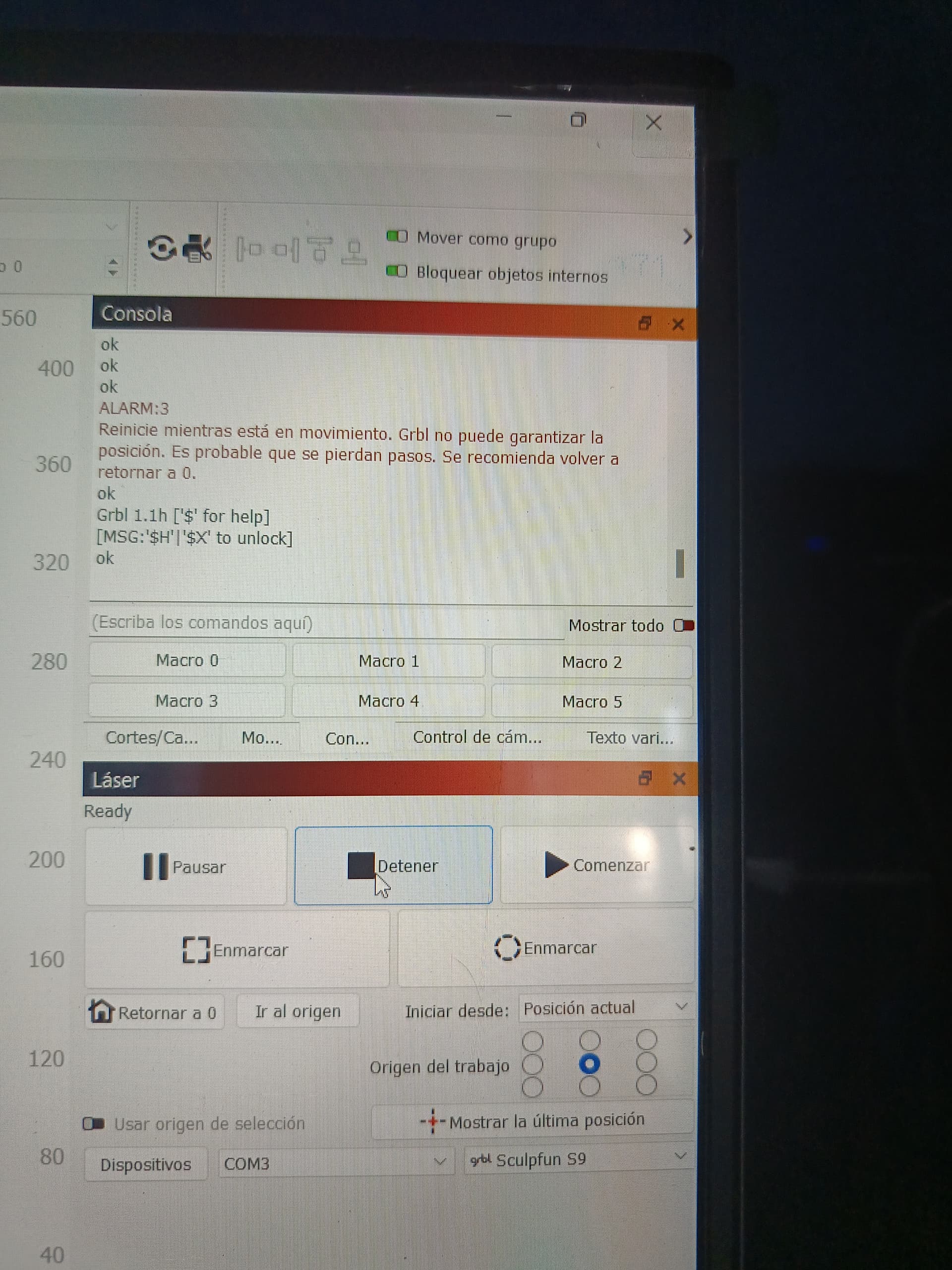
  1. You are getting an Out of Bounds message (Alarm 3).
  2. Your output is much larger than the design indicates.
  3. You reported your output rotated by 90 degrees compared to the design. This is why it did not make sense to @Kuth when he looked at the measurements.

He asked for the GRBL parameters. To do this, Open the Console window and right-click so you can Clear Console. Then enter $$ in the box below the window. Copy that text and paste it in a Reply along with the Lightburn file mentioned above.

2 Likes

Hi good day, this is what appears in that window:
thanks for your help

Esperando conexión…

ok

[VER:1.1h.20220925:]

[OPT:V,15,128]

Target buffer size found

ok

<Idle|MPos:0.000,0.000,0.000|FS:0,0|WCO:0.000,0.000,0.000>

ok

Comenzando transmisión

Transmisión completada en 0:01

<Idle|MPos:0.000,0.000,0.000|FS:0,0|WCO:0.000,0.000,0.000>

ok

Comenzando transmisión

Transmisión completada en 0:01

<Idle|MPos:0.000,0.000,0.000|FS:0,0|WCO:0.000,0.000,0.000>

ok

Comenzando transmisión

Transmisión completada en 0:02

<Idle|MPos:5.003,-4.994,0.000|FS:0,0|WCO:0.000,0.000,0.000>

ok

Comenzando transmisión

Transmisión completada en 0:01

<Idle|MPos:5.003,-4.994,0.000|FS:0,0|WCO:0.000,0.000,0.000>

ok

Comenzando transmisión

Transmisión completada en 0:02

<Idle|MPos:10.006,-10.001,0.000|FS:0,0|WCO:0.000,0.000,0.000>

ok

Comenzando transmisión

Transmisión completada en 0:02

<Idle|MPos:14.996,-14.995,0.000|FS:0,0|WCO:0.000,0.000,0.000>

ok

Comenzando transmisión

Transmisión completada en 0:01

Esperando conexión…

ok

[VER:1.1h.20220925:]

[OPT:V,15,128]

Target buffer size found

ok

<Idle|MPos:14.996,-14.995,0.000|FS:0,0|WCO:0.000,0.000,0.000>

ok

Comenzando transmisión

Transmisión completada en 0:01

Comenzando transmisión

Layer C00 Pass 1 of 5

El trabajo se detuvo

Transmisión completada en 0:12

ALARM:3

Reinicie mientras está en movimiento. Grbl no puede garantizar la posición. Es probable que se pierdan pasos. Se recomienda volver a retornar a 0.

ok

Grbl 1.1h [‘$’ for help]

[MSG:‘$H’|‘$X’ to unlock]

ok

Comenzando transmisión

Transmisión completada en 0:00

Comenzando transmisión

Transmisión completada en 0:00

Comenzando transmisión

Transmisión completada en 0:00

<Idle|MPos:1.001,0.999,0.000|FS:0,0|WCO:0.000,0.000,0.000>

ok

Comenzando transmisión

Transmisión completada en 0:01

<Idle|MPos:1.001,0.999,0.000|FS:0,0|Ov:100,100,100>

ok

Comenzando transmisión

Transmisión completada en 0:02

Comenzando transmisión

Layer C00 Pass 1 of 5

El trabajo se detuvo

Transmisión completada en 0:07

ok

ok

ok

ok

ALARM:3

Reinicie mientras está en movimiento. Grbl no puede garantizar la posición. Es probable que se pierdan pasos. Se recomienda volver a retornar a 0.

Grbl 1.1h [‘$’ for help]

[MSG:‘$H’|‘$X’ to unlock]

ok

Comenzando transmisión

Layer C00 Pass 1 of 5

El trabajo se detuvo

Transmisión completada en 0:08

ok

ok

ok

ok

ok

ALARM:3

Reinicie mientras está en movimiento. Grbl no puede garantizar la posición. Es probable que se pierdan pasos. Se recomienda volver a retornar a 0.

ok

Grbl 1.1h [‘$’ for help]

[MSG:‘$H’|‘$X’ to unlock]

ok

Comenzando transmisión

Transmisión completada en 0:00

<Idle|MPos:1.001,0.999,0.000|FS:0,0|WCO:0.000,0.000,0.000>

ok

Comenzando transmisión

Transmisión completada en 0:01

<Idle|MPos:1.001,0.999,0.000|FS:0,0|Ov:100,100,100>

ok

Comenzando transmisión

Transmisión completada en 0:02

Comenzando transmisión

Layer C00 Pass 1 of 5

El trabajo se detuvo

Transmisión completada en 0:08

ok

ok

ok

ok

ok

ALARM:3

Reinicie mientras está en movimiento. Grbl no puede garantizar la posición. Es probable que se pierdan pasos. Se recomienda volver a retornar a 0.

Comenzando transmisión

Transmisión completada en 0:11

ok

Grbl 1.1h [‘$’ for help]

[MSG:‘$H’|‘$X’ to unlock]

error:9

G-Code bloqueado durante el estado de alarma o desplazamiento.

ok

Comenzando transmisión

Transmisión completada en 0:00

<Idle|MPos:1.001,0.999,0.000|FS:0,0|WCO:0.000,0.000,0.000>

ok

Comenzando transmisión

Transmisión completada en 0:01

<Idle|MPos:1.001,0.999,0.000|FS:0,0|Ov:100,100,100>

ok

Comenzando transmisión

Transmisión completada en 0:02

<Idle|MPos:6.004,-3.995,0.000|FS:0,0|Ov:100,100,100>

ok

Comenzando transmisión

Transmisión completada en 0:01

<Idle|MPos:6.004,-3.995,0.000|FS:0,0|Ov:100,100,100>

ok

Comenzando transmisión

Transmisión completada en 0:02

Comenzando transmisión

Layer C00 Pass 1 of 5

El trabajo se detuvo

Transmisión completada en 0:06

ALARM:3

Reinicie mientras está en movimiento. Grbl no puede garantizar la posición. Es probable que se pierdan pasos. Se recomienda volver a retornar a 0.

ok

Grbl 1.1h [‘$’ for help]

[MSG:‘$H’|‘$X’ to unlock]

ok

Comenzando transmisión

Transmisión completada en 0:00

<Idle|MPos:1.001,0.999,0.000|FS:0,0|WCO:0.000,0.000,0.000>

ok

Comenzando transmisión

Transmisión completada en 0:01

<Idle|MPos:1.001,0.999,0.000|FS:0,0|Ov:100,100,100>

ok

Comenzando transmisión

Transmisión completada en 0:02

Comenzando transmisión

Layer C00 Pass 1 of 5

El trabajo se detuvo

Transmisión completada en 0:09

ALARM:3

Reinicie mientras está en movimiento. Grbl no puede garantizar la posición. Es probable que se pierdan pasos. Se recomienda volver a retornar a 0.

ok

Grbl 1.1h [‘$’ for help]

[MSG:‘$H’|‘$X’ to unlock]

ok

Comenzando transmisión

Transmisión completada en 0:00

<Idle|MPos:1.001,0.999,0.000|FS:0,0|WCO:0.000,0.000,0.000>

ok

Comenzando transmisión

Transmisión completada en 0:01

<Idle|MPos:1.001,0.999,0.000|FS:0,0|Ov:100,100,100>

ok

Comenzando transmisión

Transmisión completada en 0:02

Comenzando transmisión

Layer C00 Pass 1 of 5

El trabajo se detuvo

Transmisión completada en 0:13

ok

ALARM:3

Reinicie mientras está en movimiento. Grbl no puede garantizar la posición. Es probable que se pierdan pasos. Se recomienda volver a retornar a 0.

ok

Grbl 1.1h [‘$’ for help]

[MSG:‘$H’|‘$X’ to unlock]

ok

Comenzando transmisión

Transmisión completada en 0:00

$0=10

$1=25

$2=0

$3=4

$4=0

$5=1

$6=0

$10=1

$11=0.010

$12=0.002

$13=0

$20=0

$21=0

$22=1

$23=7

$24=100.000

$25=8000.000

$26=250.000

$27=1.000

$30=1000.000

$31=0.000

$32=1

$100=79.952

$101=78.095

$102=250.000

$103=100.000

$104=100.000

$105=100.000

$110=6000.000

$111=6000.000

$112=1000.000

$113=1000.000

$114=1000.000

$115=1000.000

$120=1000.000

$121=1000.000

$122=1000.000

$123=200.000

$124=200.000

$125=200.000

$130=400.000

$131=410.000

$132=200.000

$133=300.000

$134=300.000

$135=300.000

ok
$0=10

$1=25

$2=0

$3=4

$4=0

$5=1

$6=0

$10=1

$11=0.010

$12=0.002

$13=0

$20=0

$21=0

$22=1

$23=7

$24=100.000

$25=8000.000

$26=250.000

$27=1.000

$30=1000.000

$31=0.000

$32=1

$100=79.952

$101=78.095

$102=250.000

$103=100.000

$104=100.000

$105=100.000

$110=6000.000

$111=6000.000

$112=1000.000

$113=1000.000

$114=1000.000

$115=1000.000

$120=1000.000

$121=1000.000

$122=1000.000

$123=200.000

$124=200.000

$125=200.000

$130=400.000

$131=410.000

$132=200.000

$133=300.000

$134=300.000

$135=300.000

ok
<Idle|MPos:1.001,0.999,0.000|FS:0,0|WCO:0.000,0.000,0.000>

ok

Comenzando transmisión

Transmisión completada en 0:01

<Idle|MPos:1.001,0.999,0.000|FS:0,0|Ov:100,100,100>

ok

Comenzando transmisión

Transmisión completada en 0:02

Comenzando transmisión

Transmisión completada en 0:00

$$

$0=10

$1=25

$2=0

$3=4

$4=0

$5=1

$6=0

$10=1

$11=0.010

$12=0.002

$13=0

$20=0

$21=0

$22=1

$23=7

$24=100.000

$25=8000.000

$26=250.000

$27=1.000

$30=1000.000

$31=0.000

$32=1

$100=79.952

$101=78.095

$102=250.000

$103=100.000

$104=100.000

$105=100.000

$110=6000.000

$111=6000.000

$112=1000.000

$113=1000.000

$114=1000.000

$115=1000.000

$120=1000.000

$121=1000.000

$122=1000.000

$123=200.000

$124=200.000

$125=200.000

$130=400.000

$131=410.000

$132=200.000

$133=300.000

$134=300.000

$135=300.000

ok

@MikeyH definitely has a lot more gray hairs because of this hobby than I do. :laughing:

So, apparently the $13 parameter is fine (as it is on mine).

If what Mike mentioned is confirmed, would you be willing to share the file in question so it can be analyzed and tested?
I think the best way to understand whether the problem is with the file or the software is to test it on another machine.

This is about 3x too fast. It should not be zooming into the limit switches. A typical value is 2500 or 3000.

To increase reliability during the Pull-off portion of the Home cycle, 2 or 3 would be a better choice here.

Error 9 is an operational error, meaning you tried sending a command before the last one completed.

Alarm 3 can be caused by, in this order of possibility:

  1. Your program is telling the laser to go outside of the physical limits of the machine.
  2. There is a USB cable issue causing a temporary loss of communications.
  3. The power supply is failing and cannot deliver the needed current.

I had the gray before I bought the lasers, so the difference is hardly noticable. :rofl:

Your original complaint was a size issue. We do not see an issue with the GRBL parameters or reported position (<Idle|MPos:1.001,0.999,0.000|FS:0,0|Ov:100,100,100>) that would cause this. Like @Kuth asked, can you upload the .lbrn2 file that is showing the problem? Drag and drop it in your Reply, or use the Upload icon in the Reply box.

1 Like

Only now I realized there is a “then me” missing at the end of my sentence. :wink: :laughing:

1 Like

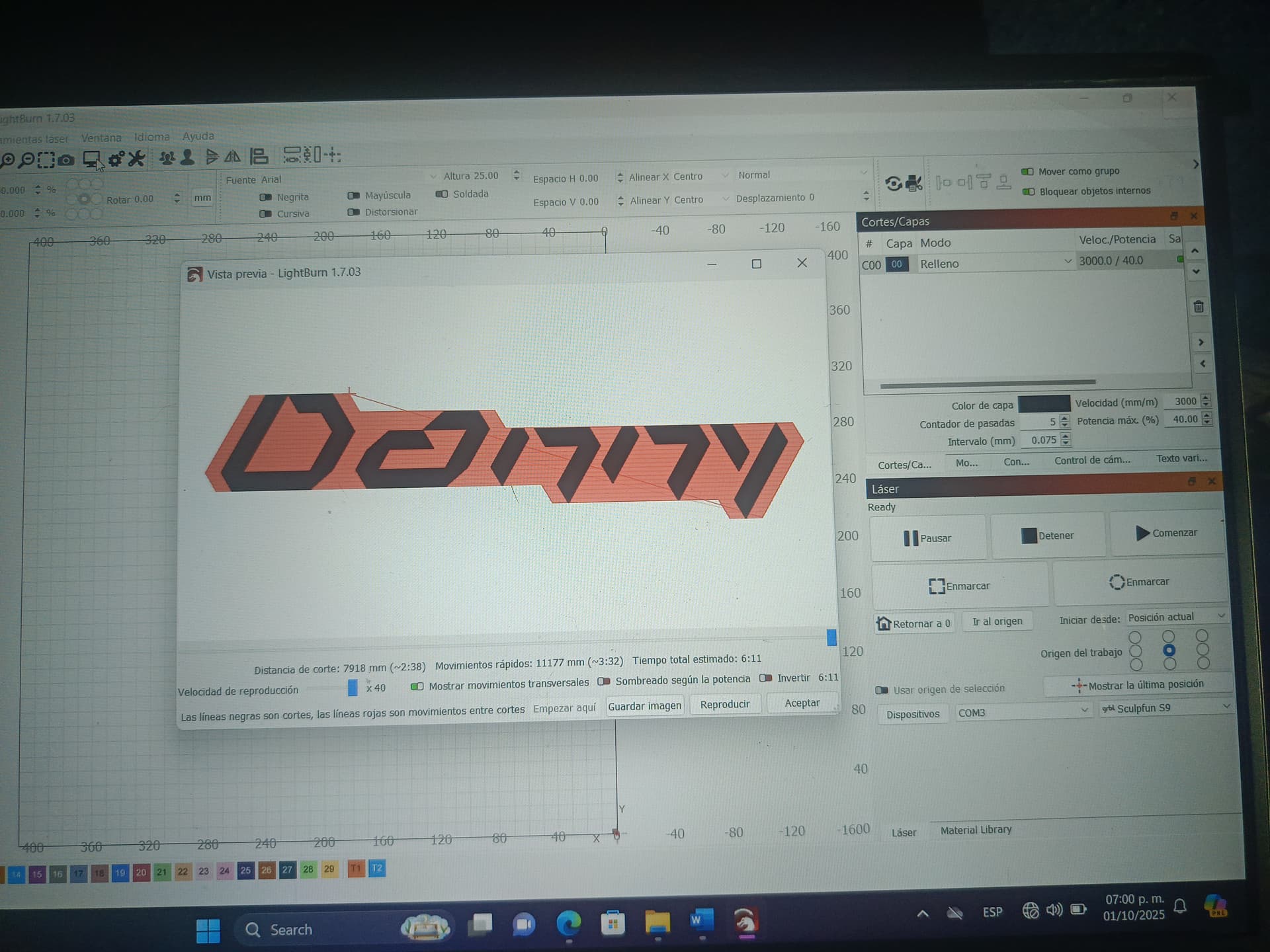
Hello, good day, thank you for your support. The actual size is 4.5 cm x 1 cm. This is just a test. It’s text. It’s being engraved on wood. The speed is set to 45.0 and the power is set to 80. It would take 3 hours and 1 minute, which seems excessive, so I’m stopping it without knowing if the size will increase. If I set the parameters as the manufacturer says, which would be 3000 speed and 40 percent power for wood, the design would take 6 minutes and 11 seconds, but the design is too large… I don’t know if what’s wrong is the controller or the firmware that I haven’t updated and I don’t even know how to do it, or if the machine is defective… What is clear to me is that the parameters are not adequate… What can I do?.. Greetings and I really appreciate your help. :. :.

$0=10

$1=25

$2=0

$3=4

$4=0

$5=1

$6=0

$10=1

$11=0.010

$12=0.002

$13=0

$20=0

$21=0

$22=1

$23=7

$24=100.000

$25=8000.000

$26=250.000

$27=1.000

$30=1000.000

$31=0.000

$32=1

$100=79.952

$101=78.095

$102=250.000

$103=100.000

$104=100.000

$105=100.000

$110=6000.000

$111=6000.000

$112=1000.000

$113=1000.000

$114=1000.000

$115=1000.000

$120=1000.000

$121=1000.000

$122=1000.000

$123=200.000

$124=200.000

$125=200.000

$130=400.000

$131=410.000

$132=200.000

$133=300.000

$134=300.000

$135=300.000

Hi how I can do that… Sorry I am new on this…
And my hair is not white, now is purple…

Just drag and drop in a Reply or use the Upload icon in the Reply box.

I think part of the problem is that you’re inadvertently not paying attention to some details.
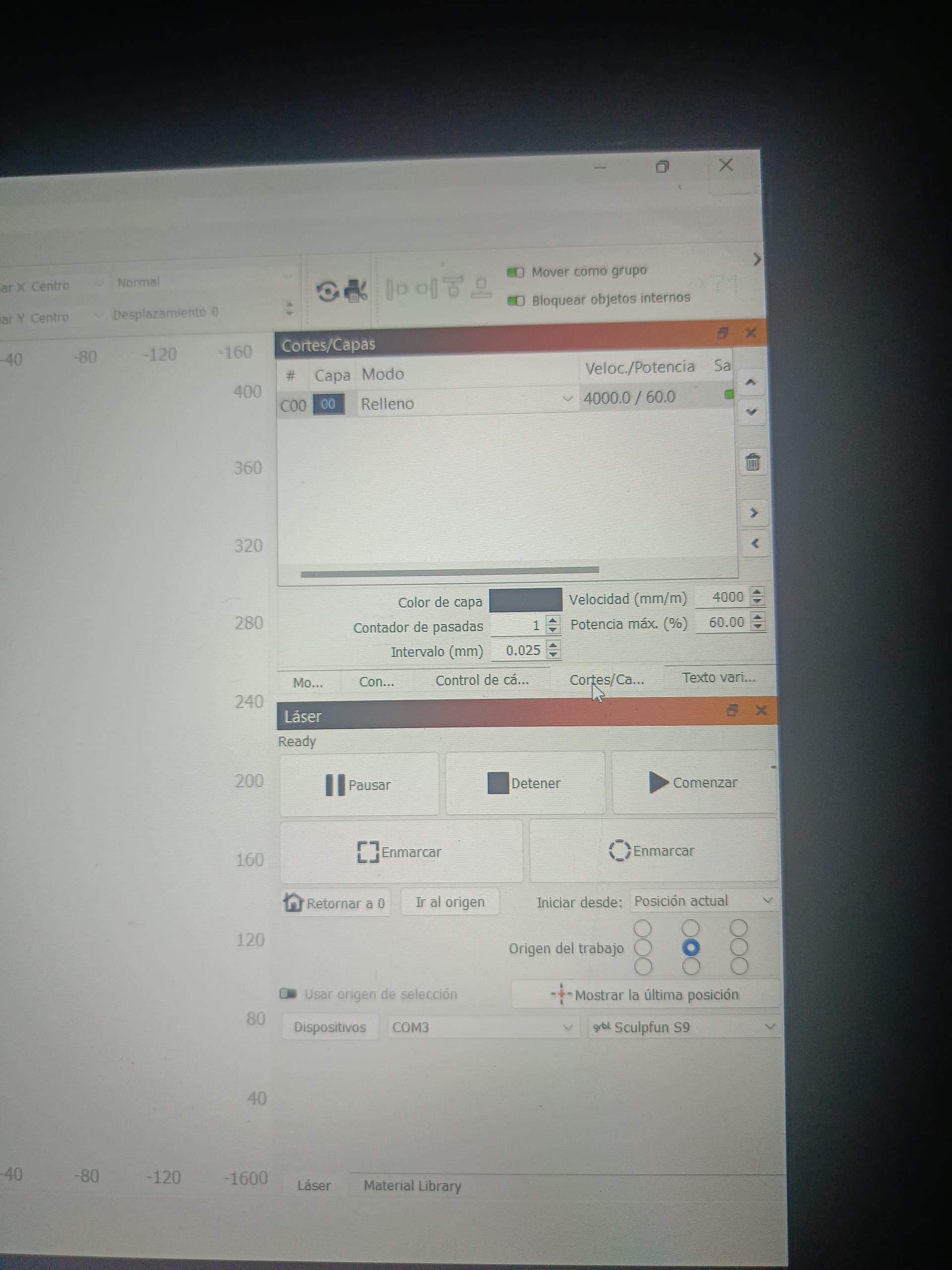
In red is the number of times you’ll repeat the job.
In green is the distance in millimeters that the laser module advances (Y axis) each time it completes a line (X axis).
These factors could be the main causes of the time it takes to complete the job.


Take it slow and try to understand one thing at a time.

Otherwise, when it comes to hair, you’ll end up with a rainbow in your head.

Hello, good day. I changed the parameters just like I saw in a video for engraving wood. The machine continues to do the same thing. The size is much larger. It goes beyond its original size from the start, so I stop the job.

Hi David!
I think I wasn’t clear, and for that I apologize.
The instructions I gave earlier relate to the excessive time, not the dimensions.
I’ll address the dimensions next.

Hi don’t worry, I have my hair purple but I most have to solution this, yes or yes…
Really I don’t know what is the problem, but meave is the driver…

Regarding dimensions.
I would start by drawing a square and checking whether the measurements between the drawing and the result match or differ.
Have you done this test?

The cause will certainly be found. Sometimes it takes longer than desired. :wink:

Hi, yes I did that, but the machine do exactly the same, did a bigger design than the original…
I am now worse than before, I updated the firmware and now it does absolutely nothing, it doesn’t even frame or anything, you only see that in the box that has the S9, a blue light turns on as if sending the signal, I don’t know what to do or if the machine is bad or my PC or what is happening… could you please tell me what I can do? It should be noted that the drive it has is the one you indicated, the ch340… and I downloaded the firmware from your portal… excuse me if I don’t send you a video but it does absolutely nothing…

I read through every posting and nobody suggested updating the firmware. What was your reason for doing it?

By doing this, you wiped out all the machine parameters you needed for proper control of the machine. This now adds a new task of getting your machine running the basic operations. The solution is to restore them from a previous list. FORTUNATELY FOR YOU, there is a list of the GRBL parameters in this thread. You must now check each one and change it, if it does not match what is posted above. When you finish, come back and let us know if the laser is operating again.

Whose portal? @misken is the only other known source of Sculpfun software other than Sculpfun, and he has not posted anything in this thread.

Yes your are right, this was the same mail that I sent to the support… So that’s was a mistake I know… Sorry…
I don’t know what I have to do… That’s true…

Hi I put $$ in the console and doesn’t appear anything…
Could you please tell me, how I can modify that parameters… I remember saw that… I tried to found that but I don’t know where is that…Hi I found how modify the parameters… this i how appears… the question is why i can change that… the console doesn’t show the same parameters, and the name of thats…

$0=10

$1=25

$2=0

$3=0

$4=0

$5=1

$6=0

$10=1

$11=0.010

$12=0.002

$13=0

$20=0

$21=0

$22=0

$23=1

$24=200.000

$25=3000.000

$26=250.000

$27=3.000

$28=1500.000

$30=1000.000

$31=0.000

$32=1

$38=1

$40=1

$100=80.000

$101=80.000

$102=250.000

$103=100.000

$104=100.000

$105=100.000

$110=6000.000

$111=6000.000

$112=1000.000

$113=1000.000

$114=1000.000

$115=1000.000

$120=1000.000

$121=1000.000

$122=1000.000

$123=200.000

$124=200.000

$125=200.000

$130=410.000

$131=400.000

$132=200.000

$133=300.000

$134=300.000

$135=300.000

ok