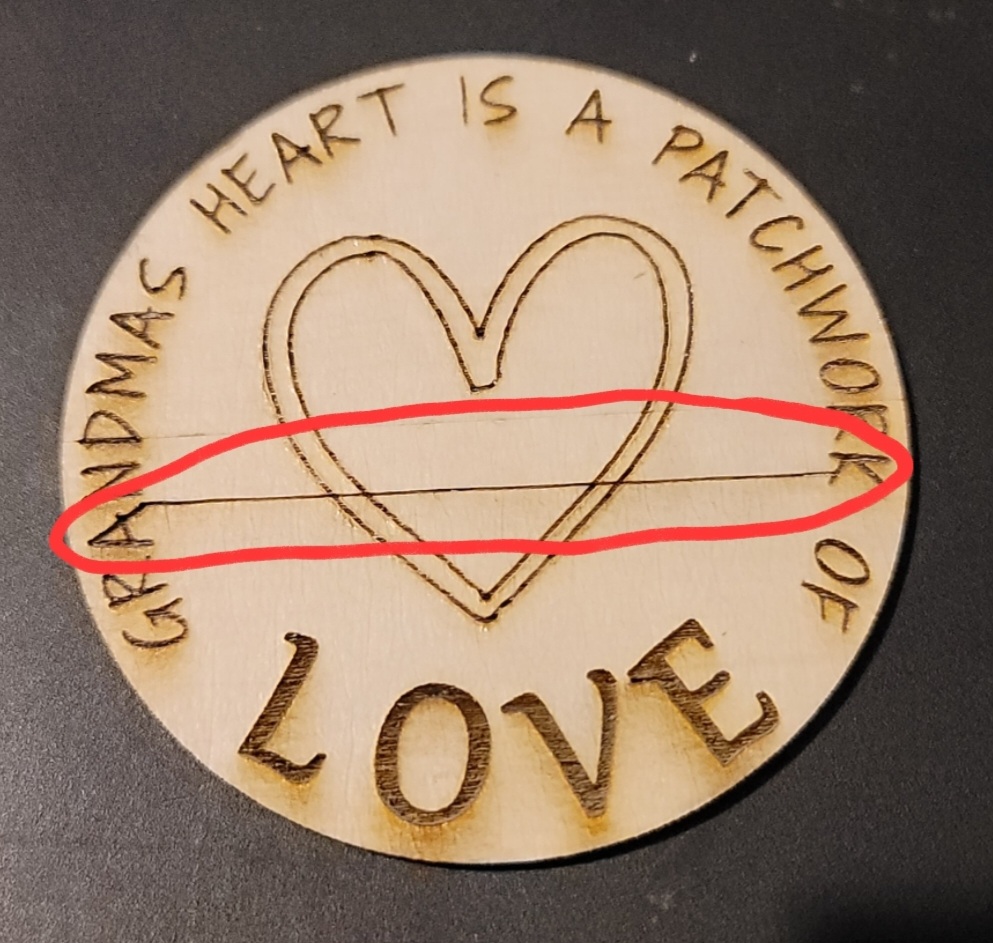
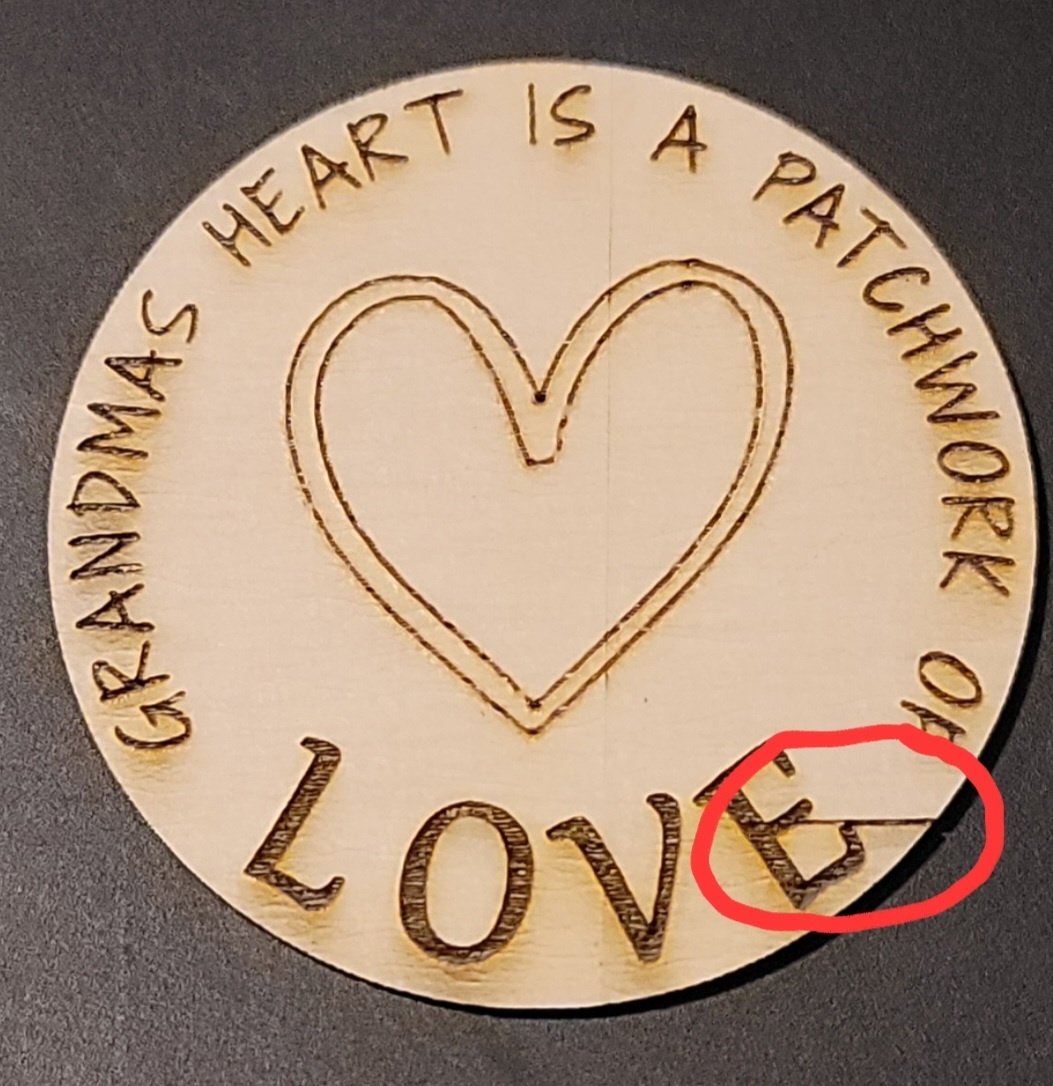
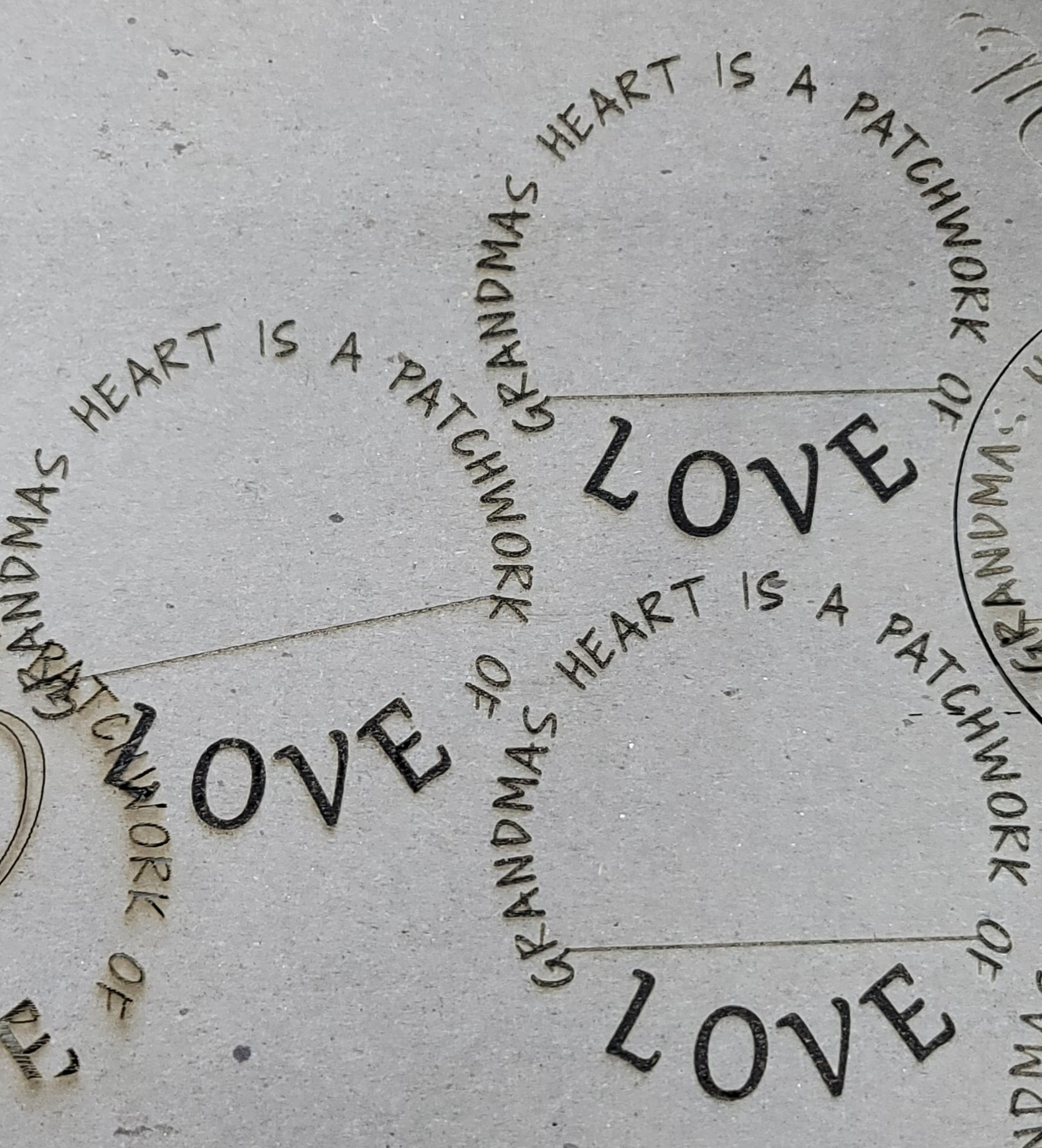
I’m experiencing a new issue I’ve never seen before after laser was idle for a while. Also recently upgraded to Latest version of LB (2.0.05). During engraving laser stays enabled during travel move but not consistent during run. The issue is repeatable when running same image back to back. I can’t find any settings to eliminate it but changing line interval will move the issue to another location. I tried different USB cables including shorter cables. Tried many various engraving settings including angle (0, 10, 45, 90), interval, changed the font, speed, laser power etc. Tried back-revving LB to 1.7, same issue. Two made from wood are during troubleshooting with different settings, other pic on cardboard shows repeated pattern when running file without changes the issue repeats in same place every time. In the past I never had issues like this but haven’t used the laser in a while till now and this issue is driving me nuts. Any ideas?
Changed to cardboard to minimize waste. Two on right are same file/settings ran twice one after the other (copied artwork and pasted), Left is angle changed to 10 degrees. I looked in the Gcode right around line 2200 and all travel moves have “S0” set for disabling laser during travel (see attached Gcode)
I thought about hardware and tried many things to remedy including running from laptop instead of desktop, different USB ports and cables. Could be power supply related but doesn’t seem like a hardware issue due to repeatability. If it was truly random I would agree with a potential hardware failure.
Running various power settings to test. Right now just running on cardboard.
Speed 50mm/sec
Power 12.5 - Constant power mode
No issues cutting that I can find, it only happens with engraving.
As a rule of thumb, if you didn’t change anything and something has changed, it’s not a software problem.
A repeatable failure means you can run the G-Code through a simulator, pause where the problem happens, and check what the power is set to at that point.
If the power is set to zero and the laser is still turned on, then it’s definitely a hardware problem.
A failing power supply or laser head need not cause random problems, because the pattern of operations may be what triggers the problem: the hardware is on the edge of failing and this particular sequence pushes it over the edge every time.
I’ve tried different files and fonts and the same problem will happen at various places but again repeats if I run the same image twice with no changes to the size, or settings. But then yesterday I ran the same engraving that had the issue but doubled it up so the G-code was forced to change and it didn’t exhibit the issue at all. I also looked to see if the problem occured at the same percentage of the run which would lend itself to the power supply or controller getting hot maybe. but this didn’t pan out either as one file will had random line at maybe 40% after 6 minutes of run time and another will occur at 90% after it runs for 12 min. Again I can run that same file immediately again and the extra line will appear in the exact same spot. I really feel that because the problem is so repeatable at the exact same location on specific images that it cant be hardware related. I could at great effort try going back to my old Arduino Mega based controller on GRBL I originally used, but that had its own issues, which is why I upgraded to the Blackbox X32.
Ok, Well I ordered a new power supply as suggested and still having exactly the same issue with a brand new power supply. So since I have eliminated that as an issue I may attempt to try a different controller.
Is there a recommended GRBL based controller to try? I think Openbuilds who made my BlackBox x32 is or has gone out of business so Id like to try another controller that has a lot of options for 4th axis, dual Z, and relays for turning on and off Air, fan, water etc.
It turns out plenty of hardware problems are perfectly repeatable, because the job applies exactly the same motions & power levels every time. As a result, if the hardware only fails under those circumstances, it’ll fail every time they occur.
Have you verified the power level in the G-Code with a simulator to confirm or refute a software problem? If the power level is set correctly (at zero) in the G-Code, then it’s definitely a hardware problem.
I did look through the Gcode in a simulator at the lines around where the issue happens repeatedly. Indeed the power level is zero during those travel moves, So I agree it seems to be hardware, though I don’t know how Lightburn streams to the controller either. Is there a buffer at the controller that lightburn is keeping full? I have tried different USB cables, checked power, and motor cables to and from the controller. I think I’ll try reinstalling my old Arduino Mega Ramps setup I ran with for a while before upgrading to this 32bit controller.
I’m looking at maybe moving to DSP controller (Ruida) maybe that would be more reliable and better for raster engraving? It’s just strange I never had this problem until recently after renewing my LB license and getting the latest update from 1.7 to current. (I did try backreving to 1.7 and see it still, So I tend to agree its hardware somewhere.
FYI when I edit the same file to duplicate the engraving so instead of running one image I double it and run both together (one full image first then move to the other without stopping) the issues changes location but still happens. I would think if a electronic or hardware issue were the cause as you suggest the problem would still happen at the same location when all those conditions are met but it moved to another location. Still I will keep trying hardware fixes for now.
All controllers have a buffer, with sizes ranging from a hundred characters up through kilobytes. Depending on the Transfer Mode, LightBurn sends either a line at a time or as much as will fit in the buffer.
A large-enough buffer can absorb the entire G-Code program at one gulp, after which LightBurn has no further control over what happens. You can check the buffer size in the Console window just after startup or with the $I command:
[OPT:VL,15,128]
The second number gives the buffer size in bytes.
I suspect the buffer in your controller is large enough to hold any test program.
Migrating the settings from old to new often resolves peculiar issues:
IIRC, GRBL-ish controllers do not have a digital output to enable / disable a CO₂ high-voltage power supply through its H or L inputs; Ruida-ish controllers have a L-ON output for that purpose. I assume the H / L inputs on the HV power suppy are not connected to anything, in which case they both float in the “enabled” state.
If the PWM output does not drop to 0 V when the power is set to 0% (as during a move), then the HV power supply will produce a (weak?) output when it should not.
It’s entirely possible the two controllers produce slightly different PWM output voltages in the 0% = no power state: the old one didn’t quite trigger the power supply, but the new one does.
Measuring that voltage would be a job for an oscilloscope, because you’d want to trigger on various motions, but there’s now enough evidence to suggest the power supply is fine and the controller isn’t quite behaving the way the HV power supply requires.