When I select the Frame key, the laser moves rapidly to the right. This also happens when I select Start.
Check your Origin location in the Settings window.
2 Likes
Hi @FyrFly106
This usually means LightBurn and the laser disagree about where the job should start.
As @MikeyH says, check Laser Tools → Device Settings and confirm the Origin matches the machine’s physical home/origin corner - that is, the location of your physical homing switches if you have them. On most GRBL diodes, like the C1 that is the front left.
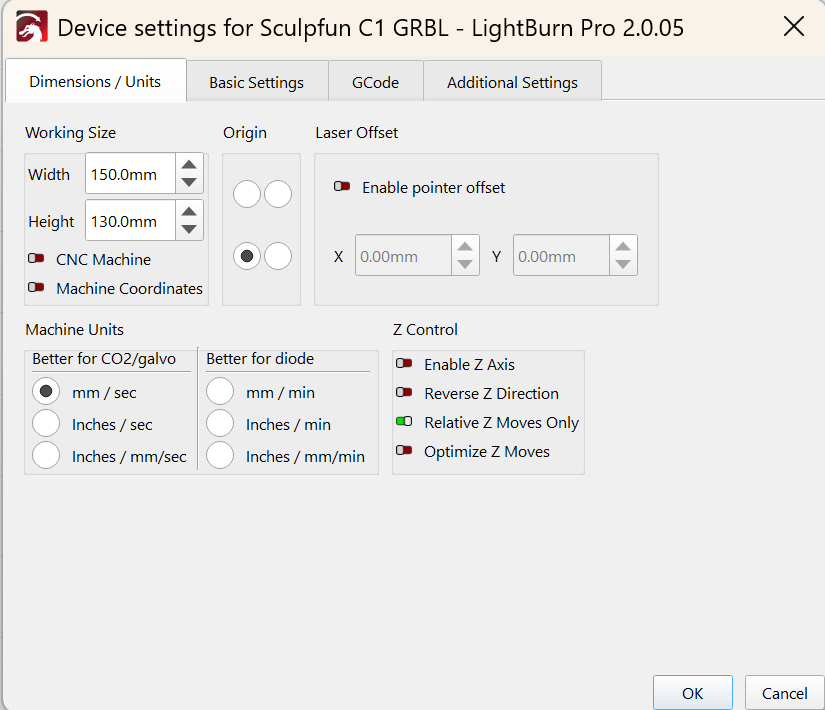
Then check the Start From setting in the Laser window. For testing, use Absolute Coords. Place a small test shape near the expected corner of the workspace, then try Frame again.
Honestly, there are so many ways to configure your system that revisiting the basics can help.
I watch the video on there all the time.
2 Likes
I had that problem, it turned out to be lines (red dotted) outside of the Grid area on the screen.
Zoom out using the mouse wheel and see if there are any
1 Like