I have several lasers, but the one with which I am having a problem is the red and black 80w Chinese laser with a Ruida controller
The laser has been working perfectly for couple of years now but when I turned it on today and started to cut a base plate for a router, the program ran and the laser head moved around properly, BUT, the laser itself would not fire.
Checked the laser was set to fire - yes.
Checked the water was OK - yes.
Laser fired when I pressed the fire button - yes
Laser worked when running program - NO
Ran program and held piece of card up to mirror so that I could see if it was firing - NO
Lifted lid at rear to check laser when pressing fire button - yes, laser fired and went nicely purple in the tube.
Ran program and laser would not fire.
Program is set for 6mm sec speed, line cut, 90% power.
I checked all the connections and hit them with a sledge hammer to ensure they were all seated properly - they are.
If I couldn’t get the laser to fire at all, then I would understand it more easily, but when it only fires on test, that has got me beat.
Nb. 90% power is too much for this type of machine, you should stick to the recommended mA from the tube manufacturer to avoid too fast wear. (If you don’t have an ammeter I would recommend retrofitting it, it doesn’t cost much and is quick to make.)
90% is after the power has been reduced to 90% in the settings.
So, that is 90% of 90% which is about 81%. which is about 21mA
The plastic is 6mm thick and it seems to need settings something similar to that to cut in one go.
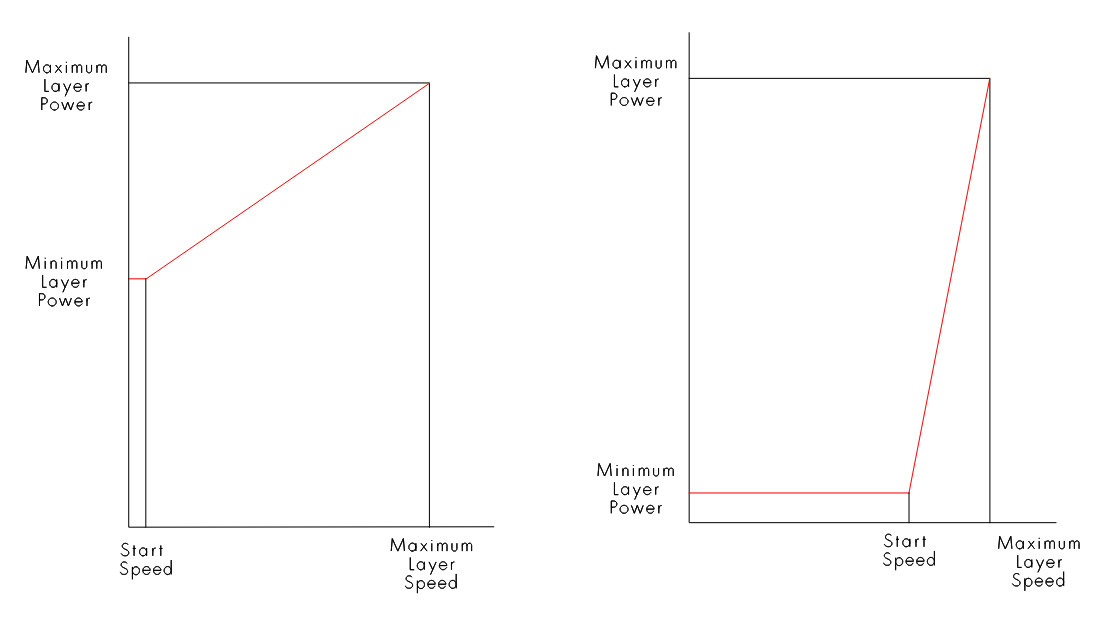
OK, You were certainly in the right area Bernd. I set the speed higher and the power lower but I also had the minimum power set to 5%. Apparently this is a no-no as the machine sees this and then refuses to go any higher than 5% even though this is an absolute minimum.
As soon as I set this to 20% it all began working properly again.
Should this be called out as a programing boo-boo? (Bug).
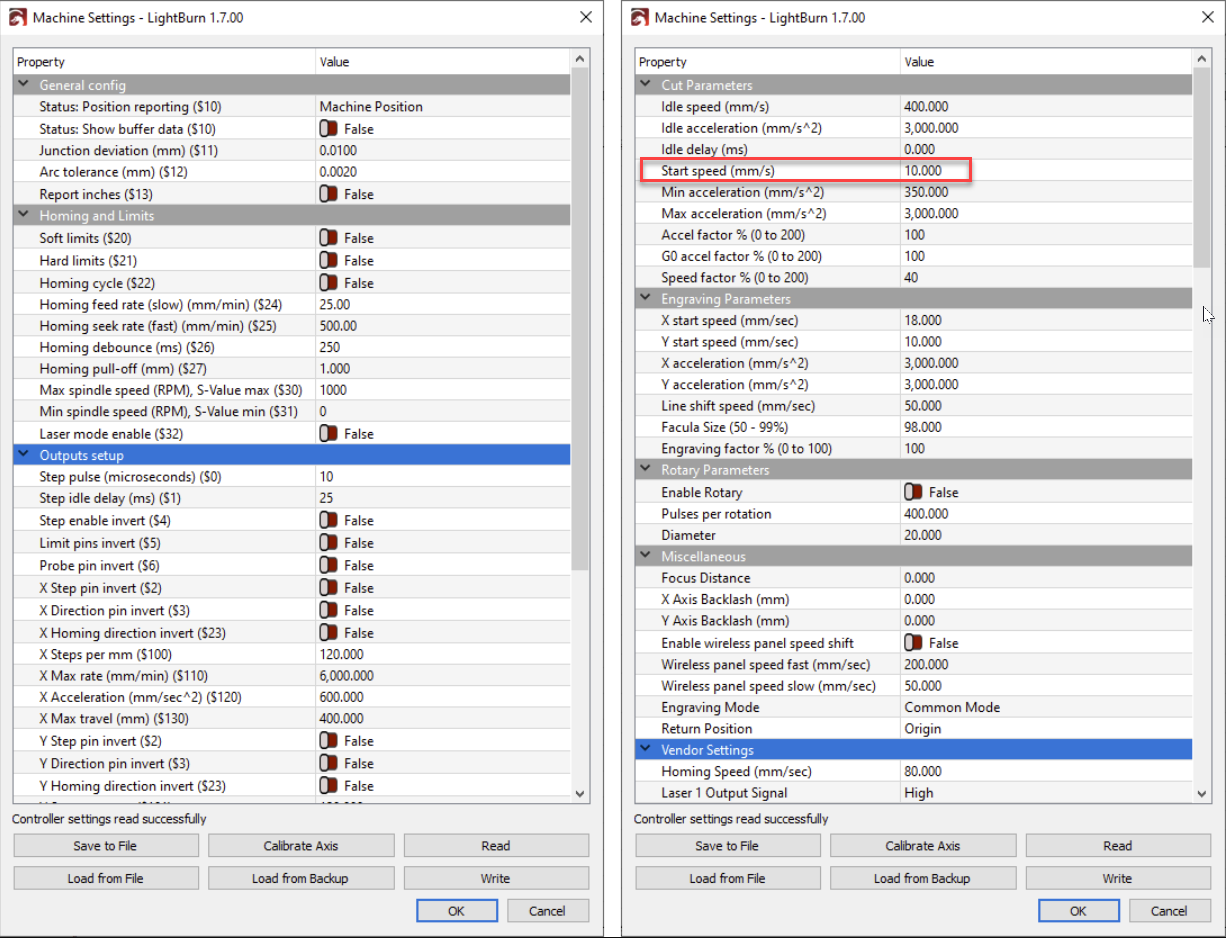
No, it’s not a bug. Ruida’s internal “start limit” is linked to a speed in the machine configuration, to put it simply.
It’s great that you have control over your max power, then there’s no cow on the ice.
If it continues following it’s path, not lasing, it’s likely not caused by the controller. If the Ruida detects an error, which it has only has two, it will halt and display some type of Chinglish error message. The Ruida thinks it’s lasing…
There are only two control signals to the laser power supply (lps), LPWM1 of the Ruida → IN of the lps. This controls the lps current limit. The laser is enabled using the L-On1 → L .
You can draw a straight, run at slow speeds and measure these signals. If it’s supposed to be lasing, then L will be low and pwm will be whatever percentage you have set.
This puts you into the min/max power changes. Start speed is set within the Ruida controller. Min/Max are the set power levels on your layer.
I set the first 90% in the machines Vendor settings and the second 90 % on the LightBurn layer settings. The machine is always set to never go over 90% of the maximum (80W) tube rating.
However, I have now discovered another problem.
The laser (according to the ampmeter) is only putting out 4 or 5 mA even when I set the machine to 100% of 90%. So, when trying to cut through 6mm plastic, I have to go over the cuts about 20-25 times. As you may imagine, this gets old pretty quickly.
The tube seems to be working properly - it has a nice - if somewhat weak - purple glow in the tube. So, could you suggest a way that I find the cause of the problem. It seems to me that it is most likely either the tube or the PSU. The lights on the PSU seem to suggest that it is working.
I think you may be going slower than the laser start speed. Try this. Increase your speed to 15mm/sec and run it. Check your Ma meter now. I think you will see a significant increase in power.
If this works, check your start speed in settings and either lower it or keep your speed above this threshold.
Well, I am usually pretty blasé about exceeding the safe limits for extending the life of the tube. Doing this makes it harder to just bump up the power to 100% of the tubes rated capacity.