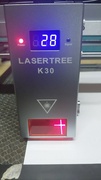
I purchased a Lasertree k30 and it has a red cross that I don’t understand how it works because theoretically it’s supposed to indicate where the work will be done, but the cross doesn’t position itself where the laser comes out for cutting, and therefore it’s not serving any purpose.
Does anyone know if there’s any configuration to be done in Lightburn so that the red cross moves to where the cutting or engraving will be done when we set it to do the framing?
Turn on the Laser Offset and put in a small value for X and Y
Jog the machine until the cross hairs is exactly over the bottom left corner of the box you previously burned
Run the job again .The box should burn exactly over the first box you burned.
If the box doesnt burn over the first one measure how far it is off on the x and y axis and make adjustments in the Pointer Offset Screen
Repeat this until you get the desired results
If you want to get a starting point for the x and y setting.
Fire the laser at very low power onto a test piece and measure the difference between the cross hairs and the laser beam on the x and y axis and start from there.
Or just pick some values like X= 18 and Y= 3 to start