Hi!
For a longer time i’ve been having a minor issue i can’t figure out, i’ve tried to look for similiar threads but couldn’t find any. I don’t know of this a software related or is it some sort of key combination i am pressing.
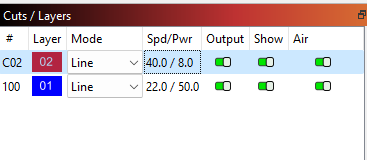
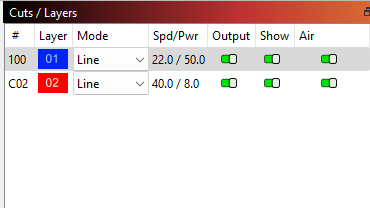
The issue im having is when i do engraving and cutting, i use the knife bed so that the parts will fall down in a collector tray, so obviously it is important that the machine is engraving before cutting. However almost every day im facing a issue where (in this example) the red layer (C02) has suddenly dropped under the blue (100) layer (using the same file when this occurs) meaning it is cutting before engraving and i have no clue why this is happening. I’ve tried looking for short keys explaining this with no results.
Summary:
I have set it to cut / engrave in layer order and that is correct and doing so, however the layers keep switching positions?
Information:
-Ruida controller.
-Sending data to the controller before starting.
-Have 5 years of experience, doing laser engravings as full time job.
Thank you for you reply!
Yes i know the layer order can be changed, and i always double check the layer order is correct when i start my job with the file, but after this i change the cuts/layers screen to the camera screen when switching materials so im not messing with any layers after they set the first time.
There is not really any specific file that is making the wierd change in the layer order, usually i have big files including hundreds or thousands different earring shapes that i am organizing ready “outside of the workspace” while the machine is makimg the previous batch to save time.
Thats why i assume there might be some key combination that is triggering this because i use the software while cutting, like i said im organizing and twisting objects to reduce material waste.
I always have my camera window open, so i do not notice the change when sending it from my computer, i either notice it from the controller when pressing start, or in worst scenario like today when my customer contacted my sayin there was one color batch without engravings.
Today after this happened again i literally tried pressing all sort of key combination but couldnt do it on purpose. Im even considering placing a camera filming my screen and keyboard to solve this
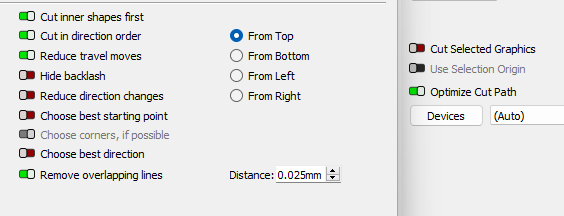
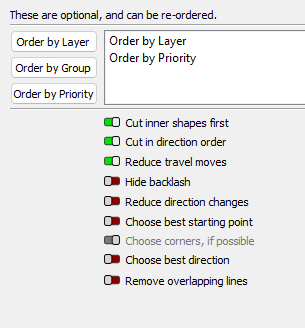
Glad to hear you’re enjoying LightBurn! Thanks for sharing your settings.
Is your red layer possibly an inner shape that is getting cut first? That may be where a layer is being overridden. It’s hard to say without inspecting your file.
While we wait for @JohnJohn’s input, can you make sure your Ruida’s memory isn’t full? I’ve heard of lasers doing strange things under those circumstances.
Today i finally think i figured out what is causing this layer order switching. Like you know you can organize the layers like you want them, for me personally is use red for line engraving,blue for cutting, green for perforation mode and so on. BUT if you select your objects and want to move them i usually use ctrl+x to make sure i got everything and prefer to move object this way, this causes the layers to go away because there is now no layers in your project anymore until you paste them back and when you paste your objects back the order of the layers are in the order like displayed in bottom of lightburn.
I wish it would keep your previous setting/order but then again i don’t know if this is possible.
Easiest way would of course be to move your cutting line to a color to right of the scale (like yellow 29). this would make the cutting line automatically last if being cut and paste, this is something i need to consider although i wouldn’t want to when im so used blue to be cutting line and have advised all my customers to use blue as cutting when sending me files.
Or maybe i need to make a set of small boxes with active color in one corner so that when i cut and paste there will still be layers left
I agree, the layer system is very flexible. Any layer can be set up to perform any operation, aside from the Tool Layers T1 and T2 of course.
ok… ctrl+x is universally ‘cut’.
I’ve replicated the behavior. I managed to make the numbers appear out of order. The layer that is fully cut from the project is appended to the end of the list of layers when it is pasted back in.
ctrl+x on the contents of a layer does not replace the layer in the previous order when ctrl+z is used to undo the cut.
I’ll check to see if @Rick sees the same on his mac and then report it.
Thank you for sticking with it. It’s truly appreciated.
Thank you for this contribution, TG. Greatly appreciated. There is now a report John has submitted and the Dev Team is aware. Thank you for assisting in tracking this down.