Im trying to align my camera and have followed a lot of suggestions like set the Work mode on controller board to Soft Origin (tried all settings) but no success. I´m not be able to “Start from absolute coords” in LB main window. As I have read LB cannot “access” this mode to the controller board.
Anyone have the solution for this?
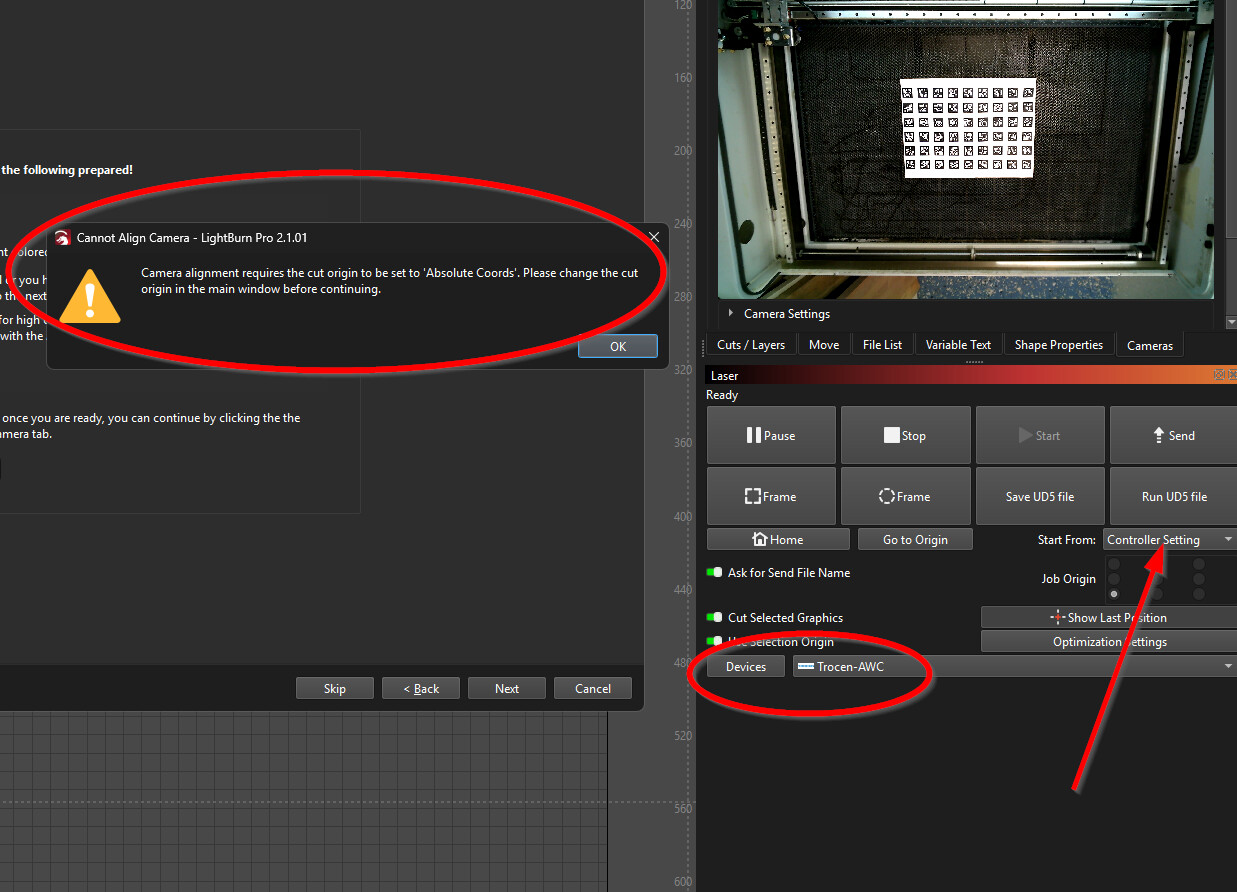
It appears the engineer who wrote the new camera system did not look at how the previous one checked for this state. I’ll see if we can get this fixed for the patch update.
Nice.
Until then, can I use the old .lbcm file?
You should be able to import it manually in the camera setup window, assuming that window opens
The alignment seems not to be accurate at all  .
.
I´ll wait to the patch or switch to Ruida board I have lying around for a few years now.
We have a fix already, so it will be included in the patch update, likely released Monday.
You should have pulled the update and fixed it.
I’ve wasted a lot of time already today with this new* camera bs..
I had a quick project to do today, can’t do it now. 
my old camera settings were nowhere to be found by explorer, so I just opted for starting over…*
*from what I’ve seen so far, it looks like it could be a huge improvement to the calibration process vs my initial experience getting my system set up originally, but it’s a PITA, the interface is glitchy, then factor in that speed setting issue not being imported from the previous version, and changing the rate format on top of it.
Mind you that I’ve only crashed into this camera bs, and that’s as far as I’ve gotten, but MY first impression is this is/was NOT ready for prime-time, and should have been a whole new stand alone installation, with the caveat that everything (~) was changing.
umm its not fixed, the camera calibration is trash and not working accurately
Can you be more specific than “is trash”? What kind of camera? What kind of laser? We’re going to need some actual details to be able to help you.
I assume since you’re responding to a thread specifically about camera issues with the Trocen AWC controller you have one of those?
I’m not the OP, but i can confirm there are issues with aligning the camera to the bad. I spent at least 4 hours repeatedly trying to get this aligned correctly. I’m using a Logitech C920s, been using it for over a year without issue. 2.1 doesn’t seem to recognize it (USB) for starters. It imports over though, so I started the calibration and alignment process. Calibration worked fine, did 9 locations with the QR code style printout. On to alignment… I did this via the QR code burn process (multiple times) AND the manual centering process (1,2,3,4) Both showed successful. Testing. Leaving the piece on the bed, i attempted to burn 9 squares and check their alignment. Only the center square is aligned (enough to be useful). The other squares are misaligned by an amount proportional to the distance from the center (directly below the camera). Never had this problem on versions < 2.0. I tried all options of calibration adjustments, same issue persists.
I will report that my camera (LB 8 mp) with Trocen controller works flawlessly after the last update.
Thank you kindly for that report! It’s good to know when we occasionally get it right.
Kenneth, This is a situation where a screen recording or some screenshots would be most helpful. I’m a bit confused by what seems like contradictory statements - The USB camera isn’t ‘recognized’ but it ‘imports’, it ‘imports over’ (did you mean ‘migrate’? or you re-imported settings?) but then you ran through calibration and alignment again, thus replacing the settings that already worked?
If it aligns correctly in one place but not another that indicates the lens calibration is off. But if it aligns “in the center” but not around the edges, that’s weird because it should align better close to the original fiducial markers, and those should have been closer to the edges than the center.
The Logitech C920s is an auto-focus camera (I have one) and when a camera refocuses that changes the lens arrangement, so the lens calibration technically no longer applies. But you also say you’ve been using it for a year with no issues, so your focus must have stayed very consistent over that time.
Being able to see you go through the process would really help us figure out where it’s going wrong.
Jeremy, Migrate would be the correct term, my apologies, when I responded I did not have lightburn open in front of me. Apparently, lightburn doesn’t like the C920, as even after calibrating and aligning it, the ‘file name’ for the calibration/alignment didn’t change. Once i tried another, more generic USB camera the calibration/alignment worked perfectly. I am aware of the focus issue, so to compensate for the autofocus I manually switch it off and set it at a specific number, say 26, for each step and later testing. I believe the root issue is LB isn’t allowing the new calibration/alignment settings to save to the C920. As a work around, I deleted the camera and attempted to start fresh with it, but LB did not recognize it. Anyway, with the new camera installed, the issue is resolved. Hopefully someone can find this info helpful. Thank you for you response and help. --All the best!
All very strange… we shouldn’t treat the C920 any different from any other USB camera. Calibration and alignments are stored inside the app prefs file, not to the camera.
I have done calibrations and alignments with my C920s as a quick test, though never in a real laser. It seemed to work fine.
If the new camera is working great but the C920 is not, that’s probably a clue. Could any of the Logitech camera control software be messing with us, do you think? (I usually keep it turned off)
I suppose anything is possible but I’m 99% positive I never installed Logitech’s software on this computer.