The job time completion estimate is always wrong. Takes much longer than what it says it should. Are there settings to correct this anywhere? I know it’s an estimate - but when it says it’s going to take 30 minutes and it actually takes 42, that’s a way off. One job was supposed to take 1:22 minutes, but it actually took 2:03 hours. Hmmmm…
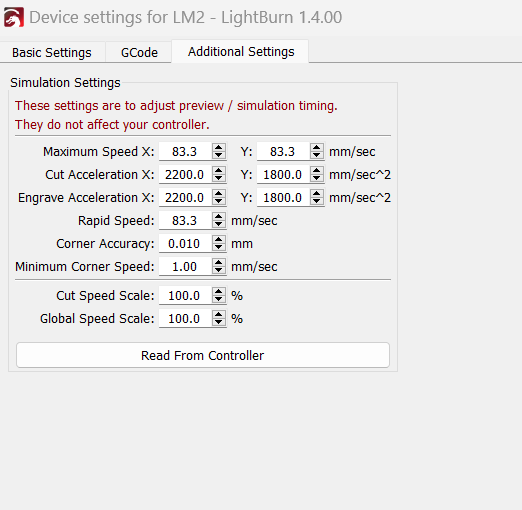
No I haven’t. What specifically does that do? Should I take a snapshot of the existing settings before I “read from controller?” One other question.
When I add an image, say a round monogram to engrave and the tap the circular dotted Frame - it does not “rubber band” around the circular graphic…but the square that exists when selecting the image [via arrow]. It seems to do the same thing as the regular frame. I even used an editor to remove background to only have the circular image, but the dotted frame still seems to do the same thing as the regular frame. The circular image appears on the workspace, but the square behind the round monogram background is white. Am I doing something wrong here with the image? Any and all help would be greatly appreciated. I will try read from controller. Maybe that’ll adjust the timing better.
It does not change or interfere with your settings, it reads your settings and applies them to make the simulation more accurate.
With regards to the framing issue it would probably help if you post the lbrn. file for others to take a look at.
This topic was automatically closed 30 days after the last reply. New replies are no longer allowed.