Disclaimer: Lightburn has worked on that machine without any issues for years.
I don’t know what changed that behaviour, but it’s completely odd.
As I said, the combo (Sculpfun S9 + Lightburn) has worked on the same machine (Linux Mint) without any problems from the beginning. It’s version 1.4 installed with the .run file, all permissions/group additions have been done.
It just can’t connect to the laser anymore.
Now the really weird part:
Since I thought about permission issues, I started LB with sudo through the terminal.
When I “Discover device”, it find’s ttyUSB0 and get’s the proper responses from it:
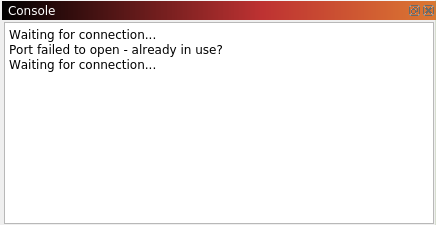
When I run it without root permissions, the connection always fails…
Does anybody know, what the problem could be here?
I also tried to install other CH340 drivers (although that shouldn’t be needed) - always the same behaviour.
@ednisley Thx a lot, those problems have all been cleared already.
I think the laser’s board has a problem. Maybe the firmware is corrupt or the board itself is broken.
I can connect to it with the screen command, ‘$’ and ‘$$’ commands work, but sometimes are really slow in answering.
When I send a ‘G0’ like Lightburn, it does not answer with ‘ok’ but with ‘Grbl 1.1h ($ for help)’
I’ll dig a bit deeper and if I find a solution I’ll post it here.
Yes. Sometimes the firmware gets corrupt. A new flash mob geht help, but it’s just a shot in the dark You can also try a different cable or power supply.
If you must run LightBurn as the root user, then the connection problems have nothing to do with the controller (or its firmware) and everything to do with device permissions.
What does the system show for the ls and groups commands?
Of course I did all the device permission checks about 20 times, no changes
Firmwareupdate was also a suggestion by the AI, based on the info that even with ‘screen’ as root I didn’t get a proper response after sending som GRBL commands to it.
Another option would have been a hardware problem with the USB connector on the board, since this behaviour showed on 2 different computers.
Strange, but it looks like the firmware of the laser has been corrupted anyhow and maybe my first flash attempt didn’t work.
@jkwilborn , @ednisley
No, it wasn’t a problem of the permissions, see above.
Even as root I didn’t get proper responses from the board everytime when I tested for a longer period of time.
I didn’t ALWAYS work as root.
Looks like I’ve been lucky on my first attempts as root, when I tried multiple commands ($, $$, G0, …) it didn’t work every time.
Software has bugs and hardware breaks, so what I think you’re saying doesn’t make sense. It’s generally going to work, if the software has bugs, it’s generally repeatable and it you have a hardware failure it’s generally isn’t intermittent.
Nevertheless, it works now, without any other changes permission wise, other than those that have already been done at first installation years ago (adding my user to the dialout and tty group).
I’ve been in IT for about 42 years now, have been admin on Linux server longer than I can think, built my own 3d printer and a full size flight simulator gg… and that’s why I first had the same thoughts you just wrote: “Software has bugs and hardware breaks, so what I think you’re saying doesn’t make sense.”
It HAD to be a permission issue or a faulty hardware.
But I had turned off the laser and computer a few month ago in a fully working state, so I didn’t expect the laser to get faulty just by sitting on a desk - so it must be the software (or so I thought).
Maybe some updates on the Linux side I didn’t remember or something like that.
Tried everything, removing that braileTTY, disabling ModemManager, nothing worked.
The craziest part was when I started LightBurn as root, it would connect to the laser and find it, even create the correct device config, but without closing LightBurn fully, just closing the device settings window, it wouldn’t be able to talk to it in “regular” mode.
(Little did I know then, that the firmware didn’t always talk to the computer…)
If I wouldn’t have checked with chatGPT, one of my other tasks would have been to carry a windows PC to my workshop and try with it, since I already tried another Linux machine.
I also hope it stays that way but at the moment everything looks good in more than 10 tries (turning everything off and on again ).

 You can also try a different cable or power supply.
 ).
).