I am VERY new to laser engraving. Can’t seem to connect Light Burn to my Mac using Sequoia 15.7.5. I was a graphic designer, and I used AutoCAD for years on windows at work, many years ago. So I’m not too intimidated by the software. Just need some help getting everything connected. I haven’t bought the real thing yet. I wanted to make sure before I bought, but this is no where…
Try these in the order listed…
- Create your Device (Laser window) manually. Select GRBL without any other letters.
- If your Mac has a USB-C connector and you are going USB-C to USB-C, the IOS may not recognize the laser. Install a dirt cheap USB-A HUB between the Mac and the laser.
Mac-C-A-Hub-A-C-laser.
I’ve tried both USB-C and just USB to no result.
Did you check that selected the correct COM port in the pull down menu in the Laser Window?
I reinstalled the drivers and still nothing shows up when I search for the laser. What next?
Can you show me where the drop down window for the COM is located? Thx
I at least got the camera to work. Ive got art on the page. I press start for the laser and I get a dialog box that says cant communicate with the laser, it might be busy.
Lower left in the Laser window.
This might be solved when you select the correct COM port.
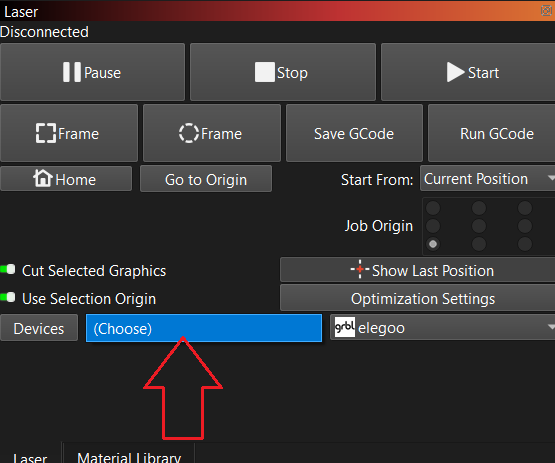
These are my choices
cu.usbserial-141420
cu.URTO
cu.Q198E880260570
cu.JBLVIEBEAM
This video shows how to tell if MacOS sees your device, along with a couple tips if it doesn’t. If the OS doesn’t see your device, Lightburn can’t see it either.

try - cu.usbserial-141420