When using the 1.7.08 trial didn’t have this issue. Pay the upgrade money and this version does. sigh
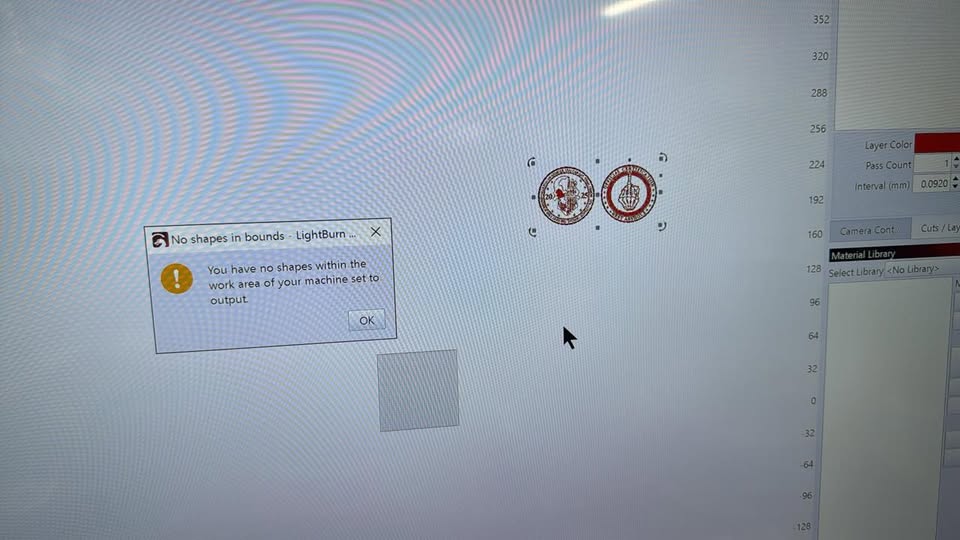
When I bring a job into LB it puts it way out there in never never land. Not sure why and not sure why there’s not a option to center job to the work area automatically.
Anyways that isn’t that bad part. Bad part is the error YOU HAVE NO SHAPES WITHIN THE WORK AREA OF YOU MACHINE SET TO OUTPUT. Sure you put them there so when I try to close the dialog box it won’t close. X won’t shut it down. Nothing removes it from the screen. And can’t do anything to move the object’s to the work area. The error box just flashes.
I have to go to the task manager and close down the lightburn task.
Laser is a Atomstack M4 work area is 70x70mm Tried both the ezcad.cfg and seacad.cfg when installing.
I have ignore out of bound shapes if possible checked also. Didn’t see any other options related to shapes or bounds.