Yes, I have the A1 Pro (the newer one with the display on the side).
Creality’s .lbdev file for the A1 Pro uses the GRBL-LPC flavour.
@hobbysaeger, did you use the .lbdev file from the SD card when you added the device? Can you share it with us?
They mention that in the official instructions here.
Hi Aron,
I’m attaching the original files from the Crality SD card for Lightburn.
I think the two files for 40W and 60W differ significantly from each other.
Ifound also files for a firmware update at download.
However , I already had the letest versins installd on the devices.
These are binary files, wich I can’t uplod here.
Thank you for the files. I’ll compare them and report back.
The .bin files won’t tell us much, because Creality does not release the source code, (as they should in respect the GPL V5 license of the GRBL firmware they are using), and we don’t see much in the changelog, unfortunately.
For the reference, the latest version on that page is V3.0.5, released on 2024-01-03.
Comparing the files from Creality, the main difference is the slightly reduced height on the 60W version (400 vs 415mm)
And the 60W device profile has “Relative Z Moves” enabled.
(Both profiles use the GRBL device type, not GRBL-LPC, as some Falcons do for some reason)
Comparing it with your .LBZIP, tells me, you used the settings from the file " Creality Falcon2 Pro.lbdev", but added the M8 command to the End GCode.
Am I correct in understanding that you added this code later, in an attempt to solve the original problem?
leftmost unit in the bottom row.
I also received a second laser module with 1.6 watts. This module doesn’t have a connection for air. I’ve never used this module. The Falcon has a red housing. There’s a USB camera built in under the top cover. So far, I haven’t been able to activate this camera with Lightburn. That’s not so important to me, though.
Thanks for confirming. You can use this link to change the info on your avatar. The edit feature is currently broken, so you’ll need to enter all the details.
To be honest, I do not understand the difference here. This G-code also shows the M9 command BEFORE the laser is turned off, right? So that’s been precisely the issue this was all about. Your profile doesn’t change it, and the laser should throw an error again. There is no difference in this G-code from the one I posted. Could you point me to the change? Maybe I’m just blind I really like to understand it
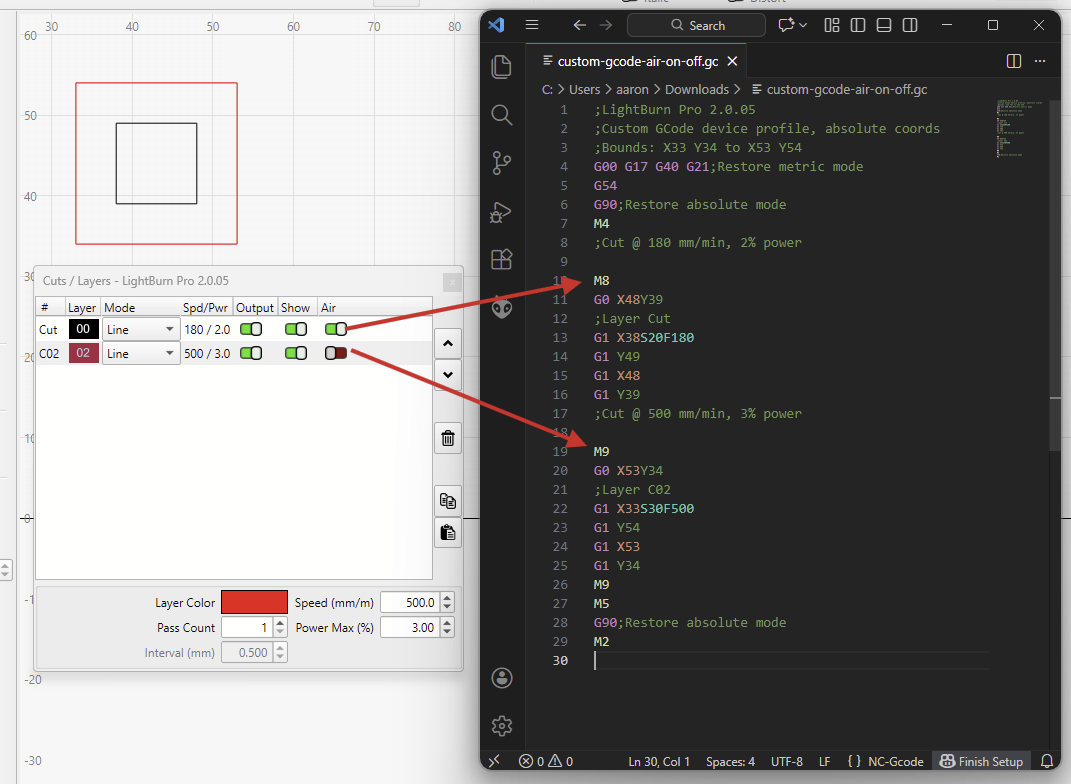
What bothered me (and possibly the Falcon) in the code from the regular GCode device type was the extra G1 S0 encapsulating the M9 command.
I have no idea how Creality’s “Airflow alarm” works exactly, and which circumstances trigger it. It might be timining dependant. There’s not much to go about on their troubleshooting page
Because, we don’t expect the laser to complain if we send it a G0 or a G1 after turning off the air assist with the M9 command.
IF the controller required a delay after turning off the Air Assist, we could add a Dwell to the “Air Off” command.
The GCode device type allows that:
Hi Aaron. I now have a file that partially explains air assist. For me, $152=30. The air pump runs for another 30 seconds after M2 or M30. This doesn’t seem to be tied to S0. I read that a slight air assist is also needed for engraving. In LaserGRBL, there’s $150=1 for low air and $152=4 for maximum air. Does this also work with Lightburn? I wanted to upload the files, but PDF and .zip files aren’t accepted here.
I’m not sure if those commands are always supposed to turn off the air assist, but it also depends on the firmware in use.
The M9 is what definitely should turn off the air pump. (I don’t see the reason why anyone would want a delay here. - If I needed it off after 20 seconds, we can just send the M9 command 20 seconds later.)
The $150 value doesn’t come from LaserGRBL, but is something Creality added to their firmware.
According to their documentation here, it controls the “The minimum and final gear” and “can be set from 0 to 100”.
The value of $152 controls the delay before turning off the Air Assist after an M9 command.
Or, more elegantly, add the necessary codes to the Device Settings in the Custom GCode section.
(It’s not currently possible to set a different air intensity in the Layer settings.)
Can you share the contents of those files as plain text?
It helps with readability if the “Hide details” function in the reply box is used to prevent posts from becoming too long.