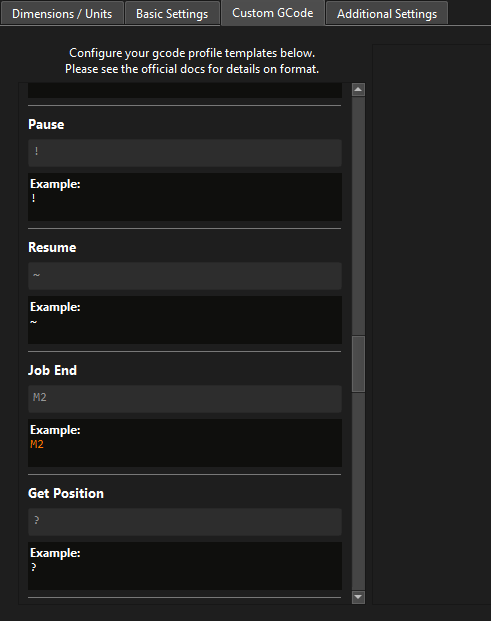
I mentioned you can, and should, modify the Job End section of the Custom Gcode profile:
I don’t know if your default is M2, or something else.
At present I cannot say why the firmware is throwing this error.
This is the first and only report of this issue so far.
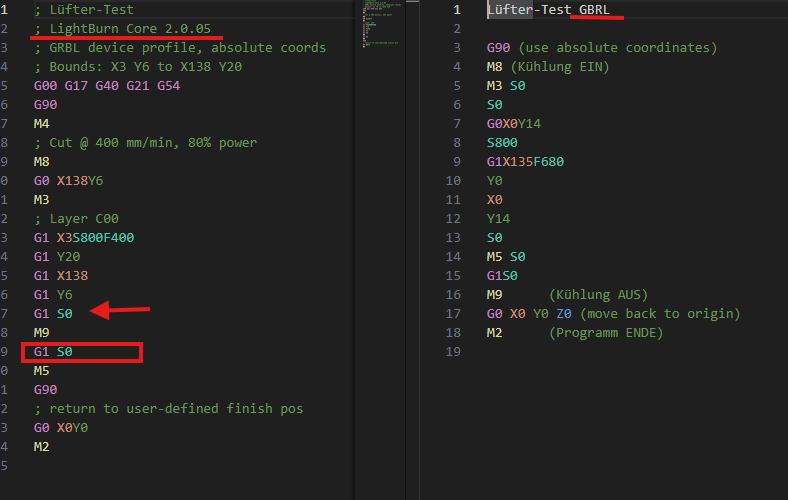
The gcode files emitted do not tell us how you have configured LightBurn to work with your device, and saying we’re not listening, is inaccurate.
It is common for users who have cut and engrave layers in the same job to turn air assist on and off several times. The firmware of the A1 would prevent that if it is indeed behaving as you report.
Therefore I suggest that the issue - again - is not in the defaults that have worked for millions of other laser users, but with this particular configuration and device.
I do not have the device, nor the LightBurn configuration bundle to be able to further evaluate if the software is indeed doing something wrong.
Compatibility with various vendors, again, is a complex dance, and I apologize if you feel like your voice isn’t heard - that is not the case. I’m simply saying that we need to look at how to tell LightBurn to correctly talk to your device. And at the moment, I can only tell you what has been done as a sane default for the use-cases our other users successfully use.
If we need to tweak the configuration for the A1, then I’m happy to help you do so. But I can’t do so in a vacuum without enough information to go on. Saying that because a firmware error is thrown while comparing gcodes of 2 different software only tells us the superficial effect.
What really matters is how LightBurn is configured so that it created the gcode that caused the error. I would appreciate the configuration bundle of your device so that we can help you fix it.
 Most laser manufacturers copied their base firmware from one small project that was never meant to drive thousands of different lasers (and is discontinued since many years).