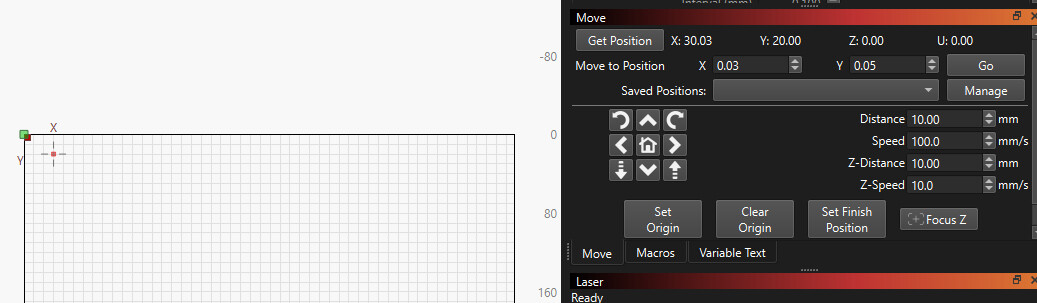
After upgrading to 2.2-RC-5 last night, the laser head position is not updating/reflected on the screen, the red dot only moves when I use the directional buttons in the Move window.
but when I move the laser head by hand nothing happens on the screen.
I have also clicked “Show Last Position” to no effect.
Could they be an XTool related problem?, here with a DSP machine on MacOS version of LB CR5, everything is as it should be, i.e. laser position is updated (upon request) and red marker is displayed “live” when using the corresponding function.
It also sounds like a laser-specific issue, with my laser, diode and DSP, what you describe, manually moving the laser head, has never given a live view of the coordinates.
As I already mentioned, I have installed both versions. 2.1.04 and 2.2-RC-5 parallel to each other. It works in the older version (2.1.04) but not in the current one version (2.2-RC-5) and both with the same settings so It has nothing to do with the machine it self.
So, when I press the directional buttons… [ Left, Right, UP, Down ] the red dot and the Coordinates are being updated in real time. But when I press the [ home ] button The laser is moving correctly to the top-left home position but the coordinates on screen are not updated and also the red dot is not reflecting the current position.
when I move the laser head by hand, than press the button “Get Position” the red dot moves to the correct position and the coordinates on screen are also updated correctly
It works here as it should, i.e. the red marker and the X/Y positions are updated correctly.
I can’t control that because when my system is on - the motors are locked - to hold position. It has to do with the determining of the laser’s position (on my DSP) machine itself. Otherwise my machine will lose its “orientation”, that’s why my machine does a homing process every time it is started.
I hope that is correctly formulated.
Yes I can, but they are all different to each other. The problem starts with the new version of LB 2.2-RC. As I said before The older versions do not have this problem. Something has changed in the new version, LB 2.2-RC
again it works fine in xTool Studio and In LB 2.1.04
The same applies to the function, “Set the laser position by clicking on the page (ALT+L)”. the laser moves to the right position but the red dot on screen is not updated.
and because my machine is 10 meter away from my computer it becomes a hassle.
I have just installed the new final version (2.2.00) and the problem still hasn’t been fixed. any progress? or at least an explanation on what has changed between the two versions?
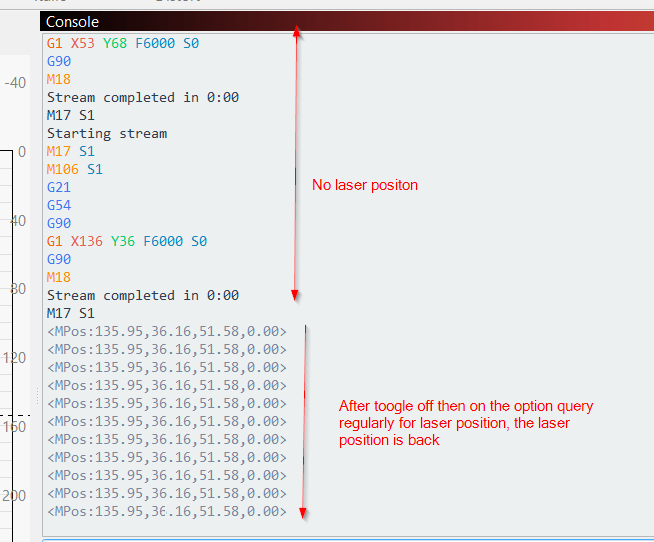
I am in the same configuration : LB Version 2.2 - XTOOL S1 20W : the laser position is missing in the workspace screen.
In my basic settings the option Query regularly for laser position is activated by default.
When i toogle this option (Off then On then Enter) the laser positon is back in the workspace screen.